Advanced Plus Security LDogg Security Config 2020

Last updated
Apr 30, 2020
How it's used?
For home and private use
Operating system
Windows 10
Log-in security
Security updates
Allow security updates and latest features
User Access Control
Always notify
Real-time security
Web browser:
  • Kaspersky Extension
  • Bitdefender Trafficlight (Firefox)

    Native System:

  • (Primary) Kaspersky Cloud Free 2021
  • (Secondary - Came with software) Wise Care 365/Kerish Doctor
  • (Firewall) Tinywall w/ Syshardener settings
  • WhitelistCloud Free
Firewall security
About custom security
n/a
Periodic malware scanners
  • CCE (Comodo)
  • Malwarebyte Anti-Malware Free
  • Roguekiller AntiMalware
  • Norton Power Eraser
Malware sample testing
Browser(s) and extensions
Firefox Extensions:

  • ClearURLs
  • Decentraleyes
  • CanvasBlocker
  • CookieAutoDelete
  • Clear Cache
  • Adguard
  • Bitwarden
  • secret extension i can't say
  • Kaspersky/Bitdefender security software

Brave Browser:
  • Built-in adblocker
  • other secret extension I cannot say
  • Bitwarden
Maintenance tools
  • Windscribe VPN: Lifetime subscription
  • Vuze
  • Authy Desktop
  • Kerish Doctor
  • Wise 365
  • Virtual DJ
  • NVT Connections Viewer
  • WPD
  • 7-Zip
  • CDBurnerXP
  • Bluestacks
  • Revo Uninstaller
  • Syshardener
  • Run by Smartscreen (Andy Ful)
  • SUMo Pro (lifetime license)
  • WhitelistCloud Free
File and Photo backup
  • Aomei Backupper
System recovery
  • Aomei Backupper
Risk factors
    • Browsing to popular websites
    • Logging into my bank account
    • Downloading malware samples
Computer specs
  • N/A
Notable changes
N/A see reply on post.
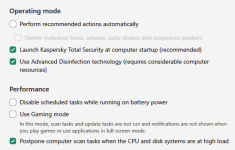
Release resources is not there anymore?
Yes, it not there any more...

1605127293202.png

Search for rootkits setting is not there anymore?

1605127350275.png

Changed of name and place ;)
 
That 95 mb is the not the actual memory used by Kaspersky. Kaspersky also use around 200 mb or more in general. The value can increase or decrease based on the tasks it performs. Use something like Process Explorer/Process Hacker to check the actual memory usage but probably the best one with proper explanation is the built in "Resource Monitor". Kaspersky and Windows Defender's ram usage is quite similar on average and 200 mb by no means is a lot.

When Kaspersky is idle for me, it floats around to 45.6mb. When performing a task, highest I've it go is 95MB currently.

~LDogg