

The MalwareTips app
Your community, one tap away.
Open MalwareTips from your Home Screen or desktop. Follow discussions, find answers and pick up where you left off.
- Home Screen access
- Optional push alerts
- Your community
You're ready to explore.Explore what's new
Installation instructions
iPhone & iPad
- Open MalwareTips in Safari and tap Share. You may need to open the Page Menu first.
- Choose Add to Home Screen. If it is not listed, use Edit Actions to add it.
- Keep Open as Web App enabled if shown, then tap Add.
Android
- Open MalwareTips in Chrome or another browser that supports app installation.
- Open the browser menu and look for Install app, Install and create shortcut, or Add to Home screen.
- Choose Install and confirm. Wording varies by browser.
Desktop
- Chrome: use the install icon in the address bar, or the menu under Cast, save and share.
- Edge: open the menu, then More tools, Apps and Install this site as an app.
- Safari on Mac: choose Share or File, then Add to Dock. Firefox on Windows: look for the web apps button in the address bar.
If you cannot find an install option, update your browser or use its bookmark option to keep MalwareTips close.
Keep up with your conversations
After installation, open the app and sign in. Enable push notifications in Preferences if you want alerts. On iPhone and iPad, push requires a Home Screen web app and iOS or iPadOS 16.4 or later.
Sign in to manage notificationsInstallation is optional. Your notification settings stay under your control.
You are using an out of date browser. It may not display this or other websites correctly.
You should upgrade or use an alternative browser.
You should upgrade or use an alternative browser.
Advanced Plus Security Lenny_FoX Desktop Config 2021
-
 Thread starter
Lenny_Fox
Thread starter
Lenny_Fox
- Start date
- 56 Replies
- 16,867 Views
Thread details
- Last updated
- Dec 11, 2020
- Main use of this computer
- For home and private use
- Operating system
- Windows 10
- Device sign-in security
- Security updates
- Allow security updates and latest features
- User Account Control (UAC)
- Notify me only when programs try to make changes to my computer
- Real-time protection
- Microsoft Defender Attack Surface Reduction rules and Anti-Exploit
- Kaspersky Cloud Free (no HTTPS scanning)
- Device firewall
- Microsoft Defender Firewall
- Custom security settings
- 1. UAC - deny elevation of unsigned binaries
2. Software Restriction Policy (similar to SimpleWindowsHardening)
3. Microsoft Defender ASR rules & Exploit protection hardening
4. Kaspersky Cloud Free (https scanning disabled)
5. Using Quad9 (DNS), Trend Micro Smart Home (router), browser (Smartscreen/Safe Browsing)
- Periodic malware scanners
- windows malicious software removal tool, Autoruns64, ProcessExplorer
- Malware sample testing
- I do not participate in malware testing
- Browsers and extensions
- Edge browser for daily browsing
- for searching & surfing: strict mode, with @BeerIsGood Edge list
- for booking & buying: default mode with no-extensions.
- Maintenance tools
- ProcessExploreer and Autoruns64
- File and photo backups
- Syncback Free and Windows Backup (yes 2x backup)
- System recovery
- Syncback adhoc, usually three to five times per day, Windows Backup monthly, Syncback to USB offline HD also once a month
- Usage and exposure
- Visiting familiar websites
- Logging into my bank account
- Working from home
- Streaming from untrusted sites
- Computer specs
- Intel I7 950 with 8 GB Ram, 2 SSD drives and 2 HDD drives (1TB and 2TB)
- Notable changes
- Replaced router
F
ForgottenSeer 85179
I think this is the first time i now read here a good Windows config with internal Windows protection. I use nearly the same.
Good work!
Good work!

Local account only & Windows Hello PIN? Is that even possible? 

I have also local account password and Windows PIN, both different 
F
ForgottenSeer 85179
Windows Hello is only saved locally and protected by TPMLocal account only & Windows Hello PIN? Is that even possible?
F
ForgottenSeer 72227
Good config!
Just curious, are you still dual booting with Linux, or have you moved away completely back to Windows?
Just curious, are you still dual booting with Linux, or have you moved away completely back to Windows?

Setup PCPC setup
Maybe try bitwarden?
Good config either way.
~LDogg
Good config either way.
~LDogg

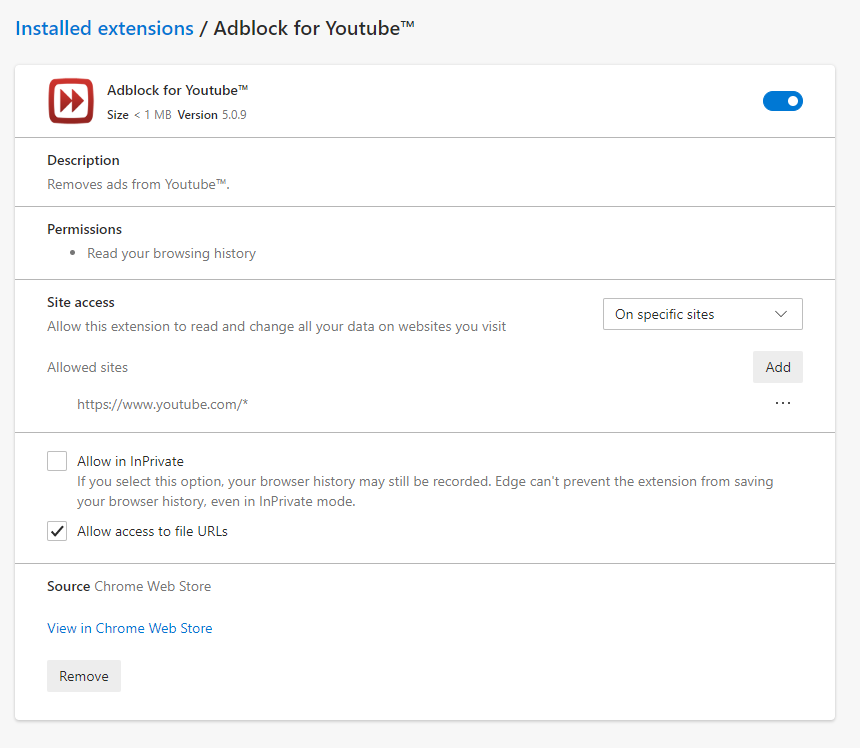
REPLACED my less alphabet with Adblock for Youtube
Because my own Less Alphabet failed to block in stream advertisements in Youtube, I removed that list from AdGuard and added Adblock for Youtube, but allow it only to run on Youtube by a forum Member who used the bypass-paywals extension only on demand when running into a paywall).
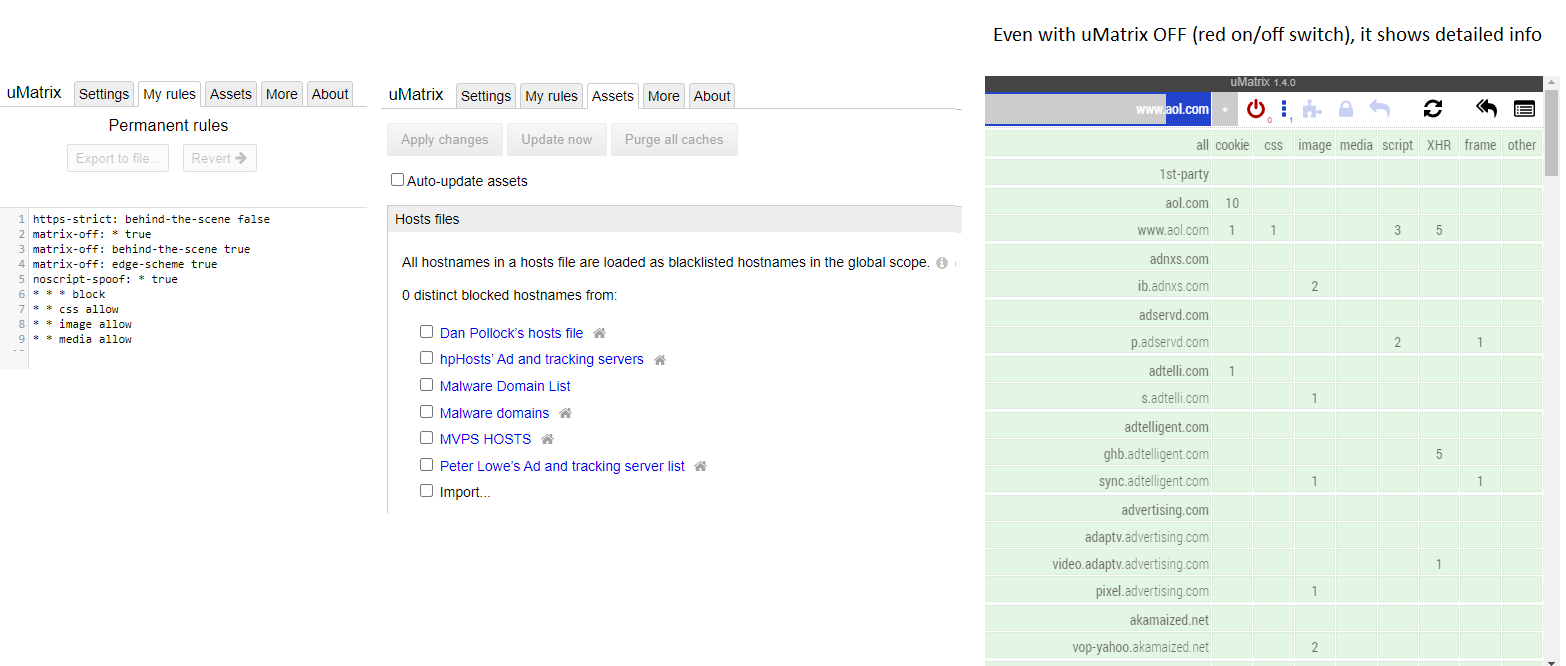
REPLACED Application Guard on-demand with uMatrix on-demand
Because Edge launches much faster without the Virtal machine sandbox of Application Guard, I removed Application Guard and added uMatrix again for on-demand usage:
Why Adguard and uMatrix instead uBlock Origin with advanced dynamic filtering?
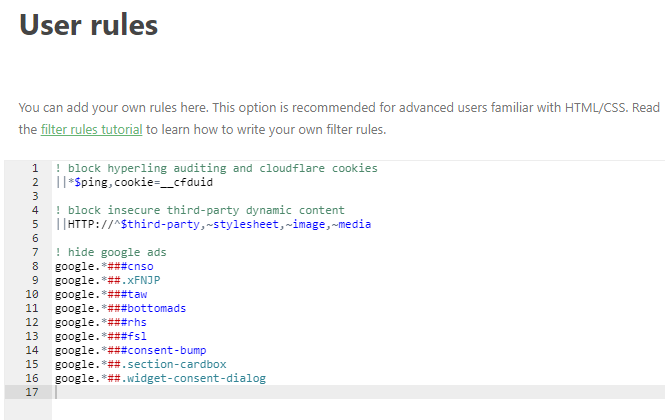
Smart forum users could suggest uBlock Origin, but I like Adguard's stealth mode (is like Clean URL's but I can tweak it) and I like it's additional cookie parameter to block cloud flare cookies. I also like the fact that uMatrix shows all the info (connected domains) while the filtering engine of uMatrix is OFf
___________ My Adguard USER RULES ---------------
Because my own Less Alphabet failed to block in stream advertisements in Youtube, I removed that list from AdGuard and added Adblock for Youtube, but allow it only to run on Youtube by a forum Member who used the bypass-paywals extension only on demand when running into a paywall).
REPLACED Application Guard on-demand with uMatrix on-demand
Because Edge launches much faster without the Virtal machine sandbox of Application Guard, I removed Application Guard and added uMatrix again for on-demand usage:
Why Adguard and uMatrix instead uBlock Origin with advanced dynamic filtering?
Smart forum users could suggest uBlock Origin, but I like Adguard's stealth mode (is like Clean URL's but I can tweak it) and I like it's additional cookie parameter to block cloud flare cookies. I also like the fact that uMatrix shows all the info (connected domains) while the filtering engine of uMatrix is OFf
___________ My Adguard USER RULES ---------------
Last edited:

F
ForgottenSeer 85179
I never use such extensions. Your quote is corrupt ?.. (inspired by @security123 who used the bypass-paywalsl extension only on demand when running into a paywall).
uMatrix doesn't provide that isolation from Application Guard. You reduce your security with that setup.REPLACED Application Guard on-demand with uMatrix on-demand
Because Edge launches much faster without the Virtal machine sandbox of Application Guard, I removed Application Guard and added uMatrix again for on-demand usage
Also uMatrix doesn't increase your browser security at all. Other stuff is already handled by AdGuard
So without uMatrix (i guess from Google extension store?) you can disable external stores which increase your browser security
I also use AdGuard too
I never use such extensions. Your quote is corrupt ?
Corrected, thanks
uMatrix doesn't provide that isolation from Application Guard. You reduce your security with that setup.
Also uMatrix doesn't increase your browser security at all.
Yep, uMatrix by far does not provide isolation like VM Sandbox of WDAG, you are right about that. I disagree about uMatrix not increasing security.
With my settings, uMatrix blocks scripts, frames and XML HTTP request does the same as NoScript blocking scripts, frames and fetch (well not really because Fetch API sort of provides simular functionality, but works differently). Meaning no javascript can execute, making it a harmless CSS, HTML (text and media) website. I don't now of in the wild examples of payload execution without javascript execution. So when eneabled uMatrix increases security as far as I know
Last edited:
F
ForgottenSeer 85179
Can be archived with browser internal permissionsWith my settings, uMatrix blocks scripts
Got bored with my current security setup, because it seems to do its job perfectly. What is the use of joining a Security Forum and not messing with your security setup. Most MT-members have probably bricked their system more often due to security tweaking as with malware infections. Being a junior member I want to be part of this distinct club who fix things which aint broken.
So here is my new setup which i will be trying out for a while.
First I changed from Standard user to Administrator and temporarily disabled "Validate Admin Sgnatures" to install Defender Control. After disabling Windows Defender I enabled "Validate Admin Signatures" again (meaning unsigned software is blocked by UAC when it wants to elevate to High Integrity Level.
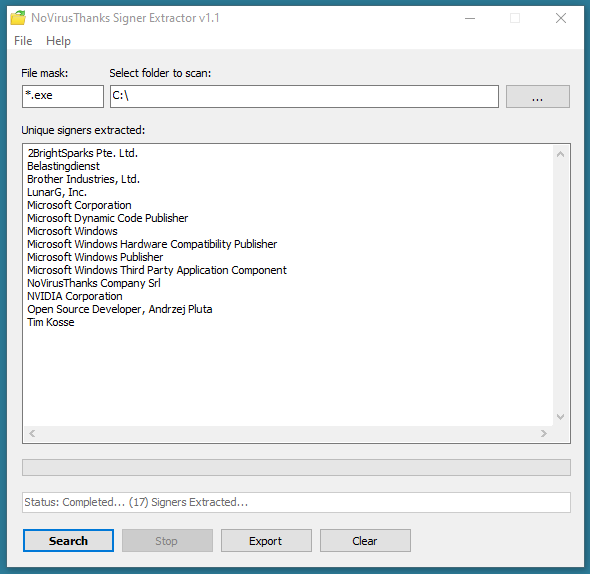
Next I broke my first safehex rule to not use software which is not activily maintained and download and installed OSArmor. Because I want a signature based whitelist I also downloaded NoVirus Thanks Signer Extractor and ran it to find out which (signed) programs I have installed
My Security setup will be based on Windows Defender Exploit protection, Andy Ful's Simple Windows Hardening and OSArmor.
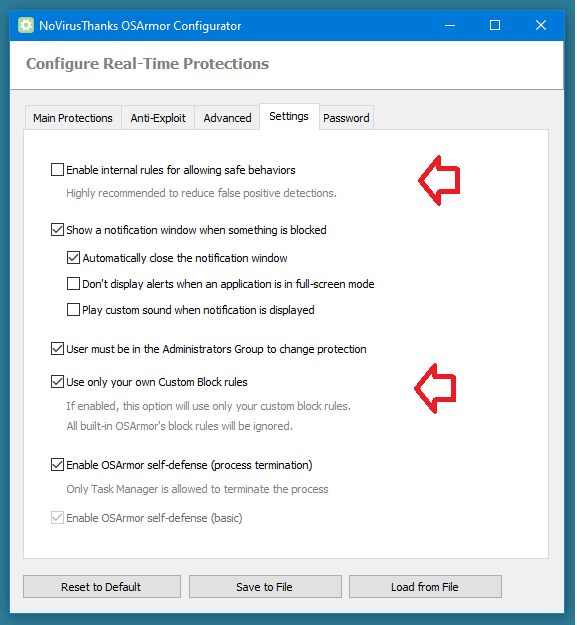
First thing I did is taking control of the protection settings, making OSArmor transparent by using my own rules only
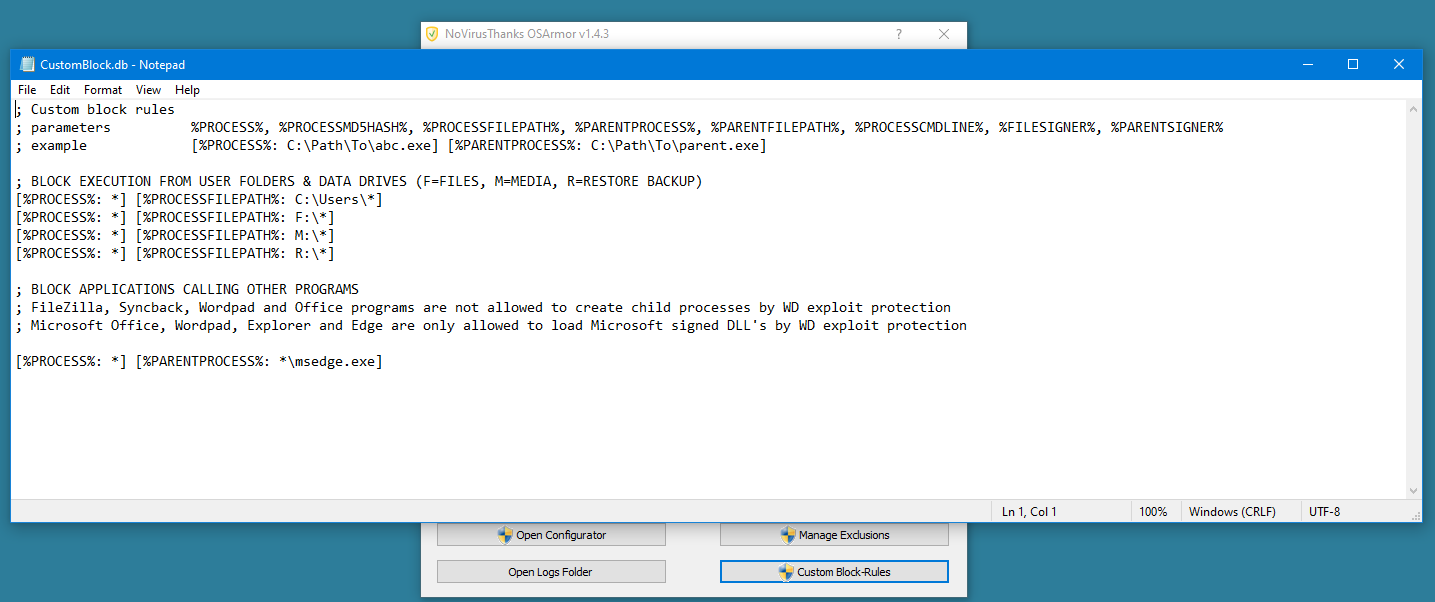
Next I configured my own block rules [Edited thanks to tip of @Andy Ful]
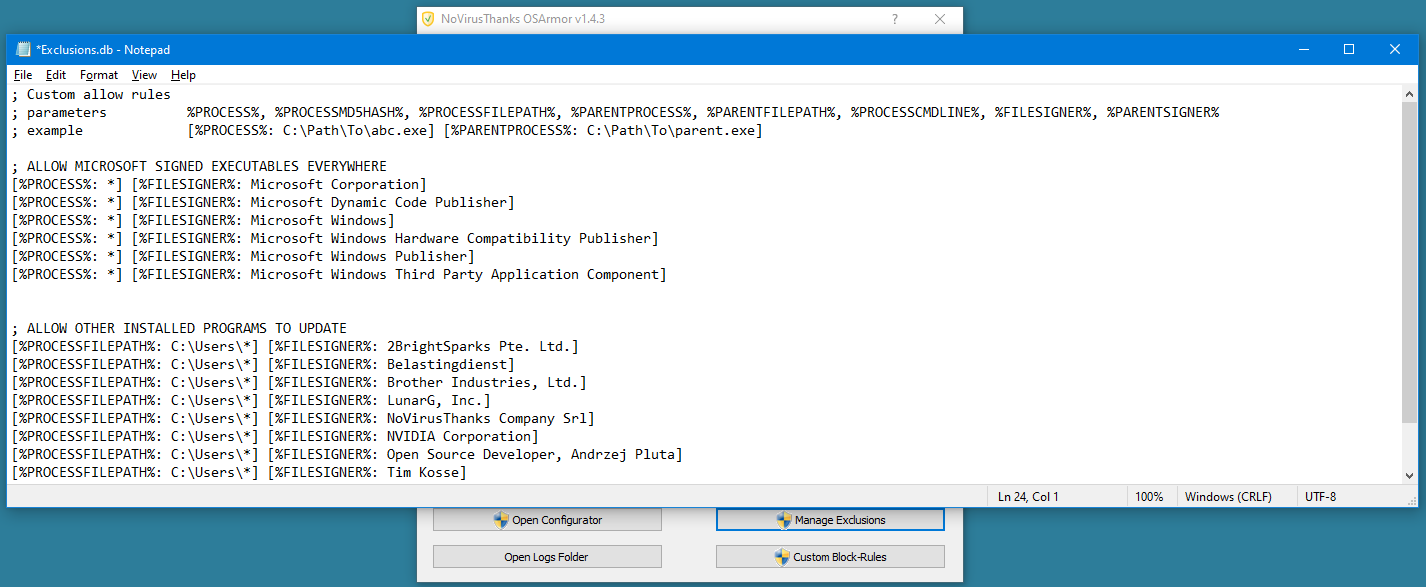
And my own signature based exclusions (whitelist), based on signatures found by Signature Extractor
Overall delay of starting of executables increased from 1.5 to 1second for first program launch and repetive starts from 0.6 to 1 second. Which shows that WD is lighter than OSArmor on my PC.
Interesting to know forum members opinions
So here is my new setup which i will be trying out for a while.
First I changed from Standard user to Administrator and temporarily disabled "Validate Admin Sgnatures" to install Defender Control. After disabling Windows Defender I enabled "Validate Admin Signatures" again (meaning unsigned software is blocked by UAC when it wants to elevate to High Integrity Level.
Next I broke my first safehex rule to not use software which is not activily maintained and download and installed OSArmor. Because I want a signature based whitelist I also downloaded NoVirus Thanks Signer Extractor and ran it to find out which (signed) programs I have installed
My Security setup will be based on Windows Defender Exploit protection, Andy Ful's Simple Windows Hardening and OSArmor.
First thing I did is taking control of the protection settings, making OSArmor transparent by using my own rules only
Next I configured my own block rules [Edited thanks to tip of @Andy Ful
]And my own signature based exclusions (whitelist), based on signatures found by Signature Extractor
Overall delay of starting of executables increased from 1.5 to 1second for first program launch and repetive starts from 0.6 to 1 second. Which shows that WD is lighter than OSArmor on my PC.
Interesting to know forum members opinions
Last edited:
Only for first party from block to allow and not on demand from allow to block for first AND third--partyCan be archived with browser internal permissions

I am using Windows Hello PIN on my HP 290 G1 which does not support TPM (no such option in BIOS). How my PIN is protected?Windows Hello is only saved locally and protected by TPM
F
ForgottenSeer 85179
Take a look at windows defender overview or open "TPM.msc" from start menu first to check that outI am using Windows Hello PIN on my HP 290 G1 which does not support TPM (no such option in BIOS). How my PIN is protected?
F
ForgottenSeer 85179
Totally fine. For insecure sites I use application guard edge anywayOnly for first party from block to allow and not on demand from allow to block for first AND third--party
As browser is itself sandboxed and JavaScript exploits are rar & fast fixed blocking Javascript only increase security in theory nowadays.
For privacy it doesn't help either as blocking increase uniqueness.
I only block it in my surfing profile because of less annoying sites.
But in the end all depends of own setup, needs, thread Modell, ...
Just my experience after years using uMatrix on deny-all mode

Are you going to test it? At first sight it feels like driving a car without fastening seat belts.My Security setup will be based on Windows Defender Exploit protection, Andy Ful's Simple Windows Hardening and OSArmor.

Andy Ful
From Hard_Configurator Tools
Verified
Honorary Member
Top Poster
Developer
Well-known
Forum Veteran
On Windows 10, you can skip the block rules for MS Office, and simply apply blocking child processes for these applications via Exploit Protection from Microsoft Security Center (does not require Microsoft Defender).
Edit.
"SWH + these OSA custom settings" is an interesting semi-locked setup. The user can install/update the applications on the base of a shortlist of available signers. I suspect that it also allows installing/updating most of the UWP apps from Microsoft Store. By using SWH to Protect the system drive (except user profiles) the setup will not break anything in the system.
Anyway, for most MT members, it would be like living in the exclusive penitentiary.
Last edited:
Recently browsing
Members who viewed this thread in the last 5 minutes
You may also like...
-
 Advanced Plus Security Dreams&Visions Security Config (Q3/2026)
 -

-

-

-