New Update Linux Mint’s Cinnamon 6.8 Desktop Environment Will Fully Support Wayland

lokamoka820

Level 55
Verified
Top Poster
Well-known
Linux Mint project Clement Lefebvre revealed today in the monthly newsletter some of the new features and improvements coming to the next major version of the Cinnamon desktop environment, version 6.8, such as full Wayland support.

The Linux Mint devs have been working hard on making Cinnamon’s Wayland session as stable as possible, and it looks like Cinnamon 6.8 will finally remove the “experimental” status of the Wayland session and fully support Wayland. Here are some of the features they’ve implemented so far:

Some of the Wayland improvements and features they managed to implement include proper mapping (sizing and positioning) for new windows, applet popup menus and context menus, proper focus stealing prevention, and improved support for multiple monitors and KVM switches.

There’s also full HiDPI support for crisp icons, smoother mouse cursor, and better handling of Chromium apps, as well as support for running root apps as Wayland clients, window progress to see, for example, Firefox download progress in the panel app button.

On top of that, the devs fixed multiple Wayland crash scenarios and significantly improved hardware acceleration throughout the compositor, desktop session, and both Wayland and Xwayland clients.

In addition to these Wayland improvements, Cinnamon 6.8 will feature a cinnamon-list-windows command to make it easy to list all open windows and to quickly see their position, size, HiDPI, app, and backend info, as well as support for systemd’s graphical-session to boost compatibility with many upstream projects.

Cinnamon’s Muffin window and composite manager also received some improvements, such as the ability to round coordinates and dimensions for all Clutter actors. According to the devs, this guarantees crisp and precise rendering and also fixes blur issues when applets or desktop components forget to do so themselves.

Cinnamon 6.8 will be the default desktop environment of Linux Mint 23, which will be released later this year. Linux Mint 23 will also feature improved SSH keyring support, LightDM configuration improvements, and fingerprint authentication improvements in Slick Greeter.
 
I am on Wayland experimental on Linux Mint 22.3 for at least 2 months and only had two hickups
1. Screensaver made PC freeze (workaround don't use screensaver)
2. Plugging in head phone to be recognized needs the browser to quit.
I was doing some research to see what distro to used on my Intel Thinkpad X13 Gen 3. I have narrowed down the options to either Fedora Cosmic Spin or Solus Budgie.

I love Linux Mint, but out of the box it is too bloated for my liking.
 
I was doing some research to see what distro to used on my Intel Thinkpad X13 Gen 3. I have narrowed down the options to either Fedora Cosmic Spin or Solus Budgie.

I love Linux Mint, but out of the box it is too bloated for my liking.

That can be a little subjective, or as you say to your liking. Maybe compared to the other versions, distros, yes, but having come from Windows, no, it's an absolute pleasure to be using a OS (Mint Cinnamon) that is bloat free, and incredibly light on my laptops and desktop PC ;) :)

And as you previously mentioned, it's been very stable.
 
Last edited:
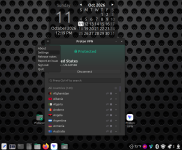
I found Proton VPN to be a easy install from their webpage instructions, compared to IVPN which took a couple more commands. Proton has a nice small footprint that I liked when using Mullvad and IVPN on Windows. I wasn't a fan of Proton on Windows, along with Nord, as they were heavier, more graphic oriented apps.

Proton has been connecting flawlessly on start up, and coming out of Suspend (sleep mode).

2026-10-11_12-19.png Screenshot from 2026-10-11 12-21-21.png
 
Okay, I'll admit it, Mint Cinnamon is boring, once you get it set up and to your liking, there isn't anything else to really do, except to use it 😅 (I still need to play, try some of my Steam single player games in it though, being able to use the PS4 controller as well).
There is no Windows update hand wringing of things being broken or changed, no Windows bloat to uninstall, no Windows telemetry to consider and disable, no signing in to get the full use of features, no 20 minute update installs and restarts, no OneDrive uninstall ghost file paths, no AV's to play with etc.

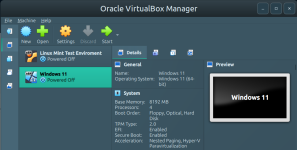
So with that, I'm going to install Windows 11 in VirtualBox just to bring some "excitement" back into my life every now and then 😅😅
 
Okay, I'll admit it, Mint Cinnamon is boring, once you get it set up and to your liking, there isn't anything else to really do, except to use it 😅 (I still need to play, try some of my Steam single player games in it though, being able to use the PS4 controller as well).

There is no Windows update hand wringing of things being broken or changed, no Windows bloat to uninstall, no Windows telemetry to consider and disable, no signing in to get the full use of features, no 20 minute update installs and restarts, no OneDrive uninstall ghost file paths, no AV's to play with etc.

So with that, I'm going to install Windows 11 in VirtualBox just to bring some "excitement" back into my life every now and then 😅😅
Why not spend your time tinkering in the terminal learning power user skills instead of trouble shooting windows updates in a vm. Learn to navigate your Linux system via commands. Look into apparmor profiles and learn to set and adjust these as well. If you get really bored you could learn how to create rules via command for iptables and learn how Linux filters traffic at the packet levels.
 
Why not spend your time tinkering in the terminal learning power user skills instead of trouble shooting windows updates in a vm. Learn to navigate your Linux system via commands. Look into apparmor profiles and learn to set and adjust these as well. If you get really bored you could learn how to create rules via command for iptables and learn how Linux filters traffic at the packet levels.

You're right, and you're really bring up some good points. Like running a different Distro in VirtualBox as well, becoming more of a power user, and in my case, even with Mint as a test bed. Learn and develop something new, rather than rehashing the old (Windows), that I already know about.

Screenshot from 2026-10-13 09-17-08.png
 
As posted Linux Mint is the first distro I tried. I only changed desktop to Cinnamon to use Wayland.

As far as I understood flatpak weakens the vertical containment (between tabs) of Chrome a bit (but it ads a strong horizontal layer when you strip unnecesary rights with flatseal).

Wayland ads a strong vertical seperation between applications.That is why I changed desktop.

I agree with @Jonny Quest that Mint is boringly solid. There is a lot info available on the web to get things done using terminal.

I figured out some mild hardening myself, but added fapolicyd using AI without problems. AI makes it easier to move from Windows to Linux IMO.

I am nearly 2 years on Linux (no dual boot, only Mint) without any issue and reading the posts of Windows users about adcommercialisation in OS and apps seems like a different world to me.
 
Last edited:
@LinuxFan58 I absolutely agree with this: AI makes it easier to move from Windows to Linux IMO.

Google AI and Gemini made the transition a lot easier, with many helpful ideas and Terminal coding to get me where I wanted. If I had tried to change pre-AI, I may not have done it, as far as forum/YouTube help (or non help?) and thinking Terminal was "scary", but it's not. In Windows there is Terminal, PowerShell, Run, Cmd prompt, Regedit that we learned to accept and work with (which AI also helped with some questions), so Terminal in Linux is their tool, as the others are for Windows.
 
Last edited:
@LinuxFan58 I absolutely agree with this: AI makes it easier to move from Windows to Linux IMO.

Google AI and Gemini made the transition a lot easier, with many helpful ideas and Terminal coding to get me where I wanted. If I had tried to change pre-AI, I may not have done it, as far as forum/YouTube help (or non help?) and thinking Terminal was "scary", but it's not. In Windows there is Terminal, PowerShell, Run, Cmd prompt, Regedit that we learned to accept and work with (which AI also helped with some questions), so Terminal in Linux is their tool, as the others are for Windows.
Perhaps this is why many YouTube channels that talk about Linux have stopped posting videos, and I wouldn't be exaggerating if I said that I haven't received notifications from the channels I follow since 2020. It was really exciting for me whenever a new video was released when I started with Linux, and I find Linux terminal commands easier to understand than Windows terminal commands.
 
You're right, and you're really bring up some good points. Like running a different Distro in VirtualBox as well, becoming more of a power user, and in my case, even with Mint as a test bed. Learn and develop something new, rather than rehashing the old (Windows), that I already know about.

View attachment 300674
No need for vm soaking up resources in this case. Time shift will work wonders if you run into trouble. Just learning the file system ECT in the terminal will not harm anything unless you start physically deleting items ECT. Learning iptables is daunting but yet simple enough to correct if you create a bad rule. A simple command will reset iptables back to default. As already mentioned using AI to learn how to make rules in your firewall is beneficial. Ufw of course is the simple solution but not as solid as creating your own rules, so it's something I usually recommend users to look into if they want to harden their system some. Apparmor is simple enough to learn to add applications facing the net and enforcing. I personally do not see the need of over kill configuration of Linux, but do believe some hardening is as stated beneficial.
 

Recently browsing

Members who viewed this thread in the last 5 minutes

Back
Top