Advanced Security Linux Mint Cinnamon Wayland setup

Last updated
Jun 1, 2026
How it's used?
For work or educational use
Operating system
Linux
Other operating system
Linux Mint 22.3 Zena Cinnamon Wayland
On-device encryption
Other full-disk drive encryption software
Log-in security
    • Biometrics (Windows Hello PIN, TouchID, Face, Iris, Fingerprint)
Security updates
Allow security updates and latest features
Update channels
Allow stable updates only
User Access Control
N/A - Linux / Mac / Other operating system
Smart App Control
N/A - Linux / Mac / Other operating system
Network firewall
Enabled
About WiFi router
TP-Link triband with IPv6 disabled, We use the three WIFI-networks seperately. The 2.4 Ghz is used for IoT-devices and guest (SPI-, NAT, ARP-filtering and intrusion detection enabled). The two 5 Ghz networks are for my wife and I (each uses his/her own) with additionally IP-MAC binding and MAC filtering enabled. I have set the e-mail log message level to critical events (acting as a rudimentary NIDS). The 5Ghz network has eternal lease time while 2.4 Ghz has short lease time (8 hours) and network partitioning enabled.
Real-time security
Non root user using build-in Linux sandboxing (AppArmor, Firejail, Flatpak) as extra protection layer.
Firewall security
Built-in Firewall for Mac/Linux
About custom security
Periodic malware scanners
When I receive files from others I scan them with Virus Total. My half yearly data backups to external USB are scanned with Microsoft Defender :cool:
Malware sample testing
I do not participate in malware testing
Environment for malware testing
None
Browser(s) and extensions
Brave-Origin with Brave adShield disabled and my two vibe coded security extensions. Using uBlockOriginLite with custom rules, added Kees1958 on ChatGPT's advice for blocking over 80% of the tracking requests!. For annoying websites I enable Brave adShield on-demand (in aggressive mode with Brave's adblock, AdGuard's URL parm, Easylist cookie and Fanboy/uBo annoyances filters enabled).
Secure DNS
  1. NextDNS in the Router with OISD and telemetry blocklists enabled (for IOT devices), allowing only common TopLevelDomains to connect.
  2. We use Quad9 as default DNS (at OS-level) for our Laptops and smartphones (to bypas router TLD firewall restrictions)
  3. Cloudflare Zero Trust Free plan (with malware protection) is used as DOH in browser with custom block page..
Desktop VPN
Proton VPN free for Linux on-demand (out of home). At home I have little use for VPN because our IP and IP location are changed regularly :-).
Password manager
Build-in (OS and Browser)
Maintenance tools
None
File and Photo backup
  • FreeFileSync quick on-demand backups to a partition on my internal SSD to which sandboxed utilities, desktop accessoires and applications have no access to.
  • The half yearly full backup saves to an external USB-SSD which is checked (afterwards) by Microsoft Defender on my wife's laptop (which has triple USB protection).
Subscriptions
    • None
System recovery
TimeShift (to another partition on 1 TB SSD)
Risk factors
    • Browsing to popular websites
    • Working from home
    • Making audio/video calls
    • Opening email attachments
    • Buying from online stores, entering banks card details
    • Logging into my bank account
    • Streaming audio/video content from trusted sites or paid subscriptions
Computer specs
AMD Ryzen 7 (5700U) laptop with 1 TB SSD and 16GB RAM
Notable changes
To many :)

After jumping back and forth, I finally decided for:
  • Changed from ControlD free to Cloudflare free ZT
  • Replaced 7-zip (unsandboxed) with PeaZip in Flatpak
  • Moved from LibreOffice in Flatpak to LibreOffice in Firejail
  • Moved from Thunderbird to Evolution (both in Flatpak sandbox)
  • Moved from Xfce desktop with X11 to Cinnamon desktop with Wayland
What I'm looking for?

Looking for maximum feedback.

@LinuxFan58

Hi, good afternoon.

The AdGuard Browser Extension only uses custom rules that update independently of the extension's filters.

Can you explain, in simple terms, why you need AG when you're using Brave's built-in ad blocker?

For example, I'm not sure if the websites in your bookmarks are handled only by AG, or by both AG and Brave's ad blocker.:unsure:
 
@Sampei.Nihira

When I am using 2 profiles, I only use Brave Shields. In my work profile I disable Brave Shields and enable the shields per website. In my surfing profile I run with Brave Shields on aggressive.

When I am using 1 profile (as now), I run Brave with Adshields disabled and run either AdGuard or uBlockorigin lite with custom rules which are all website specific (that is why I have some overlap in rules with AdGuard and in AdGuard my total custom rules are around 175 and with uBol are around 95 custom rules). It does not matter whether AG or uBol run all the time, because they rules are website specific. In AdGuard it is possible to reverse the allow list (meaning AG is only active on the websites listed in the allowlist) and with uBol it is possible to move the all-urls to no-filtering and enable basic mode only on a few bookmarked websites.

Brave is set to forget history, so when I encounter a annoying website during surfing I enable aggressive mode. In this way Brave is also only used ad-hoc (for specific websites). So with 1 profile either Brave AdShield is enabled (ad-hoc or annoying websites encountered during surfing) or Ad/uBol for bookmarked websites.

Hopes this explains it.
 
Okay thanks to @NoVirusThanks I switched back to two browser profiles. 🫣🫣

Reason is that I discovered one of his other extensions API Void Browser Lockdown. So I added API Void Browser Lockdown to my work profile and limited acces to a few domains and allowed only a few file types to download. In my surfing profile I have Brave Shields enabled, but all blocklists disabled.
 
Last edited:
@LinuxFan58

Hi,
I have a question.
When comparing Brave + Shield vs Brave + uBoL vs Brave + AG in a hypothetical Speedometer 3.1 benchmark, which one is the fastest and which is the slowest?
Or is there practically no difference?

If I replace uBo with AG in the Speedometer 3.1 test, I’m about 6–7% slower.
A (theoretical) analysis with ChatGPT reveals that replacing Chrome with Brave would slow me down by about 3–4%.
So using Brave + uBo could at most gain me 3%, which the AI estimates is negligible in terms of perceived speed.

Do you agree with this theoretical analysis, or,having conducted various tests and also used Chrome, and thus having practical experience that shouldn’t be underestimated,do you assume it’s incorrect?

Have a nice day.

P.S.

It's almost 32°C in the shade here in my city.
I'm about 12 km from the Tyrrhenian Sea.;)
 
  • Wow
Reactions: Sorrento
@Sampei.Nihira

Fastest is Brave Shields disabled (enabling only ad-hoc for annoying websites) plus uBlockOrigin Lite on basic with only custom cosmetic rules and custom DNR rules and Kees1958 most used (which is only 1 rule in uBol :-) ). It is used to be 0,3 to 0.4 difference (so on 19 average that is only 1 to 2 %), but since a week or three the difference between Brave + AdGuard is nothing to 0.1 (so practically no difference). Brave in standard mode used to be 0.2 slower than AG (also only custom rules plus Kees1958 Mv3) , but Brave standard is now nearly as fast as uBol or AG, that is nice (may be I am sticking to the same setup now, because there is nothing to gain anymore).

It is 33°C here now, just over 1700 km from the Tyrrhenian Sea.;)
 
First of June, start of the meteorological summer and having many things to do (around the house for maintenance, developing two study courses), it is time to do setup summer freeze (no changes until September first). My wife already printed a calendar with weeks to show how much time I have left before holiday trip to Poland (with my self converted van) and classes start again. In last year's winter break, I completed only half of the renovation of our back yard and in spring break I renewed our solar panels (in stead of finishing the back yard), so I am in risky waters :-) happy wife is a happy life,
 
Last edited:
My Brave browser policy profile (not changing anything :-) )

{
"SitePerProcess": true,
"SandboxExternalProtocolBlocked": true,
"AudioSandboxEnabled": true,

"SafeBrowsingProtectionLevel": 1,
"DownloadRestrictions": 1,
"PromptForDownloadLocation": false,
"DownloadDirectory": "MY DOWNLOAD FOLDER",

"DnsOverHttpsMode": "secure",
"DnsOverHttpsTemplates": "https://MY FREE ZERO TRUST.cloudflare-gateway.com/dns-query",
"HttpsOnlyMode": "force_enabled",
"DefaultBraveHttpsUpgradeSetting": 2,

"DefaultInsecureContentSetting": 2,
"DefaultFileSystemWriteGuardSetting": 2,
"DefaultWebBluetoothGuardSetting": 2,
"DefaultWebUsbGuardSetting": 2,
"DefaultWebHidGuardSetting": 2,
"DefaultSerialGuardSetting": 2,
"DefaultJavaScriptSetting": 1,
"JavaScriptBlockedForUrls": [ "FILE:///*" ],
"DefaultJavaScriptOptimizerSetting": 1,
"JavaScriptOptimizerBlockedForSites": [ "HTTP://*" ],

"PasswordManagerEnabled": false,
"AutofillAddressEnabled": false,
"AutofillCreditCardEnabled": false,

"BrowserGuestModeEnabled": false,
"BrowserAddPersonEnabled": false,
"BackgroundModeEnabled": false,

"MetricsReportingEnabled": false,
"SearchSuggestEnabled": false,
"GenAILocalFoundationalModelSettings": 1,
"PromotionsEnabled": false,

"BraveRewardsDisabled": true,
"BraveWalletDisabled": true,
"BraveNewsDisabled": true,
"BraveVPNDisabled": true


}
Browser only has wirite access to my downloads in Flatpak and the save-as mechanism escapes the Flatpak sandbox (this is by design, because it is user initiated), that is the reason why I don't allow changing that folder nor allow showing the prompt for download location. Only 1 extension is allowed (uBol at the moment)
 
Last edited:
Waiting for a truck with hardwood for our backyard deck and it is raining (therefore waisting some time :-) ), Enabled Brave-Origin in the system settings and ran some test (adblock result is with Brave shield disabled and uBol enabled with custom rules only). This 1-2 (1 = uBol with custom rules, 2 = nuke them with Brave Shields) approach allows me to use only one Brave Profile. I hope Brave soon ads the auto-container option like Firefox has (FF facilitates opening websites automatically in a specific container, in Brave it is still a manual open, but auto open is planned in future versions). I am not on glasfiber, but on Ziggo coax (speedtest is via Wifi).

1781077903822.png
 
Last edited:
There's very little difference between Brave and Brave Origin in the Speedometer 3.1 test.
I see you ran the adblock test.
It would be interesting if you tried the CoverYouTracks test:

Cover Your Tracks
Food for thought: When you are going on a hike in Ciociaria, do you have the maps of Europe, mid-east Asia and north Africa with you, in case you get lost?

uBo has in its default setup over 300.000 rules. Considering the fact that many are applied to several websites (domain=A|B}C etc or A,B,C##) this set of rules easily covers half a million websites. I have maybe bookmarked 50 websites maximum.

When I ask ChatGPT when I am only using Kees1958 most used advertising and tracking blocklist (currently around 350 old fashioned ABP-format block rules) and I am living in the Netherlands, only visiting Dutch, German and English language websites, what percentage of ACTUAL trackers would you guess is blocked?

----
1781106997241.png

EDIt, (on Github) Kees1958 credit's Peter Low for first using this approach (only Peter Low's list is around 3500 rules and Kees1958 is around 350).
 
Last edited:
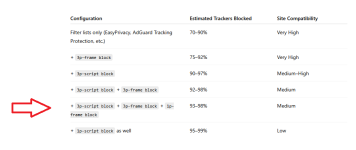
If we consider only privacy exposure (trackers) without also taking into account the security benefits in a security setup where there is efficient tracker filtering at the DNS level upstream, only dynamic filtering guarantees that the specific percentages hypothesized by ChatGPT will be reliably achieved.

Therefore, I assume that equipping the browser with even just an extension like API Void Script Stop is a precaution that reinforces the synergy achievable with your Kees1958 filter list.

Dynamic filtering is a solid guarantee for achieving tracker blocking levels that would otherwise be impossible to achieve through DNS filtering and filter lists.

As you well know, even at the preventive level.

P.S.

3.png
 
Last edited:
Because of the bad weather and the delay in some deliveries, I did not work on our back garden, but Vibe coded two extensions (locally loaded)
One preventing download of executable files (left), the second preventing surfing to websites with bad reputation using a top-tier antivirus (right) (y)

1781366725222.png


I am using Google red as background (of Google Safe Browsing warning), because I also made a personal block page in Cloudflare Zero Trust using Google red :cool:
Although nothing can install without user consent in Linux, downloaded archives are unpacked by PeaZip which is running in Flatpak sandbox.
 
Last edited:
@LinuxFan58

Hi,
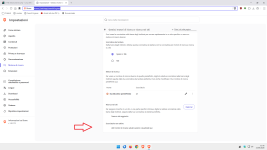
Hi, you mentioned elsewhere that Brave doesn't add inactive saved search engines.
That hasn't been my experience:

Code:
brave://settings/searchEngines

1.png

I'm currently using an extension, but if I search using a search engine that isn't on the list,for example, Ecosia,the search engine where I placed the red arrow appears.
Is there a specific flag or policy in Brave that I can't seem to find that prevents this?:unsure:
TH.
 
@LinuxFan58

Hi,
Hi, you mentioned elsewhere that Brave doesn't add inactive saved search engines.
That hasn't been my experience:

Code:
brave://settings/searchEngines

View attachment 298171

I'm currently using an extension, but if I search using a search engine that isn't on the list,for example, Ecosia,the search engine where I placed the red arrow appears.
Is there a specific flag or policy in Brave that I can't seem to find that prevents this?:unsure:
TH.
It is my experience that it is hard to add new searc engines. I had to add the url and search parm when I wanted to try out Startpage (I initially had removed all stuf I did not use, so no idea whether startpage is a default which I removed ir never was a standard listed engine, either way I had to manually add it)
1781553938530.png
 
  • Like
Reactions: Zero Knowledge
It is my experience that it is hard to add new searc engines. I had to add the url and search parm when I wanted to try out Startpage (I initially had removed all stuf I did not use, so no idea whether startpage is a default which I removed ir never was a standard listed engine, either way I had to manually add it)
View attachment 298213

No, it's easy,just use a search engine that isn't on the list and do a search.;)
After that, it will be added once you refresh the settings page where I've marked the red arrow (which is currently inactive, of course).
Try Ecosia if it's not on your list.
 
  • Like
Reactions: LinuxFan58
It is my experience that it is hard to add new searc engines. I had to add the url and search parm when I wanted to try out Startpage (I initially had removed all stuf I did not use, so no idea whether startpage is a default which I removed ir never was a standard listed engine, either way I had to manually add it)
View attachment 298213
If StartPage is bundled with your browser setup, if you want to make your personalized pref=*****, you must delete it and re-add with different username (PageStart or what you want, then after i advise newtabredirect (icpgjfneehieebagbmdbhnlpiopdcmna) extension (put your custom startpage address). and for keep all these parameters upon restart : several policies :
JSON:
  "DefaultSearchProviderEnabled": true,
  "DefaultSearchProviderKeyword": "YOUR KEYWORD",
  "DefaultSearchProviderName": "PAGESTART OR SOMETHING ELSE",
  "DefaultSearchProviderSearchURL": "https://www.startpage.com/do/search?query={searchTerms}&prfe=XXXXXXXXXXXXXXXXXXXXXXXXXXXXXXXXXXXXXXXXXXXXXXXXXXXXXXXXXXX",
  "DefaultSearchProviderSuggestURL": "https://www.startpage.com/osuggestions?q=%s&prfe=XXXXXXXXXXXXXXXXXXXXXXXXXXXXXXXXXXXXXXXXXXXXXXXXXXXXXXXXXXXXXXX",

  "HomepageIsNewTabPage": false,
  "HomepageLocation": "https://www.startpage.com/do/mypage.pl?prfe=XXXXXXXXXXXXXXXXXXXXXXXXXXXXXXXXXXX",
  "NewTabPageLocation": "https://www.startpage.com/do/mypage.pl?prfe=XXXXXXXXXXXXXXXXXXXXXXXXX",
 
  • Like
Reactions: LinuxFan58
If StartPage is bundled with your browser setup, if you want to make your personalized pref=*****, you must delete it and re-add with different username (PageStart or what you want, then after i advise newtabredirect (icpgjfneehieebagbmdbhnlpiopdcmna) extension (put your custom startpage address). and for keep all these parameters upon restart : several policies :
JSON:
  "DefaultSearchProviderEnabled": true,
  "DefaultSearchProviderKeyword": "YOUR KEYWORD",
  "DefaultSearchProviderName": "PAGESTART OR SOMETHING ELSE",
  "DefaultSearchProviderSearchURL": "https://www.startpage.com/do/search?query={searchTerms}&prfe=XXXXXXXXXXXXXXXXXXXXXXXXXXXXXXXXXXXXXXXXXXXXXXXXXXXXXXXXXXX",
  "DefaultSearchProviderSuggestURL": "https://www.startpage.com/osuggestions?q=%s&prfe=XXXXXXXXXXXXXXXXXXXXXXXXXXXXXXXXXXXXXXXXXXXXXXXXXXXXXXXXXXXXXXX",

  "HomepageIsNewTabPage": false,
  "HomepageLocation": "https://www.startpage.com/do/mypage.pl?prfe=XXXXXXXXXXXXXXXXXXXXXXXXXXXXXXXXXXX",
  "NewTabPageLocation": "https://www.startpage.com/do/mypage.pl?prfe=XXXXXXXXXXXXXXXXXXXXXXXXX",

Yes, although that doesn't prevent new inactive search engines from being added.
Only Edge has a policy that prevents such automatic additions.
I used this policy successfully in 2024 to ensure that only DDG appeared in the search engine list.
It worked perfectly.

If any forum members are interested, just ask.