Advanced Security Linux Mint Cinnamon Wayland setup

Last updated
Jun 1, 2026
How it's used?
For work or educational use
Operating system
Linux
Other operating system
Linux Mint 22.3 Zena Cinnamon Wayland
On-device encryption
Other full-disk drive encryption software
Log-in security
    • Biometrics (Windows Hello PIN, TouchID, Face, Iris, Fingerprint)
Security updates
Allow security updates and latest features
Update channels
Allow stable updates only
User Access Control
N/A - Linux / Mac / Other operating system
Smart App Control
N/A - Linux / Mac / Other operating system
Network firewall
Enabled
About WiFi router
TP-Link triband with IPv6 disabled, We use the three WIFI-networks seperately. The 2.4 Ghz is used for IoT-devices and guest (SPI-, NAT, ARP-filtering and intrusion detection enabled). The two 5 Ghz networks are for my wife and I (each uses his/her own) with additionally IP-MAC binding and MAC filtering enabled. I have set the e-mail log message level to critical events (acting as a rudimentary NIDS). The 5Ghz network has eternal lease time while 2.4 Ghz has short lease time (8 hours) and network partitioning enabled.
Real-time security
Non root user using build-in Linux sandboxing (AppArmor, Firejail, Flatpak) as extra protection layer.
Firewall security
Built-in Firewall for Mac/Linux
About custom security
  • Using only official package sources from verified publishers and de-installed all unused accessoires and applications.
  • Mildly hardened Linux by disabling P2P, remote access, old TLS versions and enabling ASLR system wide.
  • Created additional Firejail profiles with firecfg and reduced Flatpak permissions with flatseal.
  • Added OpenSnitch outbound application firewall to compliment inbound GuFW.
  • Installed logcheck with e-mail warning for security alerts & events
  • Using Wayland (experimental) on Cinnamon desktop.
  • Brave-Origin policies and site-pernissions.
Periodic malware scanners
When I receive files from others I scan them with Virus Total. My half yearly data backups to external USB are scanned with Microsoft Defender :cool:
Malware sample testing
I do not participate in malware testing
Environment for malware testing
None
Browser(s) and extensions
Brave-Origin with Brave adShield disabled and oly enabling Brave Ad-Shield for annpying websites: using my own extensions:
Secure DNS
  1. NextDNS in the Router with OISD and telemetry blocklists enabled (for IOT devices), allowing only common TopLevelDomains to connect.
  2. We use Quad9 as default DNS (at OS-level) for our Laptops and smartphones (to bypas router TLD firewall restrictions)
  3. Cloudflare Zero Trust Free plan (with malware protection) is used as DOH in browser with custom block page..
Desktop VPN
Proton VPN free for Linux on-demand (out of home). At home I have little use for VPN because our IP and IP location are changed regularly :-).
Password manager
Build-in (OS and Browser)
Maintenance tools
None
File and Photo backup
  • FreeFileSync quick on-demand backups to a partition on my internal SSD to which sandboxed utilities, desktop accessoires and applications have no access to.
  • The half yearly full backup saves to an external USB-SSD which is checked (afterwards) by Microsoft Defender on my wife's laptop (which has triple USB protection).
Subscriptions
    • None
System recovery
TimeShift (to another partition on 1 TB SSD)
Risk factors
    • Browsing to popular websites
    • Working from home
    • Making audio/video calls
    • Opening email attachments
    • Buying from online stores, entering banks card details
    • Logging into my bank account
    • Streaming audio/video content from trusted sites or paid subscriptions
Computer specs
AMD Ryzen 7 (5700U) laptop with 1 TB SSD and 16GB RAM
Notable changes
To many :)

After jumping back and forth, I finally decided for:
  • Changed from ControlD free to Cloudflare free ZT
  • Replaced 7-zip (unsandboxed) with PeaZip in Flatpak
  • Moved from LibreOffice in Flatpak to LibreOffice in Firejail
  • Moved from Thunderbird to Evolution (both in Flatpak sandbox)
  • Moved from Xfce desktop with X11 to Cinnamon desktop with Wayland
What I'm looking for?

Looking for maximum feedback.

Yes, although that doesn't prevent new inactive search engines from being added.
Only Edge has a policy that prevents such automatic additions.
I used this policy successfully in 2024 to ensure that only DDG appeared in the search engine list.
It worked perfectly.

If any forum members are interested, just ask.
and this one
 
Last edited:
I ended up with chrome://flags and switch, these flags are mostly experimental and more you tweak them more you 're unique in fingerprinting, now i just use templates in a json and use regular chromium : ON DEBIAN
View attachment 298230
Thanks for joining, care to explain your mysterious nickname? I think the 64 is your year of birth, but now Idea what 7Oz stands for :-)

7 oz stands for 7 ounces, a unit of measurement in the US Customary System that can refer to either weight (for solids) or volume (for liquids),
Common items that weigh or contain approximately 7 oz include a medium apple, a medium cooked chicken breast, a small can of soda, or a standard smartphone.
 
Thanks for joining, care to explain your mysterious nickname? I think the 64 is your year of birth, but now Idea what 7Oz stands for :-)

7 oz stands for 7 ounces, a unit of measurement in the US Customary System that can refer to either weight (for solids) or volume (for liquids),
Common items that weigh or contain approximately 7 oz include a medium apple, a medium cooked chicken breast, a small can of soda, or a standard smartphone.
You're most Welcome
You just find a new Thread to create if not already!!!;)

Ah you give two bad answers, some hints :
64 refer to something in my avatar (soup), and the second one is from India.(solid)
Good Luck!!!
 
You're most Welcome
You just find a new Thread to create if not already!!!;)

Ah you give two bad answers, some hints :
64 refer to something in my avatar (soup), and the second one is from India.(solid)
Good Luck!!!
Okay I see a Linux cannibal who has Ubuntu on a stick and boils a pot of soup from windows.

In India, the number 64 (Hindi: चौसठ or चौंसठ) is culturally significant primarily for the 64 Arts (Chausat Kala), a classical catalog of skills including singing, dancing, painting, and playing instruments.

7Oz is also the weight of a hamster, so you are the mysterious dancing hipster from india, who magically can brew windows functionality into his ubuntu setup


That explains it all, how could I miss that ;)
 
Last edited:
@LinuxFan58
I see you're using NextDNS cli, you can install this applet for always see if it's active or deactivate by something else.
Work ONLY on Cinnamon Flavor :
JSON:
/home/$USR$/.local/share/cinnamon/applets/nextdns@local

Two files to put in folder

file applet.js :

const Applet = imports.ui.applet;
const PopupMenu = imports.ui.popupMenu;
const Util = imports.misc.util;
const GLib = imports.gi.GLib;

class NextDNSApplet extends Applet.TextIconApplet {
    constructor(metadata, orientation, panelHeight, instanceId) {
        super(orientation, panelHeight, instanceId);

        this.set_applet_tooltip("NextDNS");

        this.menuManager = new PopupMenu.PopupMenuManager(this);
        this.menu = new Applet.AppletPopupMenu(this, orientation);
        this.menuManager.addMenu(this.menu);

        this._buildMenu();
        this._updateStatus();
        this._startTimer();
    }

    _buildMenu() {
        this.menu.removeAll();

        this.menu.addAction("Ouvrir les logs", () => {
            Util.spawnCommandLine("gnome-terminal -- journalctl -u nextdns.service -f");
        });

        this.menu.addAction("Démarrer", () => Util.spawnCommandLine("systemctl start nextdns.service"));
        this.menu.addAction("Arrêter", () => Util.spawnCommandLine("systemctl stop nextdns.service"));
        this.menu.addAction("Redémarrer", () => Util.spawnCommandLine("systemctl restart nextdns.service"));
    }

    _updateStatus() {
        let [ok, out] = GLib.spawn_command_line_sync("systemctl is-active nextdns.service");
        let status = out.toString().trim();

        if (status === "active") {
            this.set_applet_icon_path(GLib.get_home_dir() + "/.local/share/YOUR PNG ICON PATH");
            this.set_applet_tooltip("NextDNS actif");
        } else {
            this.set_applet_icon_path(GLib.get_home_dir() + "/.local/share/icons/YOUR PNG ICON PATH");
            this.set_applet_tooltip("NextDNS inactif");
        }
    }

    _startTimer() {
        GLib.timeout_add_seconds(GLib.PRIORITY_DEFAULT, 2, () => {
            this._updateStatus();
            return true;
        });
    }
}

function main(metadata, orientation, panelHeight, instanceId) {
    return new NextDNSApplet(metadata, orientation, panelHeight, instanceId);
}

File metadata.json :

{
    "uuid": "nextdns@local",
    "name": "NextDNS Status",
    "description": "Indicateur d'état du service NextDNS",
    "version": 1
}

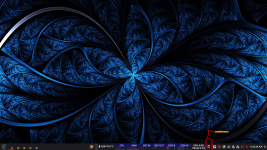
Capture d’écran du 2026-06-19 11-22-25.png
 
For Browsing, IMHO, i found Brave really good for security, speed and outside privacy, but too much things on board, this is why i use Chromium without any flags or switch just pass a long time to setup granular policies for the best result in privacy and security and most important surfing without problem (banking..........).
See my set of policies if you're interested, i am also curious about how did you set your kernel's parameters if you do.

JSON:
{
  "AIModeSettings": 1,
  "BuiltInAIAPIsEnabled": false,
  "GeminiActOnWebSettings": 1,
  "GenAILocalFoundationalModelSettings": 1,
  "HelpMeWriteSettings": 2,
  "DevToolsGenAiSettings": 2,
  "BlockThirdPartyCookies": true,
  "BrowserAddPersonEnabled": false,
  "BrowserGuestModeEnabled": false,
  "BrowserGuestModeEnforced": false,
  "BuiltInDnsClientEnabled": false,
  "DnsOverHttpsMode": "off",
  "EnableMediaRouter": false,
  "ShowCastIconInToolbar": false,
  "MediaRouterCastAllowAllIPs": false,
  "PasswordManagerEnabled": false,
  "PaymentMethodQueryEnabled": false,
  "SpellCheckServiceEnabled": false,
  "SyncDisabled": true,
  "SafeBrowsingDeepScanningEnabled": false,
  "SafeBrowsingExtendedReportingEnabled": false,
  "MetricsReportingEnabled": false,
  "UserFeedbackAllowed": false,
  "UrlKeyedAnonymizedDataCollectionEnabled": false,
  "DomainReliabilityAllowed": false,
  "SearchSuggestEnabled": false,
  "GoogleSearchSidePanelEnabled": false,
  "NetworkPredictionOptions": 2,
  "QuicAllowed": false,
  "HardwareAccelerationModeEnabled": true,
  "ClearBrowsingDataOnExitList": [
    "browsing_history",
    "download_history",
    "cookies_and_other_site_data",
    "cached_images_and_files",
    "password_signin",
    "autofill",
    "site_settings",
    "hosted_app_data"
  ],
  "ExtensionInstallBlocklist": ["*"],
  "ExtensionInstallAllowlist": [
    "jobpjnhlpobhgdddaeifllnbbleopibe",
    "ddkjiahejlhfcafbddmgiahcphecmpfh",
    "oboonakemofpalcgghocfoadofidjkkk",
    "aghfnjkcakhmadgdomlmlhhaocbkloab",
    "icpgjfneehieebagbmdbhnlpiopdcmna"
  ],
  "DefaultSearchProviderEnabled": true,
  "DefaultSearchProviderKeyword": "search",
  "DefaultSearchProviderName": "StartPage",
  "DefaultSearchProviderSearchURL": "https://www.startpage.com/do/search?query={searchTerms}&prfe=XXXXXXXXXXXXXXXXXXXXXXXXXXXXXXXXXXXXXXXXXXXXXXXXXXXXXXXXXXXXXXXXXXXXXXXXXXXX",
  "DefaultSearchProviderSuggestURL": "https://www.startpage.com/osuggestions?q=%s&prfe=XXXXXXXXXXXXXXXXXXXXXXXXXXXXXXXXXXXXXXXXXXXXXXXXXXXXXXXXXXXXXXXXXXXXXXXXXXXXXXXXXXXXXXX",
  "HomepageIsNewTabPage": false,
  "HomepageLocation": "https://www.startpage.com/do/mypage.pl?prfe=XXXXXXXXXXXXXXXXXXXXXXXXXXXXXXXXXXXXXXXXXXXXXXXXXXXXXXXXXXXXXXXXXXXXXXXXXXXXXXXXXXXXXXXXXXXXXXXXXXXXXXXXXXX",
  "NewTabPageLocation": "https://www.startpage.com/do/mypage.pl?prfe=XXXXXXXXXXXXXXXXXXXXXXXXXXXXXXXXXXXXXXXXXXXXXXXXXXXXXXXXXXXXXXXXXXXXXXXXXXXXXXXXXXXXXXXXXXXXXXXXXXXXXXXXX",
  "ShowHomeButton": true,
  "DownloadDirectory": "/home/$USER$/Bureau",
  "DefaultDownloadDirectory": "/home/$USER$/Bureau",
  "AutoplayAllowed": false,
  "DefaultGeolocationSetting": 3,
  "DefaultSensorsSetting": 2,
  "OriginKeyedProcessesEnabled": true,
  "SandboxExternalProtocolBlocked": true,
  "NetworkServiceSandboxEnabled": true,
  "AudioSandboxEnabled": true,
  "TLS13EarlyDataEnabled": false,
  "RemoteAccessHostAllowRemoteAccessConnections": false,
  "RemoteAccessHostAllowRemoteSupportConnections": false,
  "RemoteAccessHostAllowClientPairing": false,
  "RemoteAccessHostAllowFileTransfer": false,
  "RemoteAccessHostAllowUrlForwarding": false,
  "RemoteAccessHostFirewallTraversal": false,
  "RemoteAccessHostAllowPinAuthentication": false,
  "RemoteAccessHostRequireCurtain": false,
  "SafeBrowsingSurveysEnabled": false,
  "SafeBrowsingProxiedRealTimeChecksAllowed": false,
  "QRCodeGeneratorEnabled": false,
  "PromotionsEnabled": false,
  "MediaRecommendationsEnabled": false,
  "AutofillAddressEnabled": false,
  "AllowDinosaurEasterEgg": false,
  "AutofillCreditCardEnabled": false,
  "AutofillPredictionSettings": 2,
  "BatterySaverModeAvailability": 0,
  "SitePerProcess": true,
  "DefaultFileSystemWriteGuardSetting": 2,
  "DefaultWebBluetoothGuardSetting": 2,
  "DefaultWebUsbGuardSetting": 2,
  "DefaultWebHidGuardSetting": 2,
  "DefaultSerialGuardSetting": 2,
  "DefaultNotificationsSetting": 2,
  "DefaultClipboardSetting": 2
}
 
Last edited:
@7Oz-64

I only mildly hardened Linux by disabling P2P, remote access, old TLS versions and enabling ASLR system wide. I made a few changes from a website which claimed what to do when first installation linux Mint, but onyl the ones that made sense to me (e.g. reduce swapiness, I think I have set it to 10)).

My policies
{
"SitePerProcess": true,
"SandboxExternalProtocolBlocked": true,
"AudioSandboxEnabled": true,

"SafeBrowsingProtectionLevel": 1,
"DownloadRestrictions": 1,
"PromptForDownloadLocation": false,
"DownloadDirectory": "my download folder¨

"DnsOverHttpsMode": "secure",
"DnsOverHttpsTemplates": "my free Cloudflare Zero Trust ",
"HttpsOnlyMode": "force_enabled",
"DefaultBraveHttpsUpgradeSetting": 2,

"DefaultInsecureContentSetting": 2,
"DefaultFileSystemWriteGuardSetting": 2,
"DefaultWebBluetoothGuardSetting": 2,
"DefaultWebUsbGuardSetting": 2,
"DefaultWebHidGuardSetting": 2,
"DefaultSerialGuardSetting": 2,
"JavaScriptBlockedForUrls": [ "FILE:///*" ],
"JavaScriptOptimizerBlockedForSites": [ "HTTP://*" ],

"RemoteAccessHostAllowRemoteAccessConnections": false,
"RemoteAccessHostAllowRemoteSupportConnections": false,
"RemoteAccessHostAllowClientPairing": false,
"RemoteAccessHostAllowFileTransfer": false,
"RemoteAccessHostAllowUrlForwarding": false,
"RemoteAccessHostFirewallTraversal": false,
"RemoteAccessHostAllowPinAuthentication": false,
"RemoteAccessHostRequireCurtain": false,

"PasswordManagerEnabled": false,
"AutofillAddressEnabled": false,
"AutofillCreditCardEnabled": false,

"BrowserGuestModeEnabled": false,
"BrowserAddPersonEnabled": false,
"BackgroundModeEnabled": false,

"MetricsReportingEnabled": false,
"SearchSuggestEnabled": false,
"GenAILocalFoundationalModelSettings": 1,
"PromotionsEnabled": false,

"BraveRewardsDisabled": true,
"BraveWalletDisabled": true,
"BraveNewsDisabled": true,
"BraveVPNDisabled": true,

"BraveShieldsDisabledForUrls": [
¨Lots of websites +20
]

}

 
@LinuxFan58
Hi, still at 1.4 atm, uBol-stripped really interesting (DNR rules keeping(y)), i guess full compatibility with DS and for 3P-Matrix-lite is it necessary when running ubol and download sentinel ?
Nice work Sir Kees!!!
No Download Sentinel and 3P-Matrx-lite are for general use and work excellent together (and with minimum performance impact), stick to uBol or AG Mv3.

uBol-stripped is only for personal use and maybe for the few people who use a Chromium browser with a build-in adblocker (like Brave). I like to run with minimal block rules for maximum compatibility and performance. This is why I use uBol-stripped with my own ABP filter lists copied into the custom filter sandbox. With only 456 ABP rules it scores 78% on adblocker test. When I encounter an annoying website I nuke it by enabling Brave Shield in Aggressive mode (using default rules plus Fanboy's and uBo annoyances). This gives me the best of both worlds: reasonable ad-blocking with zero performance impact/issues and full blown blocking for annoying websites (with a little performance impact and a scarce/occasional compatibility issue).

1782983532364.png
with ubol-stripped and my own filter lists
 
Last edited:
@LinuxFan58

:unsure:
I'm curious,why are you using the first version of the d3ward test?
Try the 2024 test to see if it's compatible with Brave:

Test Ad Block - Toolz
Because the first one already was a nonsense test and he added more nonsense later on :unsure:

E.g. he often lists "trackers or advertising" subdomains which are part of the internal system of that advertising platform. Often you only need to block one. Compare it with your car, you only need the key to start it but he lists all the parts which makes the engine run.

When I run the new test only 49% gets blocked, should I worry?
1783057654120.png


Let's do a test and open three well known websites. I only use my personal list and most used advertising and tracking networks. Personal list is only used to circumvent cookie prompts and hide empty place holders (as you can see for the BBC). La gazetta and Le Monde are not in my personal blocklist. For those two newspapers I only use the Kees1958 most used (only has 360 simple ABP third-party block rules) and do you see advertisements La Gezetta dello Sport or Le Monde? ==> No only empty place holders with proofs the high bul$#&^level of Toolz test :-)

1783057468100.png


And I can use element picker of uBol-stripped to remove these empty placeholders when I would visit this website often (or temporary enable Brave Ad-shield and nuke it)
1783057811260.png
 
Last edited:
No, you shouldn't worry a test is just a test.
Ads aren't a problem; they're a nuisance that could even become a security issue, but by now we're able to get around that problem.

Trackers, on the other hand, are a bigger problem (for me) than ads.
So you could choose a website with lots of trackers and use your browser’s developer tools to check which ads/trackers are blocked at the browser level and, if necessary, at the DNS level.

Enable PB and check if any trackers from the previous list are missing and therefore not being blocked.
If one is present and PB blocks it exclusively, there’s a gap in network filtering.

But it’s a lot of work......;)
 
Yes in Chrome right clck inspecy, then chose the network and click lower pabe, it should show a popup with sort and header options, choose what you would like to see in lower pane.

1783104116383.png
 
  • Like
Reactions: Sampei.Nihira
Yes, Brave’s developer tools display specific warnings that aren’t present in Chrome, so it’s a bit more complicated to understand.

I usually use:

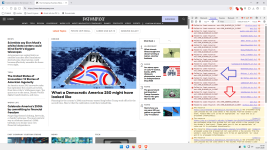
fastcompany.com

In the image below, the red arrow highlights the warnings blocked by the browser and extensions.
If you install PB, it will always look like this.

The blue arrow highlights the blocks caused by DNS:

1.png

Using Firefox as a point of comparison provides a better analysis.
You’ll notice specific warnings blocked by PB, DNS, uBo, and Firefox’s built-in anti-tracker feature.......