

The MalwareTips app
Your community, one tap away.
Open MalwareTips from your Home Screen or desktop. Follow discussions, find answers and pick up where you left off.
- Home Screen access
- Optional push alerts
- Your community
You're ready to explore.Explore what's new
Installation instructions
iPhone & iPad
- Open MalwareTips in Safari and tap Share. You may need to open the Page Menu first.
- Choose Add to Home Screen. If it is not listed, use Edit Actions to add it.
- Keep Open as Web App enabled if shown, then tap Add.
Android
- Open MalwareTips in Chrome or another browser that supports app installation.
- Open the browser menu and look for Install app, Install and create shortcut, or Add to Home screen.
- Choose Install and confirm. Wording varies by browser.
Desktop
- Chrome: use the install icon in the address bar, or the menu under Cast, save and share.
- Edge: open the menu, then More tools, Apps and Install this site as an app.
- Safari on Mac: choose Share or File, then Add to Dock. Firefox on Windows: look for the web apps button in the address bar.
If you cannot find an install option, update your browser or use its bookmark option to keep MalwareTips close.
Keep up with your conversations
After installation, open the app and sign in. Enable push notifications in Preferences if you want alerts. On iPhone and iPad, push requires a Home Screen web app and iOS or iPadOS 16.4 or later.
Sign in to manage notificationsInstallation is optional. Your notification settings stay under your control.
You are using an out of date browser. It may not display this or other websites correctly.
You should upgrade or use an alternative browser.
You should upgrade or use an alternative browser.
Solved Lost internet connection after running adwcleaner

Hello,
This seems to be work/business machine? We do not provide help for work/business computers. This forum is run by volunteers that spend their time free of charge. If you're making money via this PC then you should pay for its repair.
This seems to be work/business machine? We do not provide help for work/business computers. This forum is run by volunteers that spend their time free of charge. If you're making money via this PC then you should pay for its repair.
Hello,
This seems to be work/business machine? We do not provide help for work/business computers. This forum is run by volunteers that spend their time free of charge. If you're making money via this PC then you should pay for its repair.
Thank you for the reply!
It was used for work until last year, and we retired it, now it is just used for leisure, which is why it is more at risk of malware. It may still have software that we used to use? I can appreciate your position though, so let me know how you want to proceed.
Okay, then let's continue:
 Fix with Farbar Recovery Scan Tool
 This fix was created for this user for use on that particular machine.
Running it on another one may cause damage and render the system unstable.
Download attached fixlist.txt file and save it to the Desktop:
Both files, FRST and fixlist.txt have to be in the same location or the fix will not work!
Please attach it to your reply.
Download attached fixlist.txt file and save it to the Desktop:
Both files, FRST and fixlist.txt have to be in the same location or the fix will not work!
- Right-click on icon and select
Run as Administrator to start the tool.

(XP users click run after receipt of Windows Security Warning - Open File). - Press the Fix button just once and wait.
- If for some reason the tool needs a restart, please make sure you let the system restart normally. After that let the tool complete its run.
- When finished FRST will generate a log on the Desktop, called Fixlog.txt.
Please attach it to your reply.
Attachments
Okay, then let's continue:
Fix with Farbar Recovery Scan Tool
This fix was created for this user for use on that particular machine.
Running it on another one may cause damage and render the system unstable.
Download attached fixlist.txt file and save it to the Desktop:
Both files, FRST and fixlist.txt have to be in the same location or the fix will not work!
- Right-click on
icon and selectRun as Administrator to start the tool.
(XP users click run after receipt of Windows Security Warning - Open File).- Press the Fix button just once and wait.
- If for some reason the tool needs a restart, please make sure you let the system restart normally. After that let the tool complete its run.
- When finished FRST will generate a log on the Desktop, called Fixlog.txt.
Please attach it to your reply.
Thank You! I just checked and the internet is back. an I now done with pcfixing1.info as well, or should I continue down the instructions on http://malwaretips.com/blogs/pcfixing1-info-removal/
Thank you so much for your help! I would be curious to know what was changed and why?
Attachments
Malware was messing with some Internet settings. Adwcleaner deleted connected files, but didn't restore changed settings.
Glad I could help. We will delete all used tools and I'll give you some tips to harden your security and learn how to protect yourself
 MUST READ - security tips:
MUST READ - general maintenance:
In order to stay protected it is very important that you regularly update all of your software. Cybercriminals depend on the apathy of users around software updates to keep their malicious endeavor running.
Operating systems, such as Windows, and applications, such as Adobe Reader or JAVA, are used by tens of millions of computers and devices around the world, making them a huge target for cybercriminals. Downloading updates and installing them can sometimes be tedious, but the advantages you get from the updates are certainly worth it.
 TFC - to clean unneeded temporary files.
Malwarebytes' Anti-Malware - to scan your system from time to time in search for malware.
Malwarebytes' Anti-Exploit - to prevent plenty of mostly exploited vulnerabilities.
McShield - to prevent infections spread by removable media.
Unchecky - to prevent from installing additional foistware, implemented in legitimate installations.
Adblock - to surf the web without annoying ads!
Download DelFix by Xplode and save it to your desktop.
Tool deletes old system restore points and create a fresh system restore point after cleaning.
Stay safe,
TwinHeadedEagle
Glad I could help. We will delete all used tools and I'll give you some tips to harden your security and learn how to protect yourself
Recommended reading:
- Computer Security - a short guide to staying safer online.
- Simple and easy ways to keep your computer safe and secure on the Internet
The Importance of Software Updating:
In order to stay protected it is very important that you regularly update all of your software. Cybercriminals depend on the apathy of users around software updates to keep their malicious endeavor running.
Operating systems, such as Windows, and applications, such as Adobe Reader or JAVA, are used by tens of millions of computers and devices around the world, making them a huge target for cybercriminals. Downloading updates and installing them can sometimes be tedious, but the advantages you get from the updates are certainly worth it.
Recommended additional software:
Post-cleanup procedures:
Download DelFix by Xplode and save it to your desktop.
- Run the tool by right click on the icon and Run as administrator option.

- Make sure that these ones are checked:
- Remove disinfection tools
- Purge system restore
- Reset system settings
- Push Run and wait until the tool completes his work.
- All tools we used should be gone. Tool will create an report for you (C:\DelFix.txt)
Tool deletes old system restore points and create a fresh system restore point after cleaning.
My help is free for everybody.
If you're happy with the help provided and/or wish to buy me a beer for the assistance you received, then you can consider a donation:
Thank you!
If you're happy with the help provided and/or wish to buy me a beer for the assistance you received, then you can consider a donation:
Thank you!
Stay safe,
TwinHeadedEagle
Malware was messing with some Internet settings. Adwcleaner deleted connected files, but didn't restore changed settings.
Glad I could help. We will delete all used tools and I'll give you some tips to harden your security and learn how to protect yourself
Recommended reading:
MUST READ - security tips:
- Computer Security - a short guide to staying safer online.
- Simple and easy ways to keep your computer safe and secure on the Internet
MUST READ - general maintenance:
The Importance of Software Updating:
In order to stay protected it is very important that you regularly update all of your software. Cybercriminals depend on the apathy of users around software updates to keep their malicious endeavor running.
Operating systems, such as Windows, and applications, such as Adobe Reader or JAVA, are used by tens of millions of computers and devices around the world, making them a huge target for cybercriminals. Downloading updates and installing them can sometimes be tedious, but the advantages you get from the updates are certainly worth it.
Recommended additional software:
TFC - to clean unneeded temporary files.
Malwarebytes' Anti-Malware - to scan your system from time to time in search for malware.
Malwarebytes' Anti-Exploit - to prevent plenty of mostly exploited vulnerabilities.
McShield - to prevent infections spread by removable media.
Unchecky - to prevent from installing additional foistware, implemented in legitimate installations.
Adblock - to surf the web without annoying ads!
Post-cleanup procedures:
Download DelFix by Xplode and save it to your desktop.
The tool will also record healthy state of registry and make a backup using ERUNT program in %windir%\ERUNT\DelFix
- Run the tool by right click on the
icon and Run as administrator option.- Make sure that these ones are checked:
- Remove disinfection tools
- Purge system restore
- Reset system settings
- Push Run and wait until the tool completes his work.
- All tools we used should be gone. Tool will create an report for you (C:\DelFix.txt)
Tool deletes old system restore points and create a fresh system restore point after cleaning.
My help is free for everybody.
If you're happy with the help provided and/or wish to buy me a beer for the assistance you received, then you can consider a donation:
Thank you!
Stay safe,
TwinHeadedEagle
Thank You! I will go through all of that in a bit, but one thing first. the second time I go online with Chrome, I get another pcfixing1.info popup, so I am thinking I need to clean better? should I run adwcleaner again?
How that popup looks like? Can you make a picture?
How that popup looks like? Can you make a picture?
I tried to open chrome three times, and find these screens, different each time?
Attachments
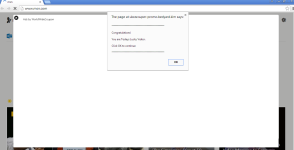
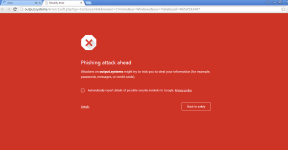
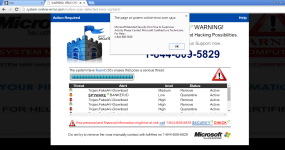
Does it happen in all browsers. Please, try to reinstall Chrome.
That seemed to remedy it. Thank You for your help!Does it happen in all browsers. Please, try to reinstall Chrome.
Recently browsing
Members who viewed this thread in the last 5 minutes


