

Lucent Warrior's Armor

  • Thread starter Thread starter Lucent Warrior
  • Start date Start date
Last updated
Dec 31, 1969
Windows Edition
Pro
User Access Control
Always notify
Real-time security
Windows Firewall with Advanced Security
Windows Defender
SmartScreen & UAC
Voodooshield Beta 3.44
Firewall security
Microsoft Defender Firewall
Periodic malware scanners
VoodooAi Beta 0.90
VT Uploader
Malware sample testing
I do not participate in malware testing
Browser(s) and extensions
Google Chrome 64bit, version 53.0.2785.143
Readability, Ublock Origin, Ip and Domain, VTChromizer,Lastpass
Maintenance tools
Windows inbuilt tools
L

Lucent Warrior

Thread author
-Vmware Workstation Pro, v12.5.0 build-4352439

System Checking Tools

-Process Explorer, v16.12
-Autoruns, v13.62
-TCPview, v3.05

Start Menu:
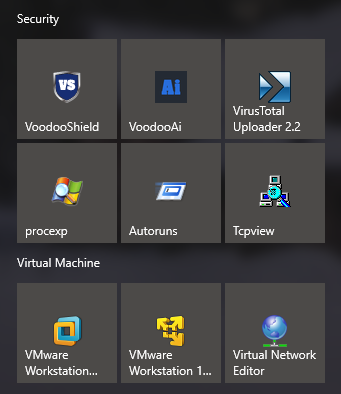
My security.png
 
Last edited by a moderator:
I personally would add Zemana as another on demand scanner. Other than that great config!
Thank you for your input.

I second that. You can also consider MBAM and/or HMP as on demand scanners.
For the rest - light and efficient setup!
Thank you as well. I have no need of extra on-demands on the system, as i have a plethora of tools on external devices should the need ever arise. Light and efficient was exactly the reason for the set up ;) :D
 
Nothing to add though unusual to see someone rely on Power Eraser as ODS. To be honest, last time I used my ODM was months ago. Granted that my browsing habits and system usage is: specific sites (forums/reddit/games sites), MT and Online Gaming, I have used it only once after the infection months ago.

I don't even really know why I have the AV installed but in any case, that is just me.

Might revisit PE as its been so long.
 
How effective is Norton Power Eraser (NPE), isn't it intended for infected machines or stubborn malware? Can you perform custom scans?

NPE disclaimer:

-Norton Power Eraser is an aggressive repair tool. There is a small risk that
legitimate programs can be marked for removal.

-The default scan requires that you restart your computer.

-You can reverse most of the changes by running Norton Power Eraser again to undo past repair sessions.

Scan Types/Options:

-Unwanted Applications Scan

-Reputation Scan, which performs a Norton Cloud lookup on a file or folder

-System Scan, performs a standard NPE scan on current windows operating system

-Multi-Boot Scan Performs a scan on the operating system you specify when
run on a computer with multiple Windows Operating systems.

-Undo a fix
 

You may also like...