
I can recall, one member of MT mentioned not using AV at all.But let's be real, sometimes one can unconsciously and unintentionally fall for it.
Like when youre on your device and have not slept for three days hahahahah


Open MalwareTips from your Home Screen or desktop. Follow discussions, find answers and pick up where you left off.
If you cannot find an install option, update your browser or use its bookmark option to keep MalwareTips close.
After installation, open the app and sign in. Enable push notifications in Preferences if you want alerts. On iPhone and iPad, push requires a Home Screen web app and iOS or iPadOS 16.4 or later.
Sign in to manage notificationsInstallation is optional. Your notification settings stay under your control.
I can recall, one member of MT mentioned not using AV at all.But let's be real, sometimes one can unconsciously and unintentionally fall for it.
Like when youre on your device and have not slept for three days hahahahah

Damn I need to tell my wife that for the first time ever I came late.It was already dead when @harlan4096 posted the screenshot of the link lead to by the "update" button.
But I am not sure it was dead when I first posted hours before the screenshot; I did not try to click.
Proof of lifeDamn I need to tell my wife that for the first time I ever I came late.
It downloads a file, Installer.59-03-4-08, or at least I could download it when I accessed the website.Btw clicking on Update Chrome does not do anything.

It's better for men to be late than women. That will equate to years of sacrifice.heheDamn I need to tell my wife that for the first time I ever I came late.

Does disabling V8 in Chrome settings help with?it is the Chromium V8 minus the file system restrictions
Not at all, because the node.js environment is portable, it can be downloaded or shipped with the executable. In this case as the decompressed size is 24 mb it has been shipped. It is not related to or affected by Chrome in any way.Does disabling V8 in Chrome settings help with?
I always come when they ask me to... there's my hard life and sacrifice!It's better for men to be late than women. That will equate to years of sacrifice.hehe

I I submitted to them as well and now it's blocked,
Awesome it's a legit site they've been around before the Y2k event


That what I meantNot at all, because the node.js environment is portable, it can be downloaded or shipped with the executable. In this case as the decompressed size is 24 mb it has been shipped. It is not related to or affected by Chrome in any way.
But also V8 is the Chromium engine, you can’t disable it.
This list was all clean yesterday; also Norton safeweb was labeling it as safe yesterday.Current status at vt.
Was labeling it safe yesterday; checked it myself.and even later after the fact: osprey blocked it and so does Eset online checker
ESET Link Checker: Is This URL Safe?
Check any link with ESET Link Checker to see if it’s safe before you click. Protect yourself from phishing, malicious websites, and scams.www.eset.com

This could help with prevent some forms of attack/vulnerabilities. JavaScript is not a low-level language like C/C++/Rust/Zig, it's a high-level language, so speed is comparatively slower than those (still very fast). JIT (Just-in-Time Compiler) is a feature that makes JavaScript run extremely fast. Still not as fast as low-level languages but close. If you use Chrome's "Don't allow sites to use JavaScript optimizations" or enable "Enhance your security on the web" feature in Edge, it disables some JIT related features. So, security increases at the cost of performance mainly on JavaScript heavy sites. It also disables Web-Assembly but Web-Assembly is not used by most sites.

I also prefer fast browsing.This could help with prevent some forms of attack/vulnerabilities. JavaScript is not a low-level language like C/C++/Rust/Zig, it's a high-level language, so speed is comparatively slower than those (still very fast). JIT (Just-in-Time Compiler) is a feature that makes JavaScript run extremely fast. Still not as fast as low-level languages but close. If you use Chrome's "Don't allow sites to use JavaScript optimizations" or enable "Enhance your security on the web" feature in Edge, it disables some JIT related features. So, security increases at the cost of performance mainly on JavaScript heavy sites. It also disables Web-Assembly but Web-Assembly is not used by most sites.
I prefer fast browsing over this added security because I myself getting affected by any such serious vulnerability is rare.


Yeah, the URL is blocked by GoogleSafeBrowsing, but when I enable it, it says the download is complete, but nothing actually downloads with Strict Settings.enable "Enhance your security on the web" feature in Edge
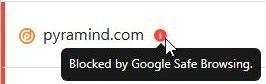
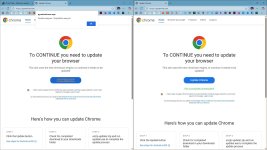
Actually, nothing downloaded even for me on default settings on my system. In the VM I had to switch to Google DNS from browser settings to make it download. DNS wasn't blocking for me at that point so I'm not sure why the download didn't trigger.Yeah, the URL is blocked by GoogleSafeBrowsing, but when I enable it, it says the download is complete, but nothing actually downloads with Strict Settings.
View attachment 293495 View attachment 293496

The link is detected by Norton and its family, but the malicious fake Chrome Updater is not detected.This list was all clean yesterday; also Norton safeweb was labeling it as safe yesterday.
View attachment 293488
Members who viewed this thread in the last 5 minutes


