App Review McAfee Protection (Plus Plans, Total Protection, LiveSafe)

It is advised to take all reviews with a grain of salt. In extreme cases some reviews use dramatization for entertainment purposes.
Product name
McAfee Total Protection/Plus Plans
Installation (rating)
5.00 star(s)
User interface (rating)
5.00 star(s)
Performance (rating)
5.00 star(s)
Core Protection (rating)
5.00 star(s)
Proactive protection (rating)
5.00 star(s)
Additional Protection notes
See tests
Browser protection (rating)
5.00 star(s)
Positives
    • Many features
    • Low impact on system resources
    • Lightning fast scans
    • Easy to use
    • Simple and non-intrusive
    • Ransomware protection
    • Strong and reliable protection
    • Detects or blocks in the wild malware
    • Consistently high test scores
    • Accurate results and reliable antivirus engine
    • Effective malicious URL blocking
    • Virus signatures are updated daily
    • Excellent scores in independent tests
    • Great value for money
    • Effective malware removal
    • Well designed, clear and easy to use interface
    • Multi-layer protection approach
Negatives
    • Advanced users may want more control
    • Short on configuration options
    • Includes paid-for components (paywall)
Time spent using product
Reviewed between 1 to 7 days
Computer specs
11th Gen Core i5
16GB RAM
Recommended for
  1. All types of users
Overall rating
5.00 star(s)
I only use a VPN when I want to fake my location in the country in question when accessing streaming services for foreign TV channels. Otherwise, I don't use a VPN. Therefore, leaks don't bother me.
To be honest, I use it for the novelty of it, like I'm getting away with something 😅☺️ I'm not trying to access geo restricted content like Netflix or websites.
 
If the pop-ups appear again after a few weeks, I'll click them away. While I hope I'll have a permanent break now, I like the program so much that I'd grudgingly accept pop-ups every few weeks.
I had many brief affairs with McAfee. The UI (though often criticised), I kinda liked it and I like the clear and simple language used.

When I did have these affairs, Real Protect used to be just behavioural monitoring. Static analysis appeared later, just around 3-4 years ago or so. Not long after the real protect fileless model appeared (that wasn’t there either).

With the new architecture, I had a brief 1 hours trial when it first came out. Now it’s been optimised and improved enough for me to like it.
 
Which is what I did, nuke it, but I'm willing to give it another try, just in case Oldie1950 post of acknowledging them helps to stop any future ones. I did like how light and efficient it is, too. But if I get any more follow-up pop-ups/solicitations, I'll uninstall it again ;) :)
Already did this 3 times (uninstalled and installed), it didn't settle and popups came almost everyday.
 
How concerned should I be with McAfee's VPN showing the below DNS response fails from the dnscheck.tools website? Proton and Mullvad pass these tests. Even F-Secure VPN passes though it takes it longer to go through the DNS security test.

Also, I've never been able to load the dnsleaktest.com website with McAfee VPN enabled. All the other ones I've used have never had that problem?

View attachment 291966
I got the same result running McAfee VPN on my laptop. From what I read, most VPN providers don't prioritize DNSSEC validation. Their DNS resolvers don't check signatures, which is why VPNs like McAfee's fail those tests.

McAfee VPN overrides the secure DNS settings I apply to the adapter on Windows, but interestingly, I discovered that isn't the case on Android. When I run dnscheck.tools with McAfee VPN on my phone, I pass the test because my DNS resolver remains set to Control D's secure server.
 
I got the same result running McAfee VPN on my laptop. From what I read, most VPN providers don't prioritize DNSSEC validation. Their DNS resolvers don't check signatures, which is why VPNs like McAfee's fail those tests.

McAfee VPN overrides the secure DNS settings I apply to the adapter on Windows, but interestingly, I discovered that isn't the case on Android. When I run dnscheck.tools with McAfee VPN on my phone, I pass the test because my DNS resolver remains set to Control D's secure server.
Thank you, Miravi, nice informative post :)
 
I got the same result running McAfee VPN on my laptop. From what I read, most VPN providers don't prioritize DNSSEC validation. Their DNS resolvers don't check signatures, which is why VPNs like McAfee's fail those tests.

McAfee VPN overrides the secure DNS settings I apply to the adapter on Windows, but interestingly, I discovered that isn't the case on Android. When I run dnscheck.tools with McAfee VPN on my phone, I pass the test because my DNS resolver remains set to Control D's secure server.
Mullvad pass this test
 
I did find if the main UI seems to be taking a while to load, but the left side panel options are showing, is to tick on one of those (esp. the Home button), and the rest of the UI will load. Just happened with me.

Screenshot 2025-10-15 134600.png
 
Last edited:
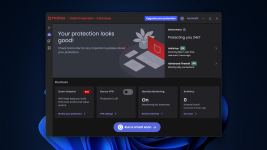
If there is a dark mode its eluding me unless its by system wide settings????

Which makes no difference here...

@Jonny Quest - Where you get your dark mode from plz?
That's a good question my friend, as I don't even know 😅 The only thing I can think of, is I reset this notebook this morning and Personalized it with a Windows dark theme, and since it's a HP notebook, had the trial version of LiveSafe installed. It showed in the Taskbar so I thought to load it and see if I could enter into the Account settings to activate my Total Protection subscription and it loaded into dark mode. It will switch if I change the Windows theme.

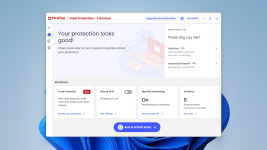
When I had previously installed Total, it was from scratch, and it wouldn't go into a dark mode with Windows, which its bright white UI was burning my eyes out against a dark desktop. What kinda annoys me is that now I have a blue nag button at the top to upgrade, which I didn't with the clean Total install (IIRC), but I'm going to leave it as is is, it's a whole lot better than the bright UI :)

Screenshot 2025-10-15 150349.png Screenshot 2025-10-15 150318.png
 
Last edited:
McAfee implements a lot of changes without requiring full update and version incrementing. At any moment in time McAfee is running loads of experiments like the Chrome flags. Some people get them, others don’t.

This was the case for quite some time with the UI that ditched the big carousels l, with the rewritten notifications, with the new threat details window, the scam notifications blocking…

I like their dark mode.
 
McAfee implements a lot of changes without requiring full update and version incrementing. At any moment in time McAfee is running loads of experiments like the Chrome flags. Some people get them, others don’t.

This was the case for quite some time with the UI that ditched the big carousels l, with the rewritten notifications, with the new threat details window, the scam notifications blocking…

I like their dark mode.
That did come to mind, that it was some sort of incremental update and that's why it changed, now has that ability. F-Secure does the same thing, changes with the Windows theme, without it having a dark mode option in the settings.
 
That did come to mind, that it was some sort of incremental update and that's why it changed, now has that ability. F-Secure does the same thing, changes with the Windows theme, without it having a dark mode option in the settings.
I also haven’t got smart scan. I know McAfee is working on a LLM based scan targeting. E.g user says they experience popups, McAfee scans the directories where adware commonly resides. This Smart Scan is not that though.
 
Its really my only issue if it is even an issue, as its a 3840 x 2160 in a 32" or so screen & fills 75% of the screen, & it is a bit on the bright side as in where are my Ray-Banns, so dark would be nice BUT I'm so pleased with Mcafee at the moment I can deal with it quite well.
I agree, as how many times do we really need to open it to tweak anything? Just maybe the occasional Quick scan, checking My Protection or viewing the Security report :)
 

You may also like...