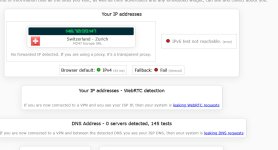
It might be related to location. I've had two popups so far and both time it was, when I was using VPN and was connected to Switzerland. Otherwise I've seen no advetisments so far.


Open MalwareTips from your Home Screen or desktop. Follow discussions, find answers and pick up where you left off.
If you cannot find an install option, update your browser or use its bookmark option to keep MalwareTips close.
After installation, open the app and sign in. Enable push notifications in Preferences if you want alerts. On iPhone and iPad, push requires a Home Screen web app and iOS or iPadOS 16.4 or later.
Sign in to manage notificationsInstallation is optional. Your notification settings stay under your control.
 Thread starter
Trident
Thread starter
Trident

There's no such option. I guess it was there in old versions.
- Adjust McAfee Settings:
- Open McAfee
- Navigate to Settings or My Preferences
- Look for Notifications or Alerts
- Disable promotional or non-critical alerts[3]


Which is something I hadn't considered. I haven't been hit with pop-up and offers like I had until using McAfee. With Kaspersky, Eset and F-Secure I never had a pop-up or up sell, so it was annoying in what I was getting. I don't mind trying it again if going through the initial pop-ups and upsells settle down once they "realized" I've seen and acknowledged them.I've had pop-ups with McAfee in the past. I declined the services offered, and that was that. No further annoyances.

And so it begins
This morning when I did a manual update, it did open the app with a notification to run a "smart scan" which it showed all the dire issues that could be resolved if I upgraded. Even when going through the prompts just to get through the prompts, the home page says, Your protection looks good, there will still be the information icon in the system tray in which you need to open the app, go into scans and click Got it, to confirm you're aware of the results (in this case for the smart scan, I didn't see the Got it after the scan, but maybe the system tray area pop up would have brought me there, 3rd image below). It would be nice if the app on the UI also had a display for the module it has the "i" for.
View attachment 291911
Fortunately, I bought the license at a very cheap price, auto renewal being disabled, so if I decide to move on, it won't be a big loss.
Edit: and now I just got this pop up. Sorry McAfee, you're gone
View attachment 291913
View attachment 291907 View attachment 291908 View attachment 291909 View attachment 291910
Which is what I did, nuke it, but I'm willing to give it another try, just in case Oldie1950 post of acknowledging them helps to stop any future ones. I did like how light and efficient it is, too. But if I get any more follow-up pop-ups/solicitations, I'll uninstall it againI had those pop ups too and some more, it is really annoying and the sad part is that I really like how light and efficient the new McAfee is, but those nasty ads? Makes me want to nuke it.

it was just a theory demolished by empirical evidenceI had all these popups , country : Belgium europe.
I really can not stand any pop ups in paid software . This is for me a no go and uninstall. ESET gladly does not practise this kind of upselling.
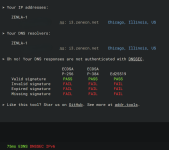
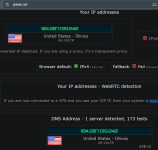
That one loads fine and McAfee VPN isn't leaking. Both servers, IP address and DNS address are from the same location.
My result. The only page I have problems loading with McAfee VPN set to connecting to fastest server is dnsleaktest.com. But, should I be concerned with the results previously posted regarding the DNS response fails, post #373?IP leak. The IP of the VPN server in Switzerland is visible:
View attachment 291969

With these references, no wonder it provided settings that haven’t existed since McAfee did the first redesign in 2017 (if I am not wrong), removing all these settings.References
[1] www.comparitech.com
[2] thetechylife.com
[3] www.consumersearch.com
[4] www.solveyourtech.com
Members who viewed this thread in the last 5 minutes