Solved Microsoft Edge keeps setting itself as default PDF reader

mlnevese

Level 29
Thread author
Verified
Top Poster
Well-known
Forum Veteran
May 3, 2015
1,822
9,837
2,769
51
Briefly explain your current issue(s)
Edge keeps setting itself as the default PDF reader
Steps taken to resolve, but have been unsuccessful
Set the default to Nitro Pro. Edge is used even when Windows informs Nitro is the default.
Your current Antivirus
ESET
I just bought a new computer and installed Nitro Pro for handling PDFS, which I've correctly set as the default. However, Edge keeps opening PDF files instead. I've searched the web, and most of the suggested solutions involve policy editing, which isn’t possible on this computer because it runs Windows 11 Home. Has anyone encountered this issue and found a solution?

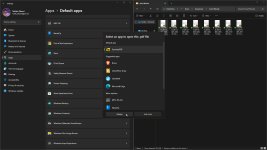
Captura de tela 2025-05-15 082500.png
 
You can try setting Nitro Pro as the default again by going to Settings > Apps > Default Apps > Set defaults by file type. Find .pdf and set Nitro Pro as default. If this doesn't work, you may need to reinstall Nitro Pro or update your Edge browser.
 
  • Like
Reactions: mlnevese
Upvote 0
You can try setting Nitro Pro as the default again by going to Settings > Apps > Default Apps > Set defaults by file type. Find .pdf and set Nitro Pro as default. If this doesn't work, you may need to reinstall Nitro Pro or update your Edge browser.
If I try to open pdf file directly from the browser downloads, it will open inside the browser, regardless of the default pdf reader set.
I have to go to the downloaded pdf file inside file explorer and to open it from there to use the default pdf reader I have set.
 
Upvote 0
You can try setting Nitro Pro as the default again by going to Settings > Apps > Default Apps > Set defaults by file type. Find .pdf and set Nitro Pro as default. If this doesn't work, you may need to reinstall Nitro Pro or update your Edge browser.

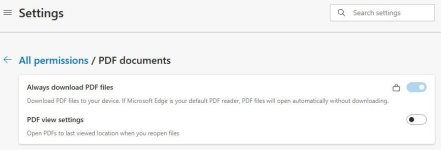
Have you set Edge to always download PDF?

View attachment 288603
The problem happens when I try to open any pdf file already saved on the computer. I'll try these when I'm back home.
 
Upvote 0
You can change this in the Edge settings. Go to Settings > Downloads > Open files with. Set it to "Always ask" or "Save file" instead of "Open file". This should prevent Edge from opening PDF files in the browser.
 
  • Like
Reactions: mlnevese
Upvote 0
Found the guilty party and, surprisingly, Windows is innocent.

I use Directory Opus as a file manager. When I got Home today, I had some time to investigate this problem and noticed that files opened correctly when i used Windows Explorer. After I searched Opus forums I found someone with a similar problem and the solution was to set the left double click action on PDF file type to Nitro, because, for some reason Opus didn't recognize the changes in Windows...

Captura de tela 2025-05-15 191853.png


Not a clean solution, but it works. Thanks everyone for the help. :alien:
 
Upvote 0