Updates to Windows for the Digital Markets Act

  • Thread starter Thread starter Brandon LeBlanc
  • Start date Start date
B

Brandon LeBlanc

Thread author
As part of Microsoft’s ongoing commitment to compliance with the Digital Markets Act, we are making the following changes to Windows 10, Windows 11, and Microsoft apps in the European Economic Area (EEA). We’ll update this post as these changes are shipped, first in Windows Insider builds and then in retail builds.
Default browser

Currently, changing the default browser with the “Set default” button sets http, https, .htm, and .html. Additional file and link types will now be set in the EEA.
  • Setting the default browser in Settings with the “Set default” button will now set the following link and file types (if the browser registers for them) in the EEA:
    • Link types: ftp, http, https, read
    • File types: .htm, .html, .mht, .mhtml, .shtml, .svg, .xht, .xhtml, .xml
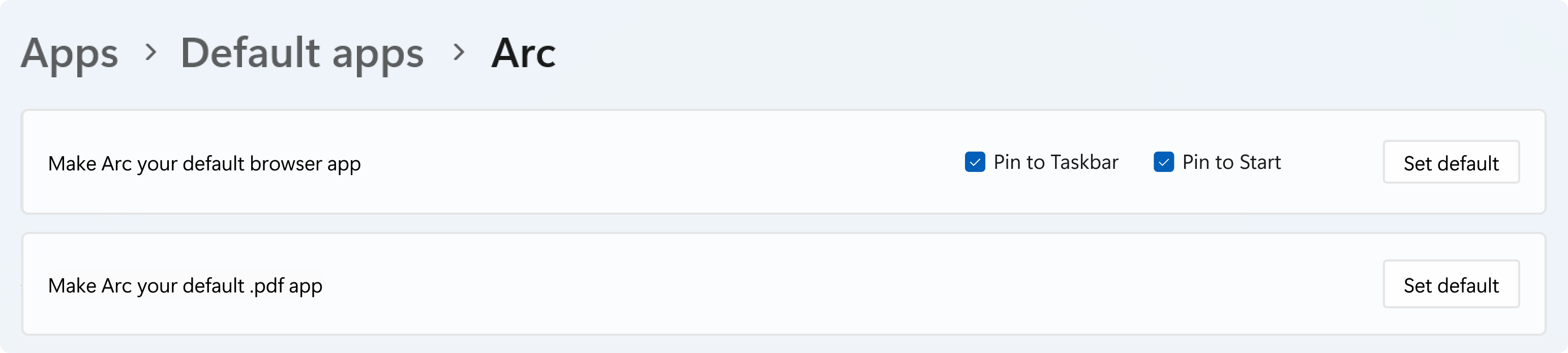
  • Setting the default browser with the “Set default” button will pin it to the Taskbar in the EEA, unless you choose not to by unselecting the checkboxes.
  • You can set the .pdf file type default for browsers (if the browser registers for it) in the EEA.
[caption id="attachment_177927" align="alignnone" width="735"]Default apps settings page showing new functionality for pinning and .pdf file type. Default apps settings page showing new functionality for pinning and .pdf file type.[/caption] Some of these default browser changes have already started rolling out to the Beta Channel in Build 26120.4151, and the rest of the functionality in Windows 10 and Windows 11 will start rolling out to retail in July.
Windows Search

In the EEA, apps can provide web search results in Windows Search. This design has been updated to be more fully featured and improve the user experience across multiple providers.
  • If an app registers a web search provider, it is automatically enabled when the app is installed.
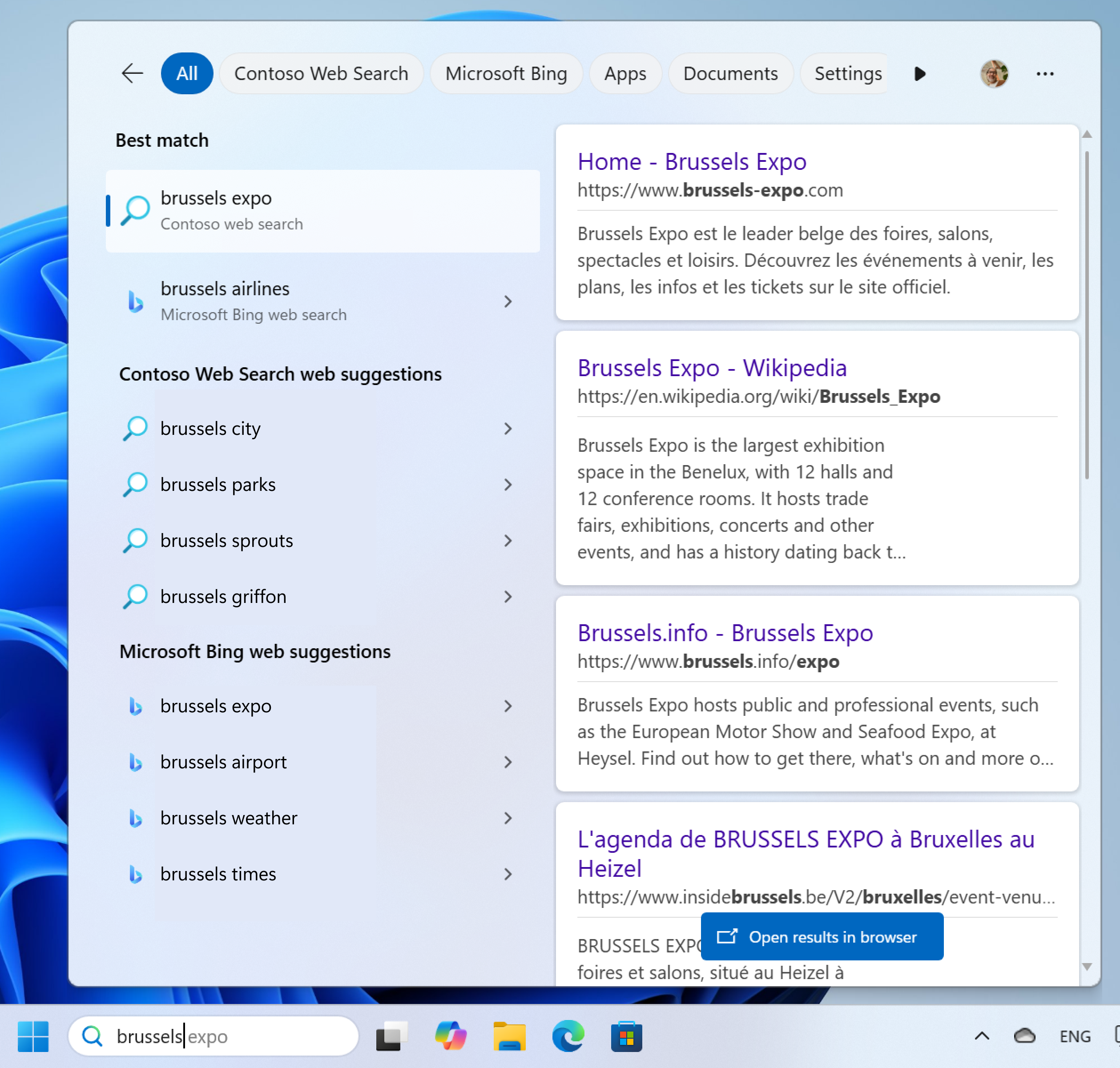
  • It is easier to view results from many web search providers at the same time, and you can still use the scoping tabs at the top to narrow down your results.
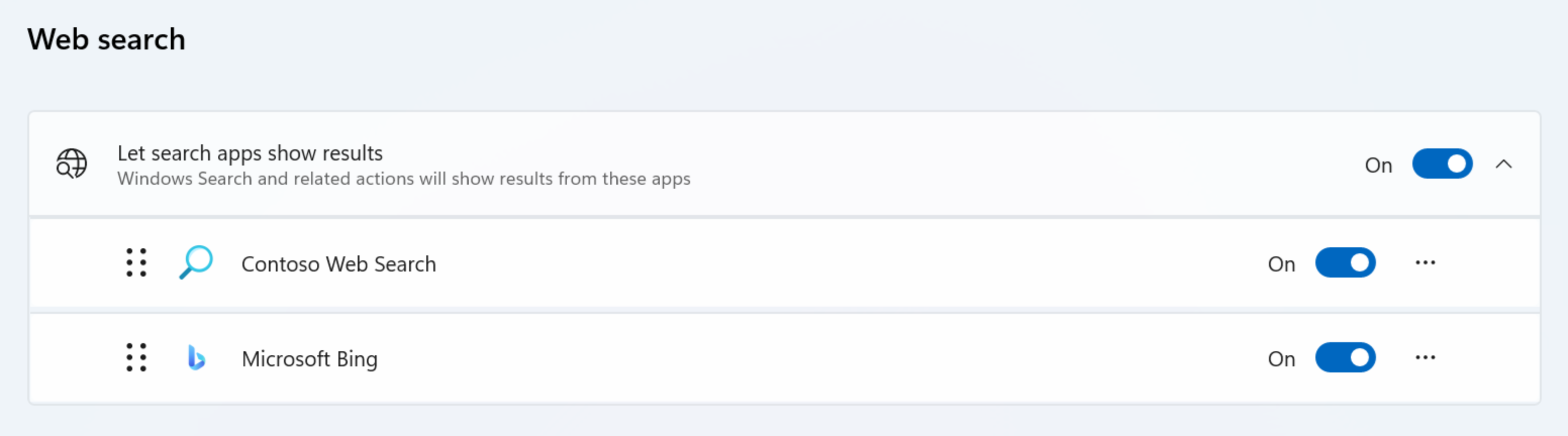
  • Web search providers can be reordered in Settings so you can easily customize your experience.
These Windows Search changes are already available in Windows Insider builds and will finish rolling out to retail builds on Windows 10 and Windows 11 in early June. Updated developer documentation is available here: Windows Search providers - Windows apps | Microsoft Learn. [caption id="attachment_177928" align="alignnone" width="515"]Search results from Windows Search showing multiple web search providers shown at the same time. Search results from Windows Search showing multiple web search providers shown at the same time.[/caption] [caption id="attachment_177929" align="alignnone" width="735"]Settings for web search providers with ability to reorder them. Settings for web search providers with ability to reorder them.[/caption]
Microsoft Store

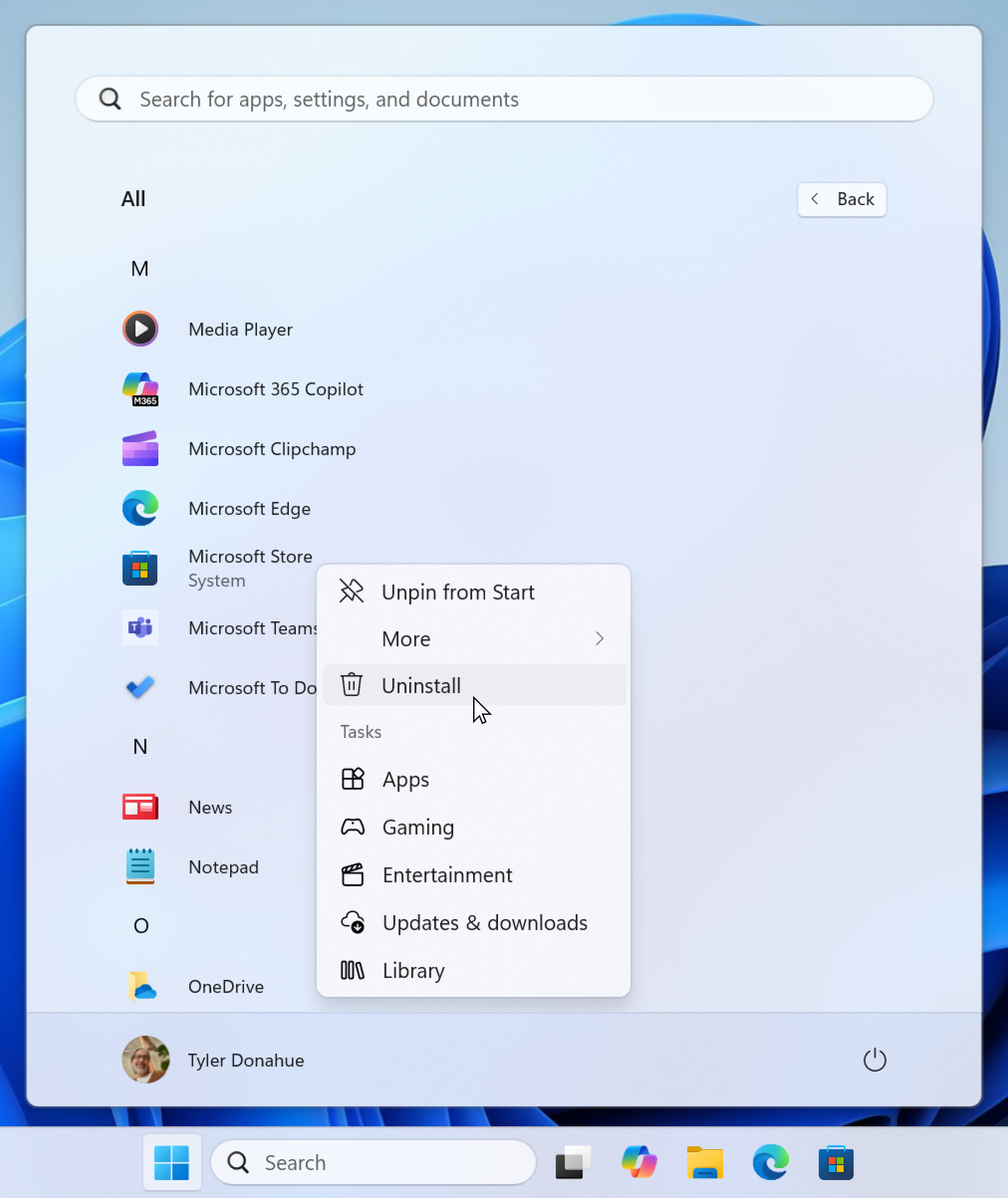
In the EEA, you will now be able to uninstall the Microsoft Store. Apps installed and distributed from the Microsoft Store will continue to get updates even if the Microsoft Store is uninstalled, keeping them secure and up to date.
  • The Microsoft Store can be uninstalled from Start and Settings in the EEA, just like other apps.
  • You will be able to reinstall the Microsoft Store.
[caption id="attachment_177930" align="alignnone" width="515"]Ability to uninstall the Microsoft Store in the EEA. Ability to uninstall the Microsoft Store in the EEA.[/caption] This change will be available later this year on Windows 10 and Windows 11 devices in the EEA. Developers have always been able to distribute their Store apps through the Microsoft Store Web Installer, such as on their own website, and this will continue to work when the Store is uninstalled.

Microsoft apps

A few changes are being made to Microsoft apps in the EEA, including:
  • The Microsoft Bing app, which is a provider of web search experiences in Windows Search, now opens web content with the default browser in the EEA. This change is already available in Windows Insider builds and will finish rolling out to retail on Windows 10 and Windows 11 in early June.
  • The Start Experiences app, which is a provider of widget and feed experiences in the Widgets Board and Lock Screen, now opens web content with the default browser in the EEA. This change will start rolling out in June to Windows 11. On Windows 10 there is no Widgets Board, instead, any application can create a dockable window on the Taskbar using desk bands. Microsoft Edge uses this capability for its News & Interests feature, which isn’t changing – it will continue opening web content directly.
  • Microsoft Edge will not prompt you to set it as the default browser unless you open it directly, for example, by clicking on its icon on the Taskbar. This change is available in the EEA starting with Edge version 137.0.3296.52, which was released on May 29, 2025.
  • When Microsoft Edge is uninstalled, other Microsoft apps won’t prompt you to reinstall it in the EEA (excluding PWAs distributed in the Microsoft Store using Microsoft Edge technology). A few apps are still being updated with this change and will start rolling out in June to Windows 10 and Windows 11.
Thanks, Windows Insider Program Team

Source: Updates to Windows for the Digital Markets Act
 
If you are an English speaker, you can choose Ireland as your region and it is part the EU and EEA (since the UK has left EU ) . It seems to me that the EU has better laws for consumers like GDPR and this Digital Markets Act. So unless Windows checks your ip address, it will obey EU laws if you choose Ireland as your region. It doesn't matter if you are a patriot of your coutnry or not, because you should choose what protects you the most as a consumer in this global economy. We are all living in this world called Windows, and Windows gives us a way to choose the best consumer laws.
 
Last edited:
Man... I just love living in the EU. The amount of benefits we have and the care we get is astonishing. I really wouldn't live anywhere else. Unfortunately, many people take for granted what we have.
 
  • Like
Reactions: rashmi
As part of Microsoft’s ongoing commitment to compliance with the Digital Markets Act, we are making the following changes to Windows 10, Windows 11, and Microsoft apps in the European Economic Area (EEA). We’ll update this post as these changes are shipped, first in Windows Insider builds and then in retail builds.

Default browser

Currently, changing the default browser with the “Set default” button sets http, https, .htm, and .html. Additional file and link types will now be set in the EEA.
  • Setting the default browser in Settings with the “Set default” button will now set the following link and file types (if the browser registers for them) in the EEA:
    • Link types: ftp, http, https, read
    • File types: .htm, .html, .mht, .mhtml, .shtml, .svg, .xht, .xhtml, .xml
  • Setting the default browser with the “Set default” button will pin it to the Taskbar in the EEA, unless you choose not to by unselecting the checkboxes.
  • You can set the .pdf file type default for browsers (if the browser registers for it) in the EEA.
[caption id="attachment_177927" align="alignnone" width="735"]Default apps settings page showing new functionality for pinning and .pdf file type. Default apps settings page showing new functionality for pinning and .pdf file type.[/caption] Some of these default browser changes have already started rolling out to the Beta Channel in Build 26120.4151, and the rest of the functionality in Windows 10 and Windows 11 will start rolling out to retail in July.

Windows Search

In the EEA, apps can provide web search results in Windows Search. This design has been updated to be more fully featured and improve the user experience across multiple providers.
  • If an app registers a web search provider, it is automatically enabled when the app is installed.
  • It is easier to view results from many web search providers at the same time, and you can still use the scoping tabs at the top to narrow down your results.
  • Web search providers can be reordered in Settings so you can easily customize your experience.
These Windows Search changes are already available in Windows Insider builds and will finish rolling out to retail builds on Windows 10 and Windows 11 in early June. Updated developer documentation is available here: Windows Search providers - Windows apps | Microsoft Learn. [caption id="attachment_177928" align="alignnone" width="515"]Search results from Windows Search showing multiple web search providers shown at the same time. Search results from Windows Search showing multiple web search providers shown at the same time.[/caption] [caption id="attachment_177929" align="alignnone" width="735"]Settings for web search providers with ability to reorder them. Settings for web search providers with ability to reorder them.[/caption]

Microsoft Store

In the EEA, you will now be able to uninstall the Microsoft Store. Apps installed and distributed from the Microsoft Store will continue to get updates even if the Microsoft Store is uninstalled, keeping them secure and up to date.
  • The Microsoft Store can be uninstalled from Start and Settings in the EEA, just like other apps.
  • You will be able to reinstall the Microsoft Store.
[caption id="attachment_177930" align="alignnone" width="515"]Ability to uninstall the Microsoft Store in the EEA. Ability to uninstall the Microsoft Store in the EEA.[/caption] This change will be available later this year on Windows 10 and Windows 11 devices in the EEA. Developers have always been able to distribute their Store apps through the Microsoft Store Web Installer, such as on their own website, and this will continue to work when the Store is uninstalled.

Microsoft apps

A few changes are being made to Microsoft apps in the EEA, including:
  • The Microsoft Bing app, which is a provider of web search experiences in Windows Search, now opens web content with the default browser in the EEA. This change is already available in Windows Insider builds and will finish rolling out to retail on Windows 10 and Windows 11 in early June.
  • The Start Experiences app, which is a provider of widget and feed experiences in the Widgets Board and Lock Screen, now opens web content with the default browser in the EEA. This change will start rolling out in June to Windows 11. On Windows 10 there is no Widgets Board, instead, any application can create a dockable window on the Taskbar using desk bands. Microsoft Edge uses this capability for its News & Interests feature, which isn’t changing – it will continue opening web content directly.
  • Microsoft Edge will not prompt you to set it as the default browser unless you open it directly, for example, by clicking on its icon on the Taskbar. This change is available in the EEA starting with Edge version 137.0.3296.52, which was released on May 29, 2025.
  • When Microsoft Edge is uninstalled, other Microsoft apps won’t prompt you to reinstall it in the EEA (excluding PWAs distributed in the Microsoft Store using Microsoft Edge technology). A few apps are still being updated with this change and will start rolling out in June to Windows 10 and Windows 11.
Thanks, Windows Insider Program Team

Source: Updates to Windows for the Digital Markets Act
Does changing my country/region in settings to EEA country allows applying such new features?
 
  • Like
Reactions: rashmi
Does changing my country/region in settings to EEA country allows applying such new features?
I'm not sure. Some people say just changing Windows region allowed them to delete Edge (for example), while others say they couldn't do it even if they changed region. It's unknown how Microsoft determines your region, will it be by IP address, changing region, or both. Try and see, it costs you nothing other than few minutes of time.
 
I'm not sure. Some people say just changing Windows region allowed them to delete Edge (for example), while others say they couldn't do it even if they changed region. It's unknown how Microsoft determines your region, will it be by IP address, changing region, or both. Try and see, it costs you nothing other than few minutes of time.
Changed to Ireland, restarted, but unfortunately did not work.
 
  • Like
Reactions: rashmi
No please don't remove store, you need it to update those apps you installed.
I have read on this thread you can remove store when your region is included in EEA, while installed apps will keep functioning normally and updating.
 
Last edited:
  • Like
Reactions: rashmi
I have read yesterday on MT post you can remove store when your region is included in EEA, while installed apps will keep functioning normally and updating.
For safety use "O&O AppBuster" to delete Windows apps, it will show you what is system component and what is safe to delete, it also shows you what is recommended to delete and what is optional.
 
For safety use "O&O AppBuster" to delete Windows apps, it will show you what is system component and what is safe to delete, it also shows you what is recommended to delete and what is optional.
I have only two store apps installed and I need both; I only do not like Edge game assist keep coming back after uninstall with each Edge browser update.