
This new Tab Groups icon appeared on the bookmark bar today. I haven't found an option to disable/hide it from here 



Open MalwareTips from your Home Screen or desktop. Follow discussions, find answers and pick up where you left off.
If you cannot find an install option, update your browser or use its bookmark option to keep MalwareTips close.
After installation, open the app and sign in. Enable push notifications in Preferences if you want alerts. On iPhone and iPad, push requires a Home Screen web app and iOS or iPadOS 16.4 or later.
Sign in to manage notificationsInstallation is optional. Your notification settings stay under your control.

Tried tab actions?This new Tab Groups icon appeared on the bookmark bar today. I haven't found an option to disable/hide it from here
View attachment 289754

It doesn't show up here.This new Tab Groups icon appeared on the bookmark bar today. I haven't found an option to disable/hide it from here
I have all of these off.Tried tab actions?
This option is not here.
Yeah, probably. Microsoft knows that I'm using Edge both on the PC and smartphone, so they put me in their list of guinea pigs for a new featureMaybe it's a controlled rollout feature.

 Maybe it's time for Ungoogled Chromium.
It is working as usual here.Boy, did MS screw up Edge again. This time it's the "Clear browsing on exit" setting. I can't remove cookie exceptions I previously made. Had to go to Cookies > Clear all cookies when you close Edge and add sites. It makes absolutely no sense having opposing cookie exceptions in order to have specified ones cleared on exit.
Right-click the favorites bar and you'll see "Show tab groups"This new Tab Groups icon appeared on the bookmark bar today. I haven't found an option to disable/hide it from here
View attachment 289754

Release notes not available at the moment, probably security updates.

Version 138.0.3351.109: July 25, 2025
Microsoft Edge release notes for Stable Channel
Microsoft Edge release note for the Stable Channellearn.microsoft.com
Feature updates
- Edge contextual capabilities in Business Chat work tab. Microsoft Copilot in Edge now supports page summarization and contextual queries to the Work tab for Microsoft 365 Copilot Business Chat. With this feature, users can ask Copilot contextual queries such as “summarize this page.” This feature also includes contextual prompt suggestions to help users ask relevant questions about open pages in Edge. Page summarization and contextual prompt suggestions is accessible for users when using Copilot through the Edge side pane.
- A Microsoft 365 Copilot license is required to use this feature. Administrators can control the availability using the EdgeEntraCopilotPageContext policy.

Microsoft Edge 138.0.3351.109
Microsoft Edge is a free web browser based on the Chromium Open Source project and other Open Source software.www.neowin.net
Version 138.0.3351.109: July 25, 2025
Microsoft Edge release notes for Stable Channel
Microsoft Edge release note for the Stable Channellearn.microsoft.com
Microsoft has released the latest Microsoft Edge Stable Channel (Version 138.0.3351.109) which incorporates the latest Security Updates of the Chromium project. For more information, see the Security Update Guide.
Microsoft Edge Version Date Released Based on Chromium Version 138.0.3351.109 7/25/2025 138.0.7204.168/.169

Version 138.0.3351.121: July 31, 2025Version 138.0.3351.121
No release notes yet.
Fixed various bugs and performance issues for Stable Channel
Stable channel security updates are listed here.
Microsoft Edge Version Date Released Based on Chromium Version 138.0.3351.121 7/31/2025 138.0.7204.183/.184
 www.neowin.net


 www.elevenforum.com

 windowsreport.com
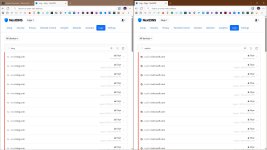
Yeah, I have them on my PC too.It seems that MS has step up, as far as Bing/Copilot goes, by creating "huge" ProvenanceData file. But blocking Bing/Copilot via DNS does it's job.
A new File Folder just appeared...
Yesterday, I noticed a new Folder showing up: C:\Users\Peter\AppData\Local\Microsoft\Edge\User Data\ProvenanceData - it's 335MB and it hasn't shown up previously. It's a .ort file. Could anyone offer any ideas, please?Microsoft reportedly testing Copilot’s new ‘smart mode’ ahead of GPT-5 rollout
According to a new report, Microsoft is testing a "smart mode" in Copilot as GPT-5’s launch is nearing as the day passes.
View attachment 289966


Yes most things also work best or better in Chrome too. . .I changed my default browser to Chrome. I am very tired of playing whack a mole with MS "new features" and also tired of MS turning Edge settings on without my permission. I have no use for or interest in Copilot.
C.H.
Version 139.0.3405.86: August 7, 2025Version 139.0.3405.86
No release notes yet.
Fixed various bugs and performance issues, feature updates, policy updates, and web platform release notes.
Stable channel security updates are listed here.
Fixes
Improved reliability
- Fixed an issue where MIP-protected PDF files from different sovereign cloud environments (including GCCH) failed to open and instead displayed the error message: “Need permissions. Contact the owner of the file to give you permissions.”
- Fixed an issue, which affected IE mode, including errors when displaying PDF files, running Java applets, and showing the Information Bar in IE mode.
Feature updates
- Fixed a browser crash that occurred on first launch when the BrowserSignin policy was enabled and configured to "Force (2) = Force users to sign-in to use the browser (all profiles)."
- Open external links in another profile when recommended by external applications. When Microsoft Edge is set as the default browser to open external links from applications, Microsoft Edge must determine which profile to open the links. Users can control which profile to use through the “Default profile for external links” setting. Applications such as Microsoft Teams or Outlook can also recommend a profile for the links. Currently, the user setting is prioritized over application recommendations. With this feature, the application recommended profile is given priority, instead of the profile selected in the setting. Admins can control the availability of the feature using the EdgeOpenExternalLinksWithAppSpecifiedProfile policy. Note: This is a controlled feature rollout. If you don't see this feature, check back as we continue our rollout.
- Changes to Wallet in Microsoft Edge. Wallet is being phased out to support a streamlined experience within Microsoft Edge. This affects the Wallet feature in Settings and the Mini Wallet found by clicking the profile icon in the top banner. Users are directed to the new Passwords, Payment, and Personal Information management experience in Settings. Also, a new Password management experience is available in Settings. For more information, see Changes to Wallet in Microsoft Edge. Note: This is a controlled feature rollout. If you don't see this feature, check back as we continue our rollout.
- Introducing a new policy that can enable/disable Microsoft 365 Copilot Chat in Edge for Business from showing in the toolbar. Edge for Business now has a dedicated policy, Microsoft365CopilotChatIconEnabled, to enable and disable Copilot in Edge from showing in the Edge toolbar. When both this policy and HubsSidebarEnabled are configured, this policy takes precedence in determining whether Copilot appears in the toolbar. If this policy isn't configured and HubsSidebarEnabled is disabled, Copilot will remain hidden. In a future release, this policy is the sole control for managing Copilot's visibility in the toolbar.
- Real-time notifications for compromised passwords. Microsoft Edge is integrating an in-context password breach notification system. This feature proactively informs users if their saved login credentials have been compromised in known data breaches, enabling them to take immediate action to secure their accounts. Admins can control availability to this feature using the PasswordMonitorAllowed policy. Note: This is a controlled feature rollout. If you don't see this feature, check back as we continue our rollout.
- Edge Settings Improvements. Edge Settings is migrating to WebUI2 to boost page responsiveness and introducing a series of minor visual and content upgrades to improve overall usability and utility. This includes optimizing for concise wording of individual settings, simplifying the number of pages and reorganizing content, and creating a cohesive user interface.
- New Autofill Personal Information Settings Configuration. A web form field collection consent toggle will be available in Autofill settings (edge://settings/autofill/personalInfo). This allows users to consent to Microsoft Edge collecting web form field labels (e.g., "First Name," "Email") to improve Autofill suggestion accuracy. Only field labels are collected and not user-entered data. The web field labels are stored securely per Microsoft's privacy standards.
This new setting is manageable via existing policies in Autofill (e.g., AutofillAddressEnabled), EdgeAutofillMlEnabled. AutofillAddressEnabledis the parent setting forEdgeAutofillMlEnabled. The EdgeAutofillMlEnabled policy is the parent of this new setting, thus turning off the EdgeAutofillMlEnabled policy turns off this setting.- Web AI APIs for prompt and writing assistance. Microsoft Edge now implements the Writing Assistance APIs and the Prompt API (for Edge extensions) with a local language model, Phi-4-mini, that is built into the browser. These easy-to-use JavaScript APIs are made available via Edge flags (set to Enabled, by default only for the Summarizer and Prompt API for extensions) so that sites and extensions can apply AI capabilities on the web. The small language model is downloaded as the first time any of these APIs is used and later shared across all domains, serving local AI use-cases with reduced cost, network independence, and increased privacy (since data input to the model doesn't leave the user’s device). Admins can control the availability of these APIs via the GenAILocalFoundationalModelSettings policy. These APIs are currently not implemented in China. Read the announcement here, and feel free to provide feedback.
- Enhancements to Performance and Secure network. Browser essentials is now separated into two distinct experiences (Performance and Secure Network) - both available from the Settings and more menu (“…” on the menu bar).
- Reset Microsoft Edge enterprise sync. For users having problems syncing browsing data across other signed-in devices, they can reset sync data from the Microsoft servers via Edge Settings edge://settings/profiles/sync/reset. This option should only be used if the sync data is available on one of the user's devices or if they want to delete all sync data from the servers. Note: In Microsoft Edge 139, reset sync is enabled for users encountering a "No permissions" MIP error and in Microsoft Edge 140, reset sync is enabled for users encountering a "Service disabled" MIP error.
- Update to Microsoft AutoUpdate policy. The MAUEnabled policy allowed admins to continue using Microsoft AutoUpdate on macOS. Since Microsoft Edge now uses EdgeUpdate, the MAUEnabled policy is planned to be obsoleted in Microsoft Edge version 140.
Microsoft Edge Version Date Released Based on Chromium Version 139.0.3405.86 8/07/2025 139.0.7258.66/67

Members who viewed this thread in the last 5 minutes

