
Version 149.0.4022.62: June 11, 2026 (Stable)
No release note yet.


Open MalwareTips from your Home Screen or desktop. Follow discussions, find answers and pick up where you left off.
If you cannot find an install option, update your browser or use its bookmark option to keep MalwareTips close.
After installation, open the app and sign in. Enable push notifications in Preferences if you want alerts. On iPhone and iPad, push requires a Home Screen web app and iOS or iPadOS 16.4 or later.
Sign in to manage notificationsInstallation is optional. Your notification settings stay under your control.
 Thread starter
eonline
No release note yet.

Category Description Fixes Fixed various bugs and performance issues. Security Stable channel security updates are listed here. Fixes
- Fixed an issue that caused the Downloads dialog to continue displaying the "Keep/Delete" prompt for .rdp files after the download completed.




This is insane; I have uninstalled; only Brave on my PC.Another update, adding another 1GB to the size of a browser I don't even use.
View attachment 298184
I'll do it tonight. I was just watching Chris Titus's video on how to remove it so it doesn't come back again, and I'll apply it later.This is insane; I have uninstalled; only Brave on my PC.


I have issues also with Windows security; for the third time in row, after clean install and using for sometime, it fails to open when clicked; the processes are running normally in taskmanger, only the interface.There was an entry earlier from MS in start-up witch was Edge cleanup, & it did remove the previous version

Do it this way. It's easier and safer. You install Wintoys from MS Store, go to Tools > System > Digital Markets Act > On. Restart machine, uninstall Edge via Settings et voila! Like magic! Poof!I'll do it tonight. I was just watching Chris Titus's video on how to remove it so it doesn't come back again, and I'll apply it later.


Thank you, the like button does not appear even after refreshing the page.Do it this way. It's easier and safer. You install Wintoys from MS Store, go to Tools > System > Digital Markets Act > On. Restart machine, uninstall Edge via Settings et voila! Like magic! Poof!
Uninstall Microsoft Edge From Windows 11 Safely from Britec09
Frankly, I'm really surprised that MS allows Wintoys to do this in non-EEA countries but let's not tell.

Indeed, it still happens randomly. Be nice if @Jack can fix the little bugs in the forum software.Thank you, the like button does not appear even after refreshing the page.
Version 149.0.4022.80 June 18, 2026
Release Summary
Category Description Fixes Fixed various bugs, feature updates and performance issues. Security Stable channel security updates are listed here. Fixes
- Fixed an issue that prevented QR code generation from working.

We published it almost at the same time.Microsoft Edge release notes for Stable Channel
Microsoft Edge release note for the Stable Channellearn.microsoft.com

UPDATE;Another update, adding another 1GB to the size of a browser I don't even use.
View attachment 298184
Microsoft Edge's app size has increased significantly because it is no longer just a web browser. It is integrated into Windows as a core system component that powers Windows Widgets, system search, and Edge WebView, while also keeping duplicated files to ensure stability during updates.
The main reasons for the larger footprint include:
- EdgeCore and WebView: Windows requires underlying Edge components (EdgeCore and WebView) to render modern, web-based UI elements across your OS. This essentially means your computer houses multiple sub-versions of Edge to support these applications.
- Hard-Linked Files: In Windows Apps menus, the displayed size often counts files multiple times. Shared files (like core rendering engines) are linked across multiple folders, artificially inflating the size you see in settings.
- Cached Data: Modern browsers like Edge store a large amount of temporary data (cookies, saved site information, media caches) to make websites load faster and allow you to resume sessions instantly.
- Leftover Update Installers: Edge regularly updates itself, and leftover installation files (.tmp, old .exe versions) can sometimes accumulate over time in your system folders.
UPDATE;
I noticed that more users have observed the same issue with MS Edge's size increasing in recent versions. For example, here is a thread on Reddit discussing it.
The only answer I found from Microsoft Support is the following:
Why is Microsoft Edge so big? - Microsoft Q&A
Hi, I wonder why Microsoft Edge become so big in size recently; I remember Edge is about 900 MB a while ago. Thanks😀learn.microsoft.com
I checked the size of my Microsoft Edge installation using Wiztree, but I used the filter to calculate Edge only, excluding WebView, and the result was as shown in the screenshot: 1.5 GB in the Users folder (let's consider it cache files), and 1.5 GB in Program Files (x86), which I don't understand why.The explanation in Microsoft Support website is accurate. They are indeed hardlinked. You can see the actual size using something like WizTree in its Size vs Allocated tab. File Explorer is basically too dumb to calculate the actual size.
View attachment 298328
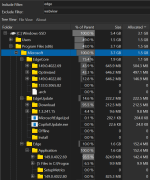
Close to Brave's numbers.I checked the size of my Microsoft Edge installation using Wiztree, but I used the filter to calculate Edge only, excluding WebView, and the result was as shown in the screenshot: 1.5 GB in the Users folder (let's consider it cache files), and 1.5 GB in Program Files (x86), which I don't understand why.
View attachment 298336
It's because you still have older versions of Edge which was not deleted. I can see them in your screenshot. They are usually deleted on a system restart after an update but sometimes they don't. You can delete them manually.I checked the size of my Microsoft Edge installation using Wiztree, but I used the filter to calculate Edge only, excluding WebView, and the result was as shown in the screenshot: 1.5 GB in the Users folder (let's consider it cache files), and 1.5 GB in Program Files (x86), which I don't understand why.
View attachment 298336
Release Summary
Category Description Fixes Fixed various bugs, new policy update and performance issues. Security Stable channel security updates are listed here. Policy updates
New policies
- RestrictBackgroundFetchFromServiceWorkerEnabled - Restrict Background Fetch API when called from a Service Worker
MalwareTips community
Create an account to reply to this thread, ask your own questions and get help from people who know security.
Members and guests who viewed this thread in the last 5 minutes


We use essential cookies to make this site work, and optional cookies to enhance your experience.


