Unmaintained Microsoft: Windows 10 20H2 reaches end of service next month

silversurfer

Super Moderator
Verified
Top Poster
Staff Member
Malware Hunter
Forum Veteran
Microsoft has reminded customers today that multiple editions of Windows 10 20H2 and Windows 10 1909 are reaching the end of service (EOS) on May 10, 2022.

In a support document, Microsoft says that Windows 10 20H2 (also known as the October 2020 Update) will reach EOS for Windows 10 Home, Pro, Pro Education, and Pro for Workstations users.

It's also worth mentioning that Enterprise, Education, and IoT Enterprise editions will reach end of servicing one year later, on May 9, 2023.

Redmond also revealed in a separate announcement that Windows 10 1909 Enterprise, Education, and IoT Enterprise editions would also reach EOS next month (Windows 10 1909 Home, Pro, Pro Education, and Pro for Workstations already did last May).

"The May 2022 security update, released on May 10, is the last update available for these versions," Microsoft explained on Friday.
"After that date, devices running these editions will no longer receive monthly security and quality updates containing protections from the latest security threats."
 
Hi, what do I do after 10 May, I am not sure what version I am running, but it is the latest, what version is that, end of support of Windows 10 Home is still 2025 right?
Please advice.:unsure:
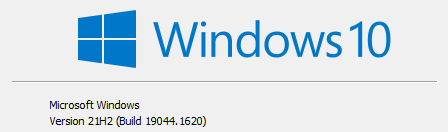
No need to worry, You probably running Windows 10 Version 21H2

Bild 002.png
 
No need to worry, You probably running Windows 10 Version 21H2

View attachment 265669
Hello @silversurfer ,
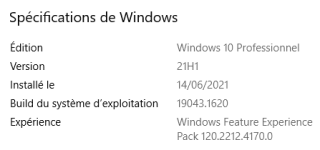
I'm sure that this is not the right place for my post but after reading it I verified my Windows 10 Pro version and I'm still with 21H1.
So I have 2 questions, how can I got 21H2 ? and is it interesting to got 21H2 ?
3.PNG
 
Hello @silversurfer ,
I'm sure that this is not the right place for my post but after reading it I verified my Windows 10 Pro version and I'm still with 21H1.
So I have 2 questions, how can I got 21H2 ?
Usually it's offered in Windows Settings => Windows Update. There you can see when it's possible as next "Feature Update..."


and is it interesting to got 21H2 ?
I believe, depends what users prefers, if it's most important for OS stability than keep running 21H1 a few months longer, in the meantime Microsoft fixes major issues.
If users wants new features than choose latest version of Windows 10, but even here depends which new features are really useful in users point of view ;)
 

Recently browsing

Members who viewed this thread in the last 5 minutes

Back
Top