Advanced Plus Security Minimalist's security configuration 2021

Last updated
Dec 12, 2021
How it's used?
For home and private use
Operating system
Windows 10
On-device encryption
Log-in security
Security updates
Check for updates and Notify
User Access Control
Always notify
Smart App Control
Network firewall
Real-time security
Emsisoft Anti-Malware
Firewall security
Microsoft Defender Firewall
About custom security
Macrium: enabled and configured Macrium Image Guardian
Periodic malware scanners
HitmanPro and Norton Power Eraser
Malware sample testing
I do not participate in malware testing
Browser(s) and extensions
Firefox & uBlock Origin
Secure DNS
My ISP's
Desktop VPN
Mullvad
Password manager
KeePass
Maintenance tools
ShutUp10
CCleaner
File and Photo backup
Daily - Macrium Incremental file backup for important data.
Weekly - manually copying data and system images to external disks.
System recovery
Macrium Reflect
Risk factors
    • Working from home
    • Browsing to popular websites
    • Browsing to unknown / untrusted / shady sites
    • Opening email attachments
    • Buying from online stores, entering banks card details
    • Logging into my bank account
    • Downloading software and files from reputable sites
    • Sharing and receiving files and torrents
    • Requesting and accepting remote access
    • Gaming
    • Streaming audio/video content from shady sites
Computer specs
HP EliteDesk 800 G5 TWR
• Intel Core i7-9700 CPU @ 3.00GHz
• Intel UHD Graphics 630
• DDR4 32 GB @ 2667 MHz
• 2x 500 GB SSD + 4TB HDD
Notable changes
24.12.2020 - original post.
29.12.2020 - added information for new data entries.
30.12.2020 - added information about password manager.
1.1.2021 - set Quad9 for DNS server.
15.1.2021 - added CloudFlare to DNS servers list.
19.1.2021 - changed updates to manual.
24.1.2021 - enabled Macrium Image Guard.
31.1.2021 - added info about network firewall.
15.2.2021 - installed Trend Micro as real-time antimalware solution.
27.2.2021 - Installed Kaspersky Internet Security and enabled Trend Micro protections included in router.
7.3.2021 - replaced Kaspersky Internet Security with Emsisoft Anti-Malware.
21.6.2021 - installed KIS in "minimal mode".
8.8.2021 - installed ESET Internet Security
12.12.2021 - installed Emsisoft Anti-Malware
What I'm looking for?

Looking for medium feedback.

Great config with one of the best paid suites there is (y)
I stopped using O&O ShutUp10, while it being very good software and rarely causing problems with the recommended settings, I try to do most things manually nowadays with the help of this Kaspersky website: Online Privacy Checker: Protect your Social Media Privacy
 
I've made few changes in past days.
I replaced Kaspersky Internet Security with Emsisoft Anti-Malware. I will see how long I'll be able to stay away from KIS :)
I also set Quad9 as my DNS provider.
 
Last edited:
@Minimalist Keep me posted on Quad9. I'm interested in swapping up my DNS provider when I'm not using my VPN 24/7/365.

I see you are using Macrium Reflect. Have you used viBoot? Great tool that some folks don't know about. Link: Macrium viBoot

viBoot is a good tech tool to have when wanting to test things out. Thought I mention it!

Good setup!

~Brian
 
Thnx @Lightning_Brian .

I like Qad9 so far. I didn't test it's blocking capabilities but doing some tests with DNSBench it scored quite well.

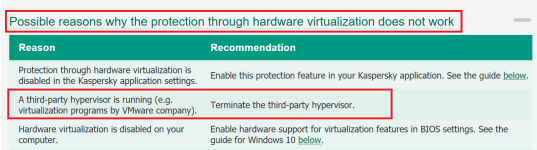
Yes, I use Macrium Reflect for a long time now and like it a lot. I did not use viBoot till now but I read about it. I use Kaspersky a lot and IDK if both apps could use hyper-v at the same time.
I usually test my images by attaching VHD, restoring an image to it and run it in Virualbox. I know it's an old way of doing it but I still prefer it over viBoot. I also don't install CBT and MIG on my system. I guess that I like just the basics and that they work with no problems.
 
Hi @Minimalist !

Good stuff! Glad you are liking Quad9 so far. Been looking at seriously using that when I'm not using my VPN 24/7/365. Glad to hear your experience is going well thus far.

Read more about viBOot - super nice and quite easy to use in my own humble opinion. I'm not sure about the Kaspersky route and if both apps can use Hyper-V at the same time. @harlan4096 would you be able to answer that question for Minimalist? I would suspect the answer is 'yes'; however, I wouldn't want to inform you incorrect info.

The old way is a good way there Minimalist. I know if I wasn't using the stuff I'm using now that would be the way I would test things too.

~Brian
 
Thnx. I guess that Kaspersky only needs it for Safe money component? Since I don't use it, it wouldn't be a big problem.

EDIT: that was the reason why I asked:

1610228820269.png
 
Last edited: