
From the setup owner
View current setup
Switched to a separate Easylist and Adguard Base filter. 


Open MalwareTips from your Home Screen or desktop. Follow discussions, find answers and pick up where you left off.
If you cannot find an install option, update your browser or use its bookmark option to keep MalwareTips close.
After installation, open the app and sign in. Enable push notifications in Preferences if you want alerts. On iPhone and iPad, push requires a Home Screen web app and iOS or iPadOS 16.4 or later.
Sign in to manage notificationsInstallation is optional. Your notification settings stay under your control.
 Thread starter
Morro
Thread starter
Morro
Imported from an earlier discussion · awaiting owner confirmation
Earlier staff assessment. The reviewer, date and configuration version were not recorded. It has not been verified against the current Hub setup.

 malwaretips.com
How members rate the shared configuration. This is community feedback, not a security test.
Shared by the member. This is a configuration record, not a device scan.
malwaretips.com

Default AdGuard Base already contains EasyList. If you are using the default one, then remove that and use this one instead. This is AdGuard Base without EasyList:Switched to a separate Easylist and Adguard Base filter.

Theoretically, this is true; practically, using only easylist lets YT ads pass when opened in new tab, and using only adguard list leave some gaps after blocking ads.Default AdGuard Base already contains EasyList. If you are using the default one, then remove that and use this one instead. This is AdGuard Base without EasyList:
Many/most YouTube related fixes are part of uBlock Origin filters so using only EasyList may not be enough for YouTube while AdGuard Base has many rules that are compatible only with AdGuard products (extension, desktop & mobile app). So maybe that's why you experienced that.Theoretically, this is true; practically, using only easylist lets YT ads pass when opened in new tab, and using only adguard list leave some gaps after blocking ads.
True; that is why trying to augment with extra filter lists.Vivaldi's ad-blocker is not as power and featureful as uBO, AdGuard or even Brave's adblocking engine
Enable the "strict blocking" setting in the Vivaldi ad blocker. It blocks ads that open in a new tab or window.After testing Vivaldi's own adblocker, I have removed uBlock Origin Lite. I am pleasantly surprised that Vivaldi has become quite a bit faster since switching to its own ad and tracker blocker.
I used to enable the built-in EasyPrivacy, EasyList, PeterLowe, FanboyAnnoyance, and EasyListCookie filters in Vivaldi's ad blocker and never noticed ads on YouTube. Today, I tried the built-in filters, AdGuardBase, HageziDNSPro, and AdGuardDNS, but I noticed intermittent ads, skipping, or delays of a few seconds. It seems either the Vivaldi Desktop updates broke its ad blocker or YouTube detects it now.
In Vivaldi on two iPads, I'm using the mentioned built-in filters, along with HageziDNSLight and AdGuardDNS (NextDNS), and I'm not seeing ads on YouTube.
@Morro, What's your experience?
I tried disabling all extensions, but I see ads on YouTube with Vivaldi's ad blocker. Also, Vivaldi doesn't clear browsing data successfully. After clearing browsing data, the history section is empty, but if I browse a previously accessed website, the drop-down shows the website with the history label. I can clean the browsing data successfully through chrome://settings.So far I am not seeing any ads on Youtube?
Having two groups of settings in Vivaldi is quite distrubing.I tried disabling all extensions, but I see ads on YouTube with Vivaldi's ad blocker. Also, Vivaldi doesn't clear browsing data successfully. After clearing browsing data, the history section is empty, but if I browse a previously accessed website, the drop-down shows the website with the history label. I can clean the browsing data successfully through chrome://settings.
I tried disabling all extensions, but I see ads on YouTube with Vivaldi's ad blocker. Also, Vivaldi doesn't clear browsing data successfully. After clearing browsing data, the history section is empty, but if I browse a previously accessed website, the drop-down shows the website with the history label. I can clean the browsing data successfully through chrome://settings.
I wish it is "wise" enough to not break anythting.Wise Disk Cleaner
I wish it is "wise" enough to not break anythting.


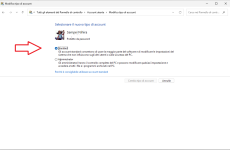
Hi,
Perhaps you meant to write “from Administrator to Standard.”
Or from Microsoft account to Local account.
Check it out.
- Control Panel
- User Accounts
- Change account type (password required)
See below for an example of my Microsoft Standard Account:
View attachment 292476
 www.joindns4.eu
Efficient but with more FP compared to ControlD hagezi tif.I started trying out DNS4EU two weeks ago, and I must say that so far I really like. It is fast, and it has different option for people in the EU.
Free public DNS resolver for Europe | DNS4EU
The free DNS4EU resolver, for everyone in Europe. Get the addresses, set it up in minutes, and block malware and phishing with no tracking.
Members who viewed this thread in the last 5 minutes


