
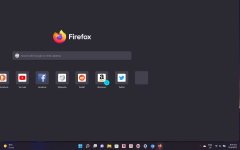
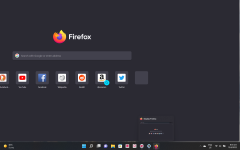
Advice Request Mozilla Firefox, after each update, not displaying properly when opening

Please provide comments and solutions that are helpful to the author of this topic.

HarborFront

Level 73
Thread author
Verified
Top Poster
Content Creator
Forum Veteran
Oct 9, 2016
6,209
23,125
7,179
Far East
1649810913761.png1649811385491.png

I noticed the last 2 times, and now, that after each FF update it doesn't open properly as above when executed from the shortcut on the desktop. So far I have not done anything to FF yet i.e. it's still in its original copy. However, if you look at the tiny window below (above the FF icon) it seems to display properly

If I do a fresh install it'll open correctly

Anyone has this issue?
 
Last edited by a moderator:
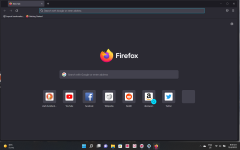
When I went to C:/Program Files/Mozilla Firefox and execute firefox from there it opens correctly as below. And that's provided if I opened FF from the shortcut first on the desktop.

If I just simply execute FF from C:/Program Files/Mozilla Firefox the display is still not proper. I remember I installed a fresh copy of FF v99.0, and it was displaying properly. After the v99.0.1 update, the display went haywire.

1649811654219.png

So I deleted the FF shortcut from the desktop and created a new one. Too bad it still did not display properly as in my opening post.
 
Last edited by a moderator: