


winball501
Level 1
Hi everyone,
We're a small team of two developers, winball501 and iemirakman, and we'd like to share the app we've been building: Multron Download Manager. It's a fast, modern download manager for direct links, videos from 1,800+ sites, cloud-drive files and torrents, all in one app, with a browser extension that sends your downloads to it automatically, on Windows, macOS and Linux.
Runs everywhere
Built natively for every major desktop platform, on both Intel/AMD and ARM:
Speed
Reliable
Videos and music from 1,800+ sites
Cloud drives and file hosts
Built-in BitTorrent client
Browser extension
Security
Comfortable to use
Download
github.com/Multron-Community/Multron-Download-Manager/releases/latest
Pick the file for your system from the table on the release page. The macOS build is not notarized yet, so right-click the app and choose Open the first time. You can also read the source code on GitHub.
It's still a young project and we're improving it with every release. Feedback, bug reports and feature ideas are very welcome, either here or on GitHub Issues, and they really help us decide what to build next. Thanks for reading!
We're a small team of two developers, winball501 and iemirakman, and we'd like to share the app we've been building: Multron Download Manager. It's a fast, modern download manager for direct links, videos from 1,800+ sites, cloud-drive files and torrents, all in one app, with a browser extension that sends your downloads to it automatically, on Windows, macOS and Linux.
Runs everywhere
Built natively for every major desktop platform, on both Intel/AMD and ARM:
- Windows 10 and 11 – a regular installer that also sets up .torrent files and magnet links.
- macOS – native builds for Apple Silicon and Intel Macs.
- Linux – a package built on each distribution it is made for, for x86_64 and arm64:
- .deb for Ubuntu 24.04+, Linux Mint 22+ and Debian 13+
- a separate .deb for Debian 12 and LMDE 6
- .rpm for Fedora
- .rpm for openSUSE Leap 16 and Tumbleweed
- AppImage for every other distribution, such as Arch and CachyOS
- 35+ browsers – Chrome (Beta, Dev, Canary), Edge (Beta, Dev, Canary), Brave, Opera, Opera GX, Vivaldi, Chromium / Ungoogled Chromium, Arc, Dia, Yandex, Naver Whale, Thorium, Supermium, Cent, Comodo Dragon, Epic, Avast / AVG / CCleaner Secure Browser, Sidekick, Wavebox, Firefox (Developer Edition, Nightly), LibreWolf, Waterfox, Floorp, Zen and Mullvad Browser. On Windows any other browser registered with the system is found too, and on Linux browsers installed from Flathub are supported.
- 12 languages – English, Turkish, German, French, Spanish, Italian, Portuguese (Brazil), Russian, Japanese, Korean and Chinese (Simplified and Traditional). It follows your system language, or you can pick one.
Speed
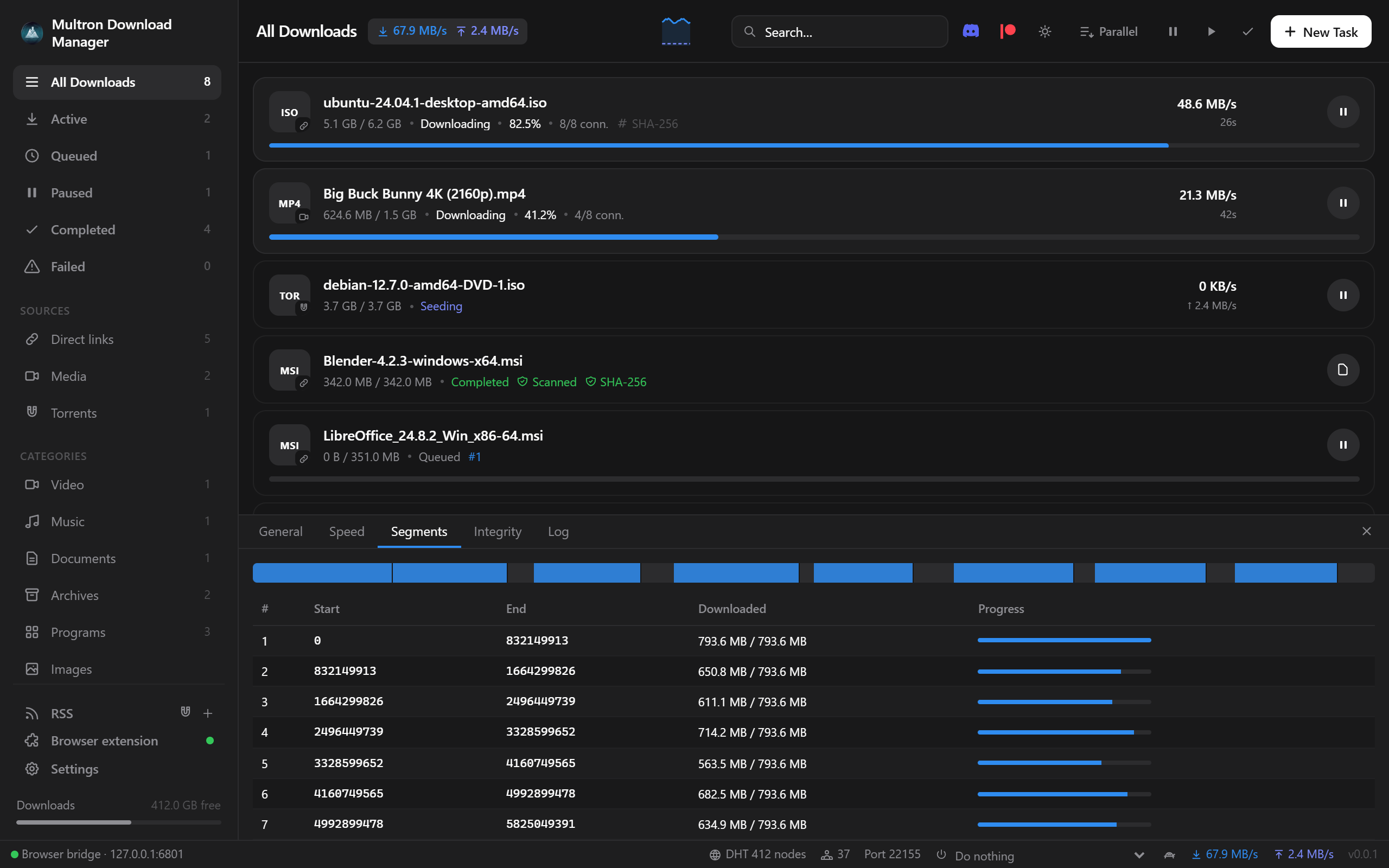
- Multi-connection downloads – every file is split into parallel parts, 8 connections by default, adjustable from 1 to 64 for all downloads or per download, even while it runs.
- Work stealing – when a connection finishes its part, it takes over half of the largest part that is left, so every connection stays busy until the last byte and a slow mirror never holds the download back.
- Direct-to-disk writes – the file space is reserved up front and every connection writes straight to its final position. There is no merge step: when the last byte lands, the file is done.
- Disk space check – a download that doesn't fit on the drive stops before it starts, instead of failing near the end.
- Global and per-download speed limits, plus a speed scheduler that switches to alternative limits by hand or at the hours and days you choose.
Reliable
- Safe resume – downloads continue after a pause, crash or restart. If the file changed on the server in the meantime, the app notices and starts over instead of mixing two versions.
- Automatic retries for connections that fail.
- Survives network changes – turning a VPN or GoodbyeDPI on or off, or switching Wi-Fi, doesn't fail the download: it waits for the network, gets fresh links and continues. Broken video pieces are downloaded again instead of ending in an error.
- Thorough deleting – removing a download can also delete its files, including the temporary pieces of unfinished video downloads.
Videos and music from 1,800+ sites
- YouTube (including Shorts and playlists), Reddit, Instagram, X, TikTok, Facebook, Vimeo, Twitch, SoundCloud, Dailymotion, Bilibili and many more, through yt-dlp.
- Pick 4K, 1440p, 1080p, 720p and more, or audio only as MP3 or M4A. MP4 videos use H.264 and AAC, so they play in every player.
- The real video title is shown right away, and metadata and thumbnails can be embedded in the file.
- yt-dlp and FFmpeg are installed and kept up to date automatically.
Cloud drives and file hosts
- Google Drive – files (including the large-file warning) and Docs, Sheets and Slides exports.
- MEGA – downloaded with multiple connections and decrypted on the fly.
- Dropbox, MediaFire, Pixeldrain and GitHub links are turned into their direct downloads.
Built-in BitTorrent client
- Magnet links, .torrent files and URLs (drag and drop, file association or the browser extension), and you choose which files to download, before or after starting.
- Play while downloading – video and audio files open in your player right away and stream in order with seeking.
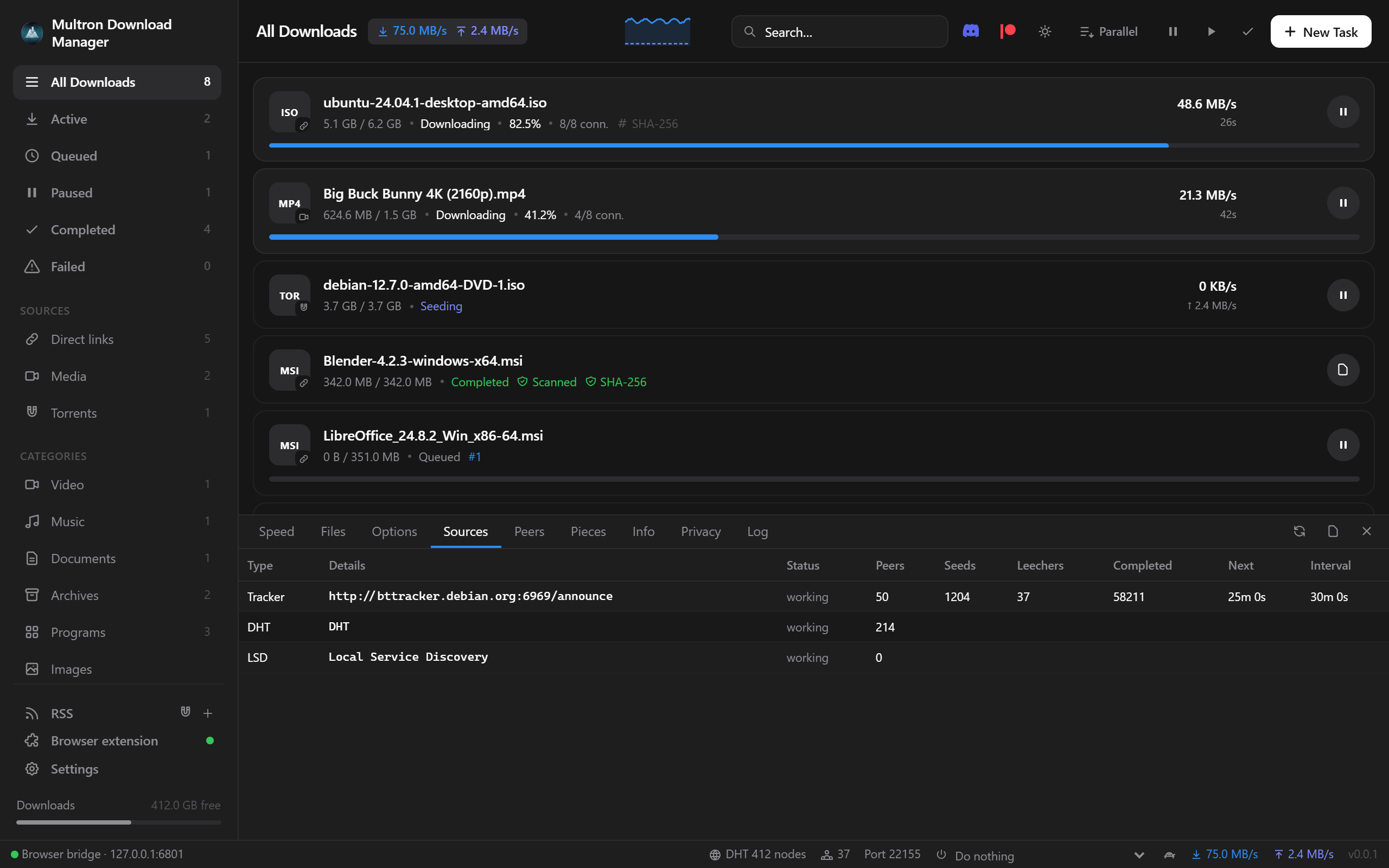
- Detailed views: speed graph, files, sources (every tracker with seeds, leechers and scrape times, plus DHT and LSD), peers, piece map, info and log.
- DHT, uTP, UPnP, Local Service Discovery, extra trackers and a one-click public tracker list.
- Seeding rules: stop at a share ratio or after a time, then pause or remove. Queue limits for active downloading and seeding torrents.
- Create torrents from a file or folder and start seeding at once, force recheck and export .torrent.
- Watch folder for .torrent files, and RSS / Atom feeds with auto-download rules (words or regex, own folder, start paused).
- Privacy: SOCKS5 proxy, binding to a network interface (VPN kill-switch style on Linux and macOS), IPv4-only, hiding the client name and turning off DHT, LSD or trackers.
- IP filters: block or allow lists from a file or URL (eMule DAT, PeerGuardian, CIDR; plain, gzip or zip), with automatic reloading.
Browser extension
- Takes over browser downloads – clicks on file links go straight to the app, and downloads started any other way are handed over too. The real link, referrer and cookies are passed along, so downloads that need a login work.
- Starts the app when it is closed, in the background, and then hands over the download.
- A download button on every video, on any site, with a quality menu. It always shows the name of what it will download, and you can hide it on a page with one click. In feeds (Reddit, Instagram, X, YouTube, TikTok, Facebook) each video is taken from its own post.
- Download all from this page – collects every video, image, audio file, file link, magnet and post on a page. It can scroll endless feeds for you, skips ads and promoted posts, and on Reddit it also collects what people posted in the comments. A picker lets you filter by type, search, select and choose one quality for everything.
- A button on Google Drive, MEGA, MediaFire, Dropbox and Pixeldrain pages, a right-click menu for links and media, and a popup with a quality picker and a paste-a-link box.
- Opens magnet links in the app.
- Setup assistant that finds your browsers, prepares the extension and connects it, and the extension updates itself together with the app.
Security
- SHA-256 verification – enter the expected hash, or let the app find .sha256 and checksum files next to the download; the file is checked when it finishes.
- Antivirus scan of finished downloads on Windows, with Microsoft Defender or your installed antivirus. Blocked or removed files are reported as threats, with a notification.
- SmartScreen / Gatekeeper – finished files get the "downloaded from the internet" mark, so Windows and macOS check them when they are opened, the same as browser downloads.
- File-name spoofing protection – hidden characters that make "invoice.exe" look like a PDF are removed.
- TLS 1.2 or newer only, HTTPS to HTTP redirects blocked, and a browser bridge that listens only on your own computer and accepts only extensions you approved.
- Verified updates – every update is checked against the release's SHA-256 list before it is installed.
Comfortable to use
- Queue: parallel or one at a time, reorder with arrows, and set how many downloads run at once.
- Bulk actions: select with Ctrl/Shift-click or Ctrl+A to pause, resume or remove many downloads, and clear finished or failed ones in one click.
- Automatic categories (video, music, documents, archives, programs, images) and optional sorting into category folders.
- When downloads finish: run a program for each file, then sleep, shut down or quit when everything is done.
- Desktop integration: tray icon, start with the system, progress on the taskbar or Dock, notifications, drag and drop, and paste a link anywhere to add it.
- Looks: light, dark or system theme, nine accent colors and transparency effects (Mica and Acrylic on Windows 11, vibrancy on macOS).
- Automatic updates for the app, yt-dlp and FFmpeg.
- Light: written in Rust, about a 10 MB installer and around 50 MB of RAM.
Download
github.com/Multron-Community/Multron-Download-Manager/releases/latest
Pick the file for your system from the table on the release page. The macOS build is not notarized yet, so right-click the app and choose Open the first time. You can also read the source code on GitHub.
It's still a young project and we're improving it with every release. Feedback, bug reports and feature ideas are very welcome, either here or on GitHub Issues, and they really help us decide what to build next. Thanks for reading!


