I'm not sure if i have posted this in the correct sub forum but i'm sure someone will move it if i have made a mistake. 
Anyway, i received a pop up message out of the blue today stating the words in my thread title. Now considering my wee laptop has been running this for about 7 years or so, i'm confused. Do i just ignore it or do i need to try and resolve it. I don't want to close the warning window in case it shuts down my computer completely and i can't get it started again so i'm looking for advice on what to do.
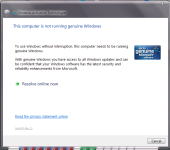 I've checked my pc and it is still showing that my product key as activated.
Anyway, i received a pop up message out of the blue today stating the words in my thread title. Now considering my wee laptop has been running this for about 7 years or so, i'm confused. Do i just ignore it or do i need to try and resolve it. I don't want to close the warning window in case it shuts down my computer completely and i can't get it started again so i'm looking for advice on what to do.