mystarting123

Hello,


Please download Farbar Recovery Scan Tool and save it to your desktop.

Note: You need to run the version compatible with your system. If you are not sure which version applies to your system download both of them and try to run them.
Only one of them will run on your system, that will be the right version.


  • Double-click to run it. When the tool opens click Yes to disclaimer.
  • Press Scan button.

    x5o4gh.png

  • It will make a log (FRST.txt) in the same directory the tool is run. Please attach it to your reply.
  • The first time the tool is run, it makes also another log (Addition.txt). Please attach it to your reply.
 
Please uninstall:
AlphaGo (HKLM-x32\...\{2C652C0A-EC71-4797-8077-F67649177AB0}) (Version: 1.0.2 - Default Company Name) <==== ATTENTION
deskapp (HKLM-x32\...\{13327864-E605-423C-9A52-721CE3068FDF}) (Version: 1.1.5 - deskapp) <==== ATTENTION


FRST.gif
Fix with Farbar Recovery Scan Tool

icon_exclaim.gif
This fix was created for this user for use on that particular machine.
icon_exclaim.gif

icon_exclaim.gif
Running it on another one may cause damage and render the system unstable.
icon_exclaim.gif

Download attached fixlist.txt file and save it to the Desktop:

Both files, FRST and fixlist.txt have to be in the same location or the fix will not work!

  • Right-click on
    FRST.gif
    icon and select
    RunAsAdmin.jpg
    Run as Administrator to start the tool.
    (XP users click run after receipt of Windows Security Warning - Open File).
  • Press the Fix button just once and wait.
  • If for some reason the tool needs a restart, please make sure you let the system restart normally. After that let the tool complete its run.
  • When finishes FRST will generate a log on the Desktop, called Fixlog.txt.

Please attach it to your reply.
 

Attachments

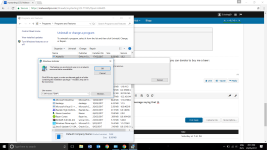
I am having some difficulties uninstalling these 2 as I keep getting a message saying that the installation source is not available.upload_2017-5-29_8-43-47.png
 
I have already ran the fix that you provided, do I just ignore AlphaGo and deskapp?
Thanks for your time and help, I appreciate it a lot.
 
adwcleaner_new.png
Fix with AdwCleaner

Please download AdwCleaner by Xplode and save the file to your Desktop.
  • Right-click on
    adwcleaner_new.png
    icon and select
    RunAsAdmin.jpg
    Run as Administrator to start the tool.
  • Accept the Terms of use.
  • Wait until the database is updated.
  • Click Scan.
  • When finished, please click Clean.
  • Your PC should reboot now.
  • After reboot, logfile will be opened. Copy its content into your next reply.

Note: Reports will be saved in your system partition, usually at C:\Adwcleaner


How is your computer behaving now?
 
As of late, I have yet to receive any more malware.
In the past 2 months, the malware files would reappear approximately every weeks time, I will continue to monitor my computer to ensure that it hasn't reappeared.
Thank you very much for the help, this issue has cost me a fair bit of time and it is a relief to see a good chance for it to be fixed.