Troubleshooting Need help with my HP LaserJet M1005 MFP

aviseth20

New Member
Describe the problem
Printer driver installation
What have you tried?
tried restarting the pc and the printer and also swapped cables
My printed seemed to work just fine until today when suddenly wont print anything. I assumed it was a driver issue (coz it has happened in the past), So I uninstalled the current driver using HP's full solution software and reinstalled the drivers using the same but I am unable to install the drivers as it keeps on telling me to plug in the printer to continue whereas I have it connected already. I tried plugging it out and back in also I have tried factory rebooting the printed and have also restarted my computer a couple of times but it has been of no help. Please help me somebody!!

PS : sorry for my bad English
 
Solution
Thank you for your help.... I fixed the issue last night by factory resetting the printer, reinstalling the usb driver and turning it off and on while installing so it got detected...
Does the USB port you connect to work fine? Is the cable in good condition? It could also be a problem with the printer's USB port.
I don't think there is either of these issues as I said it was working fine until the last couple of days and I also tried my mouse in the usb port and it worked fine.
 
Upvote 0
I don't think there is either of these issues as I said it was working fine until the last couple of days and I also tried my mouse in the usb port and it worked fine.
If the mouse works then probably the port is fine, but not the cable or the usb port of the printer. It does not matter if worked a minute ago, it could fail any time. You should check what i said.

Also, check your BIOS settings.
 
Upvote 0
Sorry for replying late...
I tried to use the printer on my laptop and it worked completely fine, So I dont think there is a problem with the hardware....
Can you be more specific and tell me more on BIOS settings.(I know what is BIOS settings, I just want to know what might interfere).
 
Upvote 0
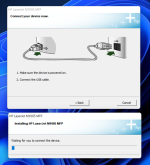
All I see while installing is this........
 

Attachments

  • Screenshot 2022-04-27 220759.png
    Screenshot 2022-04-27 220759.png
    264.1 KB · Views: 483
Upvote 0
The USB configuration section, some security feature that may be blocking the printer from being detected.

It is worth starting in safe mode and checking if Windows detects the printer, it will not be possible to install what is necessary but that will tell if it is a problem with Windows.
 
Upvote 0

Recently browsing

Members who viewed this thread in the last 5 minutes

Back
Top