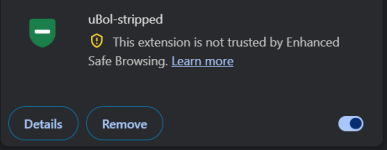
Hi, I already posted some of uBol-stripped in other threads. Because it takes so long, I am not pulling back the fully functional version of uBol-stripped (v4.2.3) which is currently send in for review (which by itself is a major improvement over version 3.3.5 which is on Google webstore). Version 4.2.3. has a better and user friendly "aid" to create custom DNR rules.
V5.0 Release Candidate is available on github (not yet in the Chrome Webstore, because 4.2.3 is waiting for review).

 github.com
So what is uBol-stripped: In simple words a stripped down version of uBO-lite, refactored for simplicity and added AdGuard code to give it AdGuard skills, while maintaining the permission less principle of uBO-lite. uBol-stripped is developed with privacy in mind, simplicity, user friendliness and reuse (Google's number 1 design principle, use what is already available, in stead of developing it yourself).
As I posted uBO-lite has strong bones, but also has less well programmed parts which are put on hastily to keep up with AdGuard Mv3. Althouh mr Hill is a brilliant programmer, but it is very hard to keep up with a team of skilled developers (AdGuard) That is why I use code from AdGuard to improve uBO-lite bones and create uBol-stripped. In Dutch "eer wie ere toekomt" (honor the ones who deserve it), the AdGuard team has been the innovative force in developing an Mv3 adblock extension with 99% of the Mv2 extension capabilities.
_________
WHAT FUNCTIONALITY DOES UBOL-STRIPPED OFFER?
After installation, add it to taskbar, clicking on the icon shows this popup.
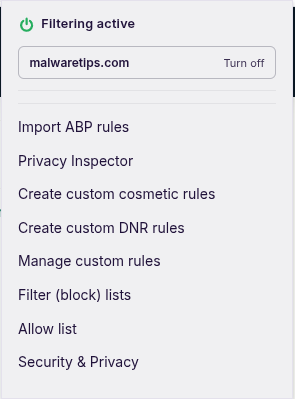
Import ABP rules
This is basically the same as AdGuard's user rules, One centralized panel where you can copy AdBlockPlus format rules to import (uBO-lite has two panels, one for custom cosmetic rules and hidden behind advanced functions for DNR rules in YAML format). So uBol-stripped is as user friendly as AdGuard and it can process uBO and AdGuard Mv3 scriptlets, without needing user script permission!!!
Privacy Inspector
Most scriptlet's (pieces of JavaScript code used to achieve something which regular ABP rules can not) are to complex for PC users. This is really a missed opportunity, because both uBO and AG Mv3 have scriptlets which can do the same as some anti-fingerprint extensions offer (e.g. canvas blocker, webgl fingerprint blocker, webgpu fingerprint blocker, etc). Because I liked the idea of JShelter (providing fingerprint protection), but not their implementation (always on, with per website exceptions) i reverted the usage (from whitelist with excetions to blacklist), This has both performance and compatibility advantages and does not require fiddling with settings (like with JShelter). I used the existing uBO and AG-scriptlets to block privacy sensitive activity on specific websites (see below explained in detail). JShelter covers much more, but Privacy Inspector is much easier to use.
Create custom cosmetic rules
This is basically uBO-lite's element picker, with only a leading popup explaining how to use it (user friendliness is one of leading principles of uBol-stripped). It is a simple point and click tool to hide page elements and create cosmetic rule for it. UBO-lite's element picker is better (finer grained) than AdGuard's create manual block rules. The UBO-lie licker allows you select parts of HTML element (so it is easier to look for steady names like ad or banner).
Create custom DNR rules
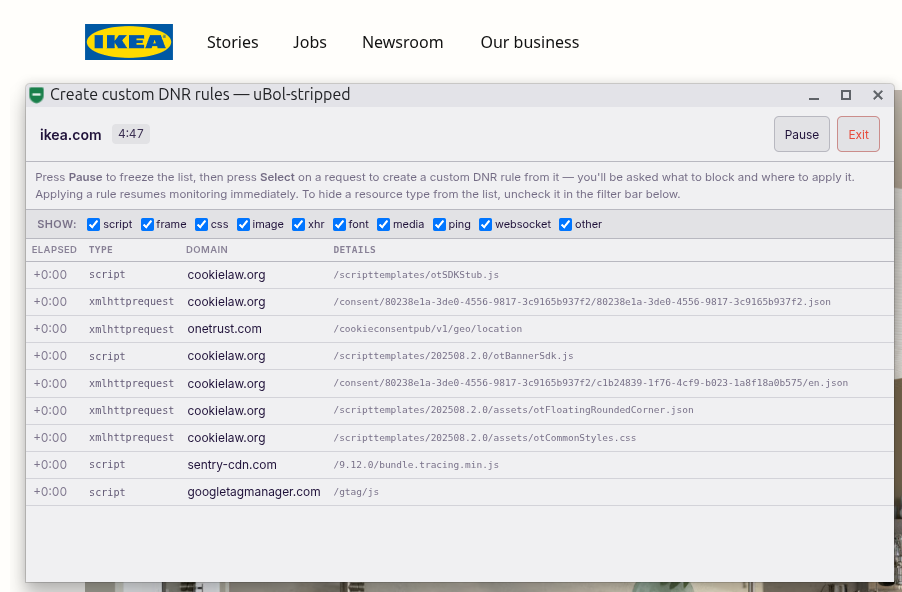
This is also a new feature, just open the monitor, see what is allowed, pause and select a resource type and a pop-up appears to help you create a DNR rule (the popup is shamelessly taken from AdGuard's excellent show logs option). No need to know YAML format as with uBO-lite (available in uBO-lite after enabling developer's mode). See below for detailed explanation.
Manage custom rules
Shows which rules you created with Privacy Inspector, Create custom cosmetic and Create custom DNR tools. You can remove (delete) individual rules or remove all.
Filter (block) lists
uBol-stripped has three default filter lists: Kees1958 most used EU-US advertising and tracker networks (yeah that is me :- ), AdGuard's URL tracking parameters removal filter list and AdGuard base filter. Warning: all rules not applying on extended EU-zone or 5 Eyes countries are silently droppes as are generic cosmetic filters (for performance reasons). The good news is that it processes all AdGuard's scriptlet set (which is more advanced than uBO-lite and cobers nearly 3 times as many domains).
uBol-stripped has AG's specific anti-adblock filter (again generic are dropped as are ant--adblock rules for country code's not in extended EU-zone and 5 Eyes countries) and automatically ads language filters (like AdGuard Mv3) for (again warning) only extended EU-zone langauge filters from AdGuard (prefered) or Easylist.
Allow List
uBO-lite has a filter modes list which you can see after enabling developer mode, but I prefer the clean and simple implementation of AdGuard (yes it is exactly the same as AG's allow list). just copy and paste your whitelist into it and you are done.
Security & Privacy
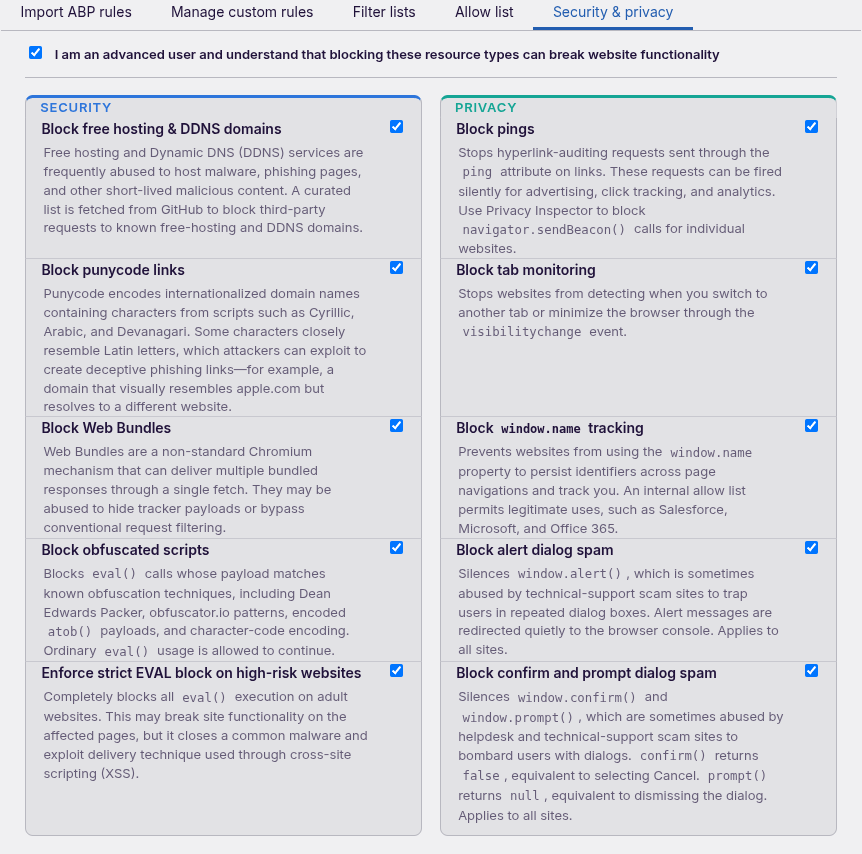
This is also a new option (not in uBO-lite or AG Mv3). When you confirm that you understand that these rules might break websites, you can enable security and privacy rules which are applied on all websites (when not on allow list). These options have a low to very low website breakage risk and have built-in allowlist to lower the breakage risk (also see details below).
DETAILED DESCRIPTION OF NEW FEATURES
Privacy Inspector
Surf to fingerprint.com to get an idea of what it does and select the Privacy Inspector on the popup.
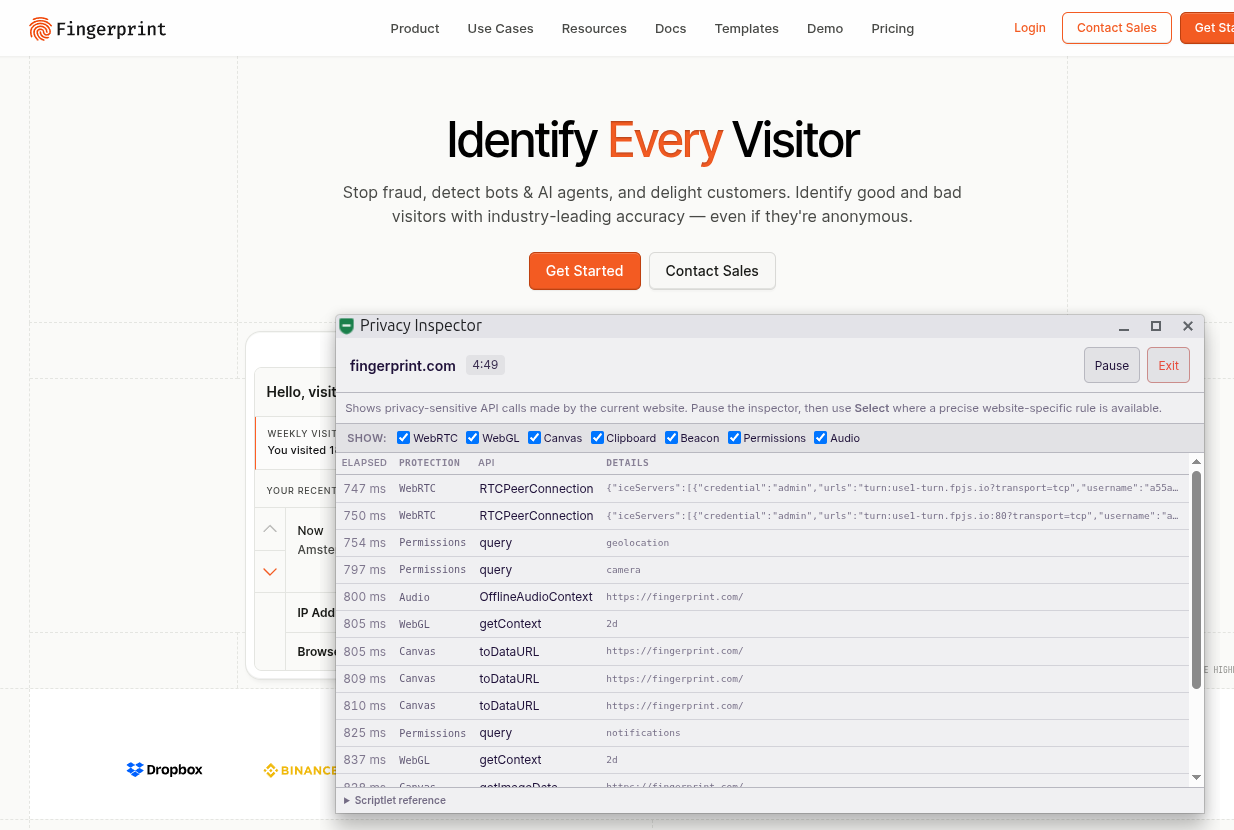
Privacy shows a list of privacy sensitive activity, which uBO and AG Mv3 have scriptlets for to block it. Just press pause and select
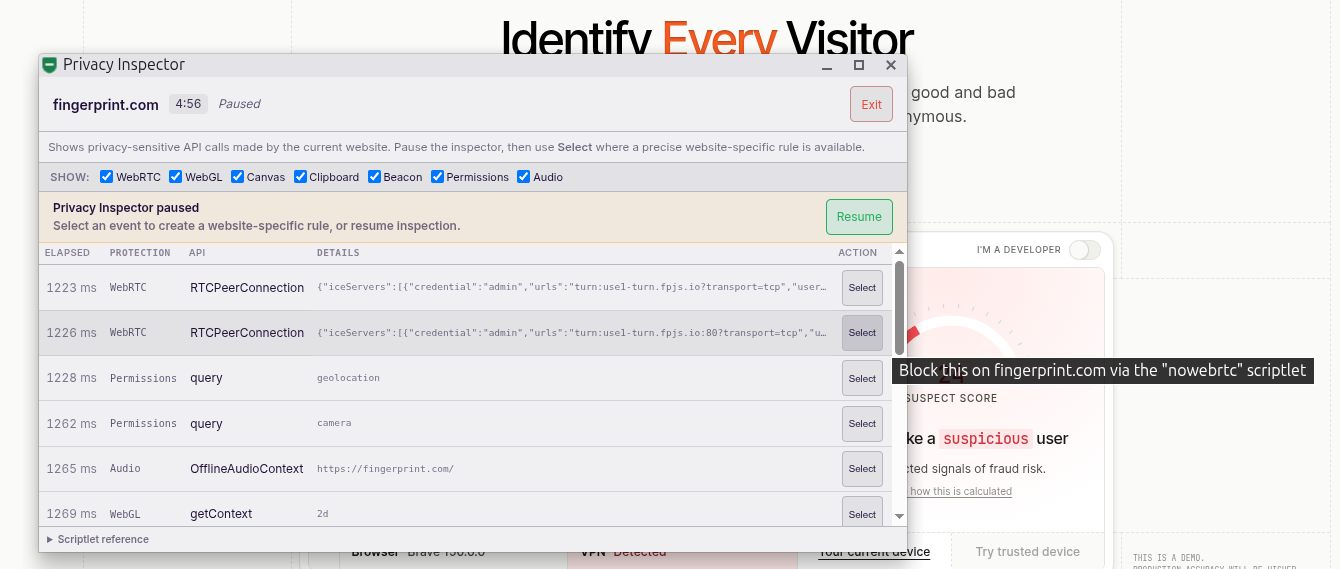
and it will create a custom rule
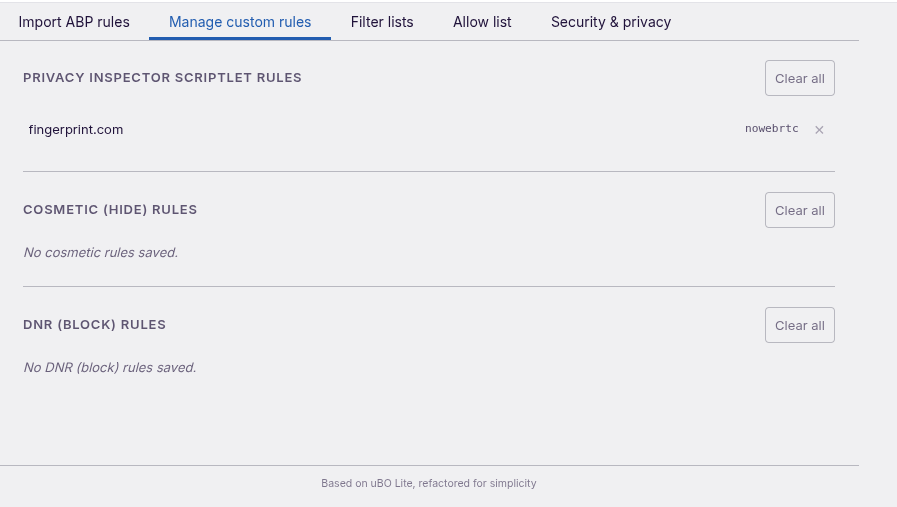
Create custom DNR-rule
Works more or les the same, only in stead of showing scriptlets in the header to view, it shows DNR resource types
The workflow is the same, pause and select and a popup-will appear (left simple, right the familiar AG create block rule panel of AG log)
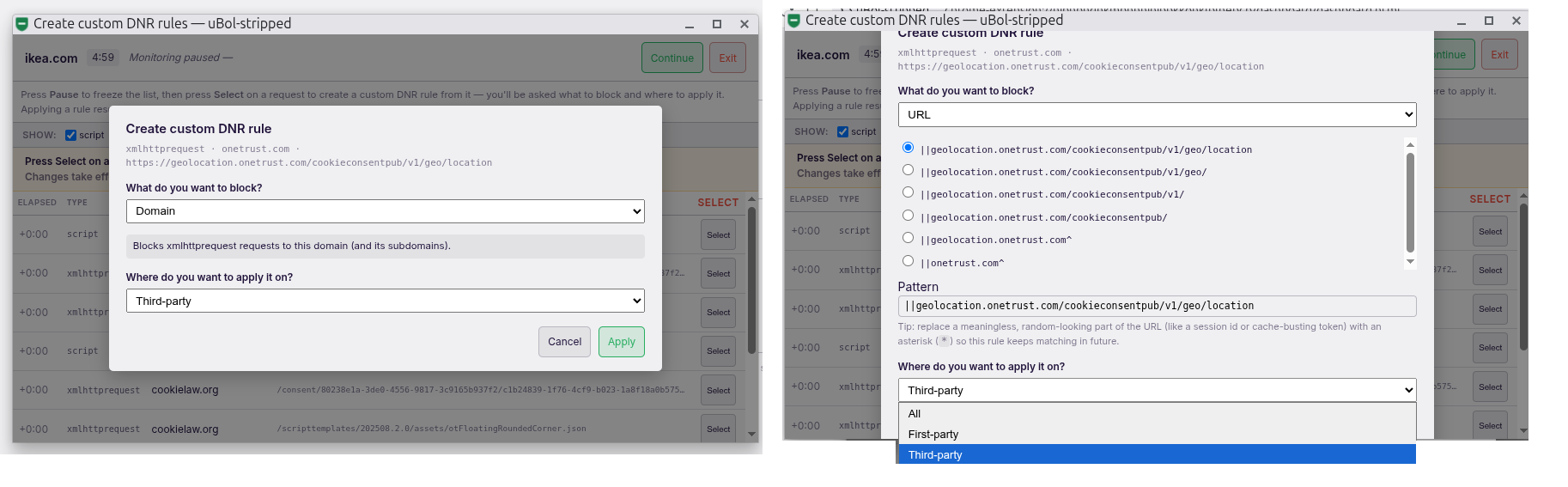
The left one creates a domain blockrule, the right one an URL-filter. Why the difference? Although Google's build-in adblocker processes DNR rules super efficient, domain rules take a tiny fraction less processing (and when your goal is to match uBO-lite in efficiency, every inch performance squeezed out of the code counts).
Security and Privacy
This is simple, just allow them the website breakage risk is low
Please report issues in this thread
V5.0 Release Candidate is available on github (not yet in the Chrome Webstore, because 4.2.3 is waiting for review).
uBol-stripped/uBol-stripped_5.0-Release-Candidate.zip at main · Kees1958/uBol-stripped
a less is more, super efficient, stripped version of uBol-lite - Kees1958/uBol-stripped
github.com
So what is uBol-stripped: In simple words a stripped down version of uBO-lite, refactored for simplicity and added AdGuard code to give it AdGuard skills, while maintaining the permission less principle of uBO-lite. uBol-stripped is developed with privacy in mind, simplicity, user friendliness and reuse (Google's number 1 design principle, use what is already available, in stead of developing it yourself).
As I posted uBO-lite has strong bones, but also has less well programmed parts which are put on hastily to keep up with AdGuard Mv3. Althouh mr Hill is a brilliant programmer, but it is very hard to keep up with a team of skilled developers (AdGuard) That is why I use code from AdGuard to improve uBO-lite bones and create uBol-stripped. In Dutch "eer wie ere toekomt" (honor the ones who deserve it), the AdGuard team has been the innovative force in developing an Mv3 adblock extension with 99% of the Mv2 extension capabilities.
_________
WHAT FUNCTIONALITY DOES UBOL-STRIPPED OFFER?
After installation, add it to taskbar, clicking on the icon shows this popup.
Import ABP rules
This is basically the same as AdGuard's user rules, One centralized panel where you can copy AdBlockPlus format rules to import (uBO-lite has two panels, one for custom cosmetic rules and hidden behind advanced functions for DNR rules in YAML format). So uBol-stripped is as user friendly as AdGuard and it can process uBO and AdGuard Mv3 scriptlets, without needing user script permission!!!
Privacy Inspector
Most scriptlet's (pieces of JavaScript code used to achieve something which regular ABP rules can not) are to complex for PC users. This is really a missed opportunity, because both uBO and AG Mv3 have scriptlets which can do the same as some anti-fingerprint extensions offer (e.g. canvas blocker, webgl fingerprint blocker, webgpu fingerprint blocker, etc). Because I liked the idea of JShelter (providing fingerprint protection), but not their implementation (always on, with per website exceptions) i reverted the usage (from whitelist with excetions to blacklist), This has both performance and compatibility advantages and does not require fiddling with settings (like with JShelter). I used the existing uBO and AG-scriptlets to block privacy sensitive activity on specific websites (see below explained in detail). JShelter covers much more, but Privacy Inspector is much easier to use.
Create custom cosmetic rules
This is basically uBO-lite's element picker, with only a leading popup explaining how to use it (user friendliness is one of leading principles of uBol-stripped). It is a simple point and click tool to hide page elements and create cosmetic rule for it. UBO-lite's element picker is better (finer grained) than AdGuard's create manual block rules. The UBO-lie licker allows you select parts of HTML element (so it is easier to look for steady names like ad or banner).
Create custom DNR rules
This is also a new feature, just open the monitor, see what is allowed, pause and select a resource type and a pop-up appears to help you create a DNR rule (the popup is shamelessly taken from AdGuard's excellent show logs option). No need to know YAML format as with uBO-lite (available in uBO-lite after enabling developer's mode). See below for detailed explanation.
Manage custom rules
Shows which rules you created with Privacy Inspector, Create custom cosmetic and Create custom DNR tools. You can remove (delete) individual rules or remove all.
Filter (block) lists
uBol-stripped has three default filter lists: Kees1958 most used EU-US advertising and tracker networks (yeah that is me :- ), AdGuard's URL tracking parameters removal filter list and AdGuard base filter. Warning: all rules not applying on extended EU-zone or 5 Eyes countries are silently droppes as are generic cosmetic filters (for performance reasons). The good news is that it processes all AdGuard's scriptlet set (which is more advanced than uBO-lite and cobers nearly 3 times as many domains).
uBol-stripped has AG's specific anti-adblock filter (again generic are dropped as are ant--adblock rules for country code's not in extended EU-zone and 5 Eyes countries) and automatically ads language filters (like AdGuard Mv3) for (again warning) only extended EU-zone langauge filters from AdGuard (prefered) or Easylist.
Allow List
uBO-lite has a filter modes list which you can see after enabling developer mode, but I prefer the clean and simple implementation of AdGuard (yes it is exactly the same as AG's allow list). just copy and paste your whitelist into it and you are done.
Security & Privacy
This is also a new option (not in uBO-lite or AG Mv3). When you confirm that you understand that these rules might break websites, you can enable security and privacy rules which are applied on all websites (when not on allow list). These options have a low to very low website breakage risk and have built-in allowlist to lower the breakage risk (also see details below).
DETAILED DESCRIPTION OF NEW FEATURES
Privacy Inspector
Surf to fingerprint.com to get an idea of what it does and select the Privacy Inspector on the popup.
Privacy shows a list of privacy sensitive activity, which uBO and AG Mv3 have scriptlets for to block it. Just press pause and select
and it will create a custom rule
Create custom DNR-rule
Works more or les the same, only in stead of showing scriptlets in the header to view, it shows DNR resource types
The workflow is the same, pause and select and a popup-will appear (left simple, right the familiar AG create block rule panel of AG log)
The left one creates a domain blockrule, the right one an URL-filter. Why the difference? Although Google's build-in adblocker processes DNR rules super efficient, domain rules take a tiny fraction less processing (and when your goal is to match uBO-lite in efficiency, every inch performance squeezed out of the code counts).
Security and Privacy
This is simple, just allow them the website breakage risk is low
Please report issues in this thread
Last edited: