
Indeed.Besides I believe that consistent blocking 3p scripts can prevent much fingerprinting.
@LinuxFan58 - BTW, I have to say browser speed is really good with 3P-Matrix Lite and µBol-stripped.


Open MalwareTips from your Home Screen or desktop. Follow discussions, find answers and pick up where you left off.
If you cannot find an install option, update your browser or use its bookmark option to keep MalwareTips close.
After installation, open the app and sign in. Enable push notifications in Preferences if you want alerts. On iPhone and iPad, push requires a Home Screen web app and iOS or iPadOS 16.4 or later.
Sign in to manage notificationsInstallation is optional. Your notification settings stay under your control.
 Thread starter
LinuxFan58
Thread starter
LinuxFan58
Indeed.Besides I believe that consistent blocking 3p scripts can prevent much fingerprinting.

Will look at it@LinuxFan58 Privacy Inspector has the same dark mode readability issue that you previously fixed in "Create custom DNR rules".
 regression issue by re-using code, sorry
Thanks for the feedback, I thought it is only 1 click (so not a deep dive) to make average users aware of the websites (fingerprinting them) which they frequently visit but not login. This is a typical perception blind spot. As a sales (I was sales director) who also wanted to understand digital marketing, I thought people need fingerprint protection on websites they often visit but never or occassionally log in. Now you tell me who cares, you are rightNot sure I'm a fan of this feature. While your explanation is very good, it assumes that users will take a "deep dive" into the rationale behind the functionality. I have my doubts about most users.
 ). but who cares about things they are not aware of: nobody
  (I feel like a dancing fool with one leg shorter than the other )
You could make it simpler to let show a popup with the warning fingerprinting detected, do you want to block it, yes or no (is the only user action needed). Or will this take another week?It took me a week to squeze the best out of AdGuard Mv3 and uBO-lite to make Privacy Inspector working.
Yes I copy the best from UBol, AG, JShelter (and UI from Noscript), but Brummelchen has no clue about the refactoring.There is also on Wilders a topic opened about uBol-stripped.
No i stick to the current workflow. On demand, not active all the time and only website specific. I know you and Oldschool like to have protection always on, but as explained it is not necessary (as the saying goes You need a thief to catch thief's, it really works differently and I worked in the industry)You could make it simpler to let show a popup with the warning fingerprinting detected, do you want to block it, yes or no (and no more user action). Or will this take another week?
No, not fingerprinting protection. Your concept and implementation are great.I know you and Oldschool like to have protection always on
It's simply that I think average users will not understand its implementation, but I have no suggestions about an alternative one.
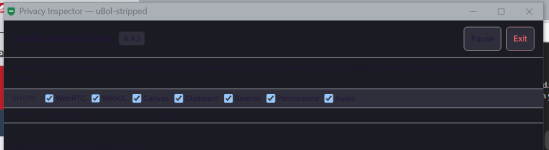
It's a bug in µBol-stripped when browser is in dark mode.In Edge, hard to see the text.
View attachment 298988

What filter lists are you thinking of:uBol has no filterlist importAdd the ability to import other filter lists and i'll change from uBOL to uBol-stripped in a heartbeat.
What filter lists are you thinking of:uBol has no filterlist import

Tried it before; does not work due to MV3 limitation.

Members who viewed this thread in the last 5 minutes