
Question NextDNS setups

Please provide comments and solutions that are helpful to the author of this topic.
@SeriousHoax, I have AdGuard DNS and Hagezi Light filters set up in NextDNS for our kids' phones. I wonder if ad filters can affect Google Family Link functions. I don't think so. Can they?
I don't think these two filters will cause any trouble. They don't usually contain anything that breaks functionality.
 
Quick question and I know I could Google it, but why not ask the pros here :) Right now I'm using the desktop app, if I enable NextDNS on the router side, will that affect the wireless devices I have connected, Amazon Echo & Dot, my Samsung phone and a Roku Stick? Will I have to reset those devises somehow?

View attachment 289373
If you set up NextDNS on your router, all your Wi-Fi devices, like your Echo, phone, and Roku, will automatically start using it for their internet requests. You won't need to adjust any settings on those individual devices.
 
If you set up NextDNS on your router, all your Wi-Fi devices, like your Echo, phone, and Roku, will automatically start using it for their internet requests. You won't need to adjust any settings on those individual devices.

Thank you, I just wanted to consider any possible issues up front, before I make any changes.
 
Quick question and I know I could Google it, but why not ask the pros here :) Right now I'm using the desktop app
You don't need the app on Windows. Enter this in terminal as admin:
netsh dns add encryption server=**.**.**.*** dohtemplate=https://dns.nextdns.io/******/Your-Device-Name autoupgrade=yes udpfallback=no
Replace the server addresses and device name (optional) with your own. Then set it in your Windows's network settings for Ethernet/WiFi whichever you are using.
if I enable NextDNS on the router side, will that affect the wireless devices I have connected, Echo, Dot Samsung phone and Roku Stick? Will I have to reset those devises somehow?
If ISP provides you a static IP address then you can set it in your router and forget about it. If it's dynamic IP address, then it will work temporarily till the IP address changes. If your router supports DoT/DoH then you can use that and your DNS will remain active even when the IP address changes.
 
If it's dynamic IP address, then it will work temporarily till the IP address changes
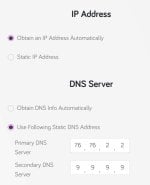
You mean this dns settings will not work after I restart my modem router and get a new dynamic ip address?

2025-07-02 19.20.48 192.168.1.1 5247c5512cfe.jpg
 
Last edited by a moderator:
You don't need the app on Windows. Enter this in terminal as admin:

Replace the server addresses and device name (optional) with your own. Then set it in your Windows's network settings for Ethernet/WiFi whichever you are using.

If ISP provides you a static IP address then you can set it in your router and forget about it. If it's dynamic IP address, then it will work temporarily till the IP address changes. If your router supports DoT/DoH then you can use that and your DNS will remain active even when the IP address changes.

Very helpful, as my ISP is a Dynamic IP. Thanks :)
 
  • Like
Reactions: rashmi
You mean this dns settings will not work after I restart my modem router and get a new dynamic ip address?
View attachment 289374
That's only for NextDNS. It needs to link the IP address with their server to provide you their service with your config when plain DNS format is used.
You are using ControlD Free and Quad9 which doesn't have profiles, so you are fine.
 
You don't need the app on Windows. Enter this in terminal as admin:

Replace the server addresses and device name (optional) with your own. Then set it in your Windows's network settings for Ethernet/WiFi whichever you are using.

If ISP provides you a static IP address then you can set it in your router and forget about it. If it's dynamic IP address, then it will work temporarily till the IP address changes. If your router supports DoT/DoH then you can use that and your DNS will remain active even when the IP address changes.
DoT and DoH have been around for a while, their widespread adoption and implementation in consumer-grade router firmware are more recent. It really started gaining significant traction around 2019-2020. Most routers unless older then these ages have had firmware updates that pushed this out. This in mind I didn't think to mention as it can be set directly.

Thank you for bringing this up as he may very well have older hardware.
 
DoT and DoH have been around for a while, their widespread adoption and implementation in consumer-grade router firmware are more recent. It really started gaining significant traction around 2019-2020. Most routers unless older then these ages have had firmware updates that pushed this out. This in mind I didn't think to mention as it can be set directly.

Thank you for bringing this up as he may very well have older hardware.

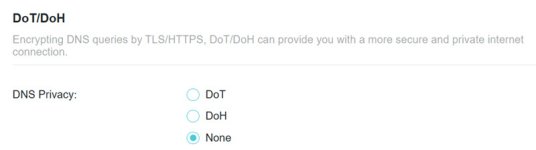
Does it matter which one I enable?
2025-07-02_11-46-45.jpg
 
Performance-wise, DoT is slightly faster; Privacy-wise, DoT is better.
When it comes to speed between DoT (DNS over TLS) and DoH (DNS over HTTPS) with NextDNS, the practical difference for most home users is often negligible and imperceptible. The actual performance often depends more on the quality of the DoT/DoH implementation in your router or device, and the proximity/load of the NextDNS servers you're connecting to.
 

You may also like...