

The MalwareTips app
Your community, one tap away.
Open MalwareTips from your Home Screen or desktop. Follow discussions, find answers and pick up where you left off.
- Home Screen access
- Optional push alerts
- Your community
You're ready to explore.Explore what's new
Installation instructions
iPhone & iPad
- Open MalwareTips in Safari and tap Share. You may need to open the Page Menu first.
- Choose Add to Home Screen. If it is not listed, use Edit Actions to add it.
- Keep Open as Web App enabled if shown, then tap Add.
Android
- Open MalwareTips in Chrome or another browser that supports app installation.
- Open the browser menu and look for Install app, Install and create shortcut, or Add to Home screen.
- Choose Install and confirm. Wording varies by browser.
Desktop
- Chrome: use the install icon in the address bar, or the menu under Cast, save and share.
- Edge: open the menu, then More tools, Apps and Install this site as an app.
- Safari on Mac: choose Share or File, then Add to Dock. Firefox on Windows: look for the web apps button in the address bar.
If you cannot find an install option, update your browser or use its bookmark option to keep MalwareTips close.
Keep up with your conversations
After installation, open the app and sign in. Enable push notifications in Preferences if you want alerts. On iPhone and iPad, push requires a Home Screen web app and iOS or iPadOS 16.4 or later.
Sign in to manage notificationsInstallation is optional. Your notification settings stay under your control.
You are using an out of date browser. It may not display this or other websites correctly.
You should upgrade or use an alternative browser.
You should upgrade or use an alternative browser.
Solved "Not Responding" message happening more & more often--performance slo-o-o-w
- Thread starter Ed_M1
- Start date
Windows Malware Removal Help & Support
13 Replies
2,545 Views

Hello,
 Check Disk
- Press the + R on your keyboard at the same time. Type cmd and click OK.

- Copy/Enter the command below and press Enter:
-
Code:
chkdsk C: /r - You should get a message to schedule Check Disk at next system restart. Please type Y and press Enter.
- All you should do now is to restart your PC and let the Check Disk process finish uninterrupted.
- Press the + R on your keyboard at the same time. Type eventvwr and click OK.
- In the left panel, expand Windows Logs and then click on Application.
- Now, on the right side, click on Filter Current Log.
- Under Event Sources, check only Wininit and click OK.
- Now you'll be presented with one or multiple Wininit logs.
- Click on an entry corresponding to the date and time of the disk check.
- On the top main menu, click Action > Copy > Copy Details as Text.
- Paste the contents into your next reply.
Did you open Command Prompt?

Okay, that is fine.
- Press Start, type CMD, and then right click --> Run as Administrator.
- This will give you privileges in Command Prompt that you need.

OK. It took 5 hours for chkdsk to run. Whew. But improvement in performance is already amazing. What's next? I'm pasting the report below.
For future reference, how often do you recommend I run chkdsk as routine maintenance? Monthly? & what "red flags" would I be looking for in the event report?
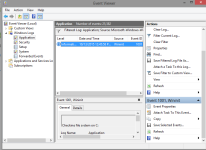
But, FYI,here's what the Event Viewer looks like to me--a little different from your instructions, but I managed to get the report.
I didn't get this instruction at first:
Log Name: Application
Source: Microsoft-Windows-Wininit
Date: 10/13/2015 12:45:58 PM
Event ID: 1001
Task Category: None
Level: Information
Keywords: Classic
User: N/A
Computer: Laptop1
Description:
Checking file system on C:
The type of the file system is NTFS.
Volume label is OS.
A disk check has been scheduled.
Windows will now check the disk.
Stage 1: Examining basic file system structure ...
Cleaning up instance tags for file 0x89ad.
311552 file records processed.
File verification completed.
5911 large file records processed.
0 bad file records processed.
Stage 2: Examining file name linkage ...
406342 index entries processed.
Index verification completed.
0 unindexed files scanned.
0 unindexed files recovered.
Stage 3: Examining security descriptors ...
Cleaning up 1873 unused index entries from index $SII of file 0x9.
Cleaning up 1873 unused index entries from index $SDH of file 0x9.
Cleaning up 1873 unused security descriptors.
CHKDSK is compacting the security descriptor stream
Security descriptor verification completed.
47396 data files processed.
CHKDSK is verifying Usn Journal...
Usn Journal verification completed.
Stage 4: Looking for bad clusters in user file data ...
311536 files processed.
File data verification completed.
Stage 5: Looking for bad, free clusters ...
100790593 free clusters processed.
Free space verification is complete.
CHKDSK discovered free space marked as allocated in the volume bitmap.
Windows has made corrections to the file system.
No further action is required.
473900031 KB total disk space.
70194208 KB in 234245 files.
149868 KB in 47399 indexes.
0 KB in bad sectors.
393579 KB in use by the system.
65536 KB occupied by the log file.
403162376 KB available on disk.
4096 bytes in each allocation unit.
118475007 total allocation units on disk.
100790594 allocation units available on disk.
Internal Info:
00 c1 04 00 30 4c 04 00 68 5d 08 00 00 00 00 00 ....0L..h]......
3d 08 00 00 58 27 00 00 00 00 00 00 00 00 00 00 =...X'..........
Windows has finished checking your disk.
Please wait while your computer restarts.
Event Xml:
<Event xmlns="http://schemas.microsoft.com/win/2004/08/events/event">
<System>
<Provider Name="Microsoft-Windows-Wininit" Guid="{206f6dea-d3c5-4d10-bc72-989f03c8b84b}" EventSourceName="Wininit" />
<EventID Qualifiers="16384">1001</EventID>
<Version>0</Version>
<Level>4</Level>
<Task>0</Task>
<Opcode>0</Opcode>
<Keywords>0x80000000000000</Keywords>
<TimeCreated SystemTime="2015-10-13T16:45:58.000000000Z" />
<EventRecordID>61074</EventRecordID>
<Correlation />
<Execution ProcessID="0" ThreadID="0" />
<Channel>Application</Channel>
<Computer>Laptop1</Computer>
<Security />
</System>
<EventData>
<Data>
Checking file system on C:
The type of the file system is NTFS.
Volume label is OS.
A disk check has been scheduled.
Windows will now check the disk.
Stage 1: Examining basic file system structure ...
Cleaning up instance tags for file 0x89ad.
311552 file records processed.
File verification completed.
5911 large file records processed.
0 bad file records processed.
Stage 2: Examining file name linkage ...
406342 index entries processed.
Index verification completed.
0 unindexed files scanned.
0 unindexed files recovered.
Stage 3: Examining security descriptors ...
Cleaning up 1873 unused index entries from index $SII of file 0x9.
Cleaning up 1873 unused index entries from index $SDH of file 0x9.
Cleaning up 1873 unused security descriptors.
CHKDSK is compacting the security descriptor stream
Security descriptor verification completed.
47396 data files processed.
CHKDSK is verifying Usn Journal...
Usn Journal verification completed.
Stage 4: Looking for bad clusters in user file data ...
311536 files processed.
File data verification completed.
Stage 5: Looking for bad, free clusters ...
100790593 free clusters processed.
Free space verification is complete.
CHKDSK discovered free space marked as allocated in the volume bitmap.
Windows has made corrections to the file system.
No further action is required.
473900031 KB total disk space.
70194208 KB in 234245 files.
149868 KB in 47399 indexes.
0 KB in bad sectors.
393579 KB in use by the system.
65536 KB occupied by the log file.
403162376 KB available on disk.
4096 bytes in each allocation unit.
118475007 total allocation units on disk.
100790594 allocation units available on disk.
Internal Info:
00 c1 04 00 30 4c 04 00 68 5d 08 00 00 00 00 00 ....0L..h]......
3d 08 00 00 58 27 00 00 00 00 00 00 00 00 00 00 =...X'..........
Windows has finished checking your disk.
Please wait while your computer restarts.
</Data>
</EventData>
</Event>
For future reference, how often do you recommend I run chkdsk as routine maintenance? Monthly? & what "red flags" would I be looking for in the event report?
But, FYI,here's what the Event Viewer looks like to me--a little different from your instructions, but I managed to get the report.
I didn't get this instruction at first:
- In the left panel, expand Windows Logs and then click on Application
For my notes for next time I've added "(below it, still in the left panel). (If you click in the right panel you need to also click “open” to see what’s next.)"
Log Name: Application
Source: Microsoft-Windows-Wininit
Date: 10/13/2015 12:45:58 PM
Event ID: 1001
Task Category: None
Level: Information
Keywords: Classic
User: N/A
Computer: Laptop1
Description:
Checking file system on C:
The type of the file system is NTFS.
Volume label is OS.
A disk check has been scheduled.
Windows will now check the disk.
Stage 1: Examining basic file system structure ...
Cleaning up instance tags for file 0x89ad.
311552 file records processed.
File verification completed.
5911 large file records processed.
0 bad file records processed.
Stage 2: Examining file name linkage ...
406342 index entries processed.
Index verification completed.
0 unindexed files scanned.
0 unindexed files recovered.
Stage 3: Examining security descriptors ...
Cleaning up 1873 unused index entries from index $SII of file 0x9.
Cleaning up 1873 unused index entries from index $SDH of file 0x9.
Cleaning up 1873 unused security descriptors.
CHKDSK is compacting the security descriptor stream
Security descriptor verification completed.
47396 data files processed.
CHKDSK is verifying Usn Journal...
Usn Journal verification completed.
Stage 4: Looking for bad clusters in user file data ...
311536 files processed.
File data verification completed.
Stage 5: Looking for bad, free clusters ...
100790593 free clusters processed.
Free space verification is complete.
CHKDSK discovered free space marked as allocated in the volume bitmap.
Windows has made corrections to the file system.
No further action is required.
473900031 KB total disk space.
70194208 KB in 234245 files.
149868 KB in 47399 indexes.
0 KB in bad sectors.
393579 KB in use by the system.
65536 KB occupied by the log file.
403162376 KB available on disk.
4096 bytes in each allocation unit.
118475007 total allocation units on disk.
100790594 allocation units available on disk.
Internal Info:
00 c1 04 00 30 4c 04 00 68 5d 08 00 00 00 00 00 ....0L..h]......
3d 08 00 00 58 27 00 00 00 00 00 00 00 00 00 00 =...X'..........
Windows has finished checking your disk.
Please wait while your computer restarts.
Event Xml:
<Event xmlns="http://schemas.microsoft.com/win/2004/08/events/event">
<System>
<Provider Name="Microsoft-Windows-Wininit" Guid="{206f6dea-d3c5-4d10-bc72-989f03c8b84b}" EventSourceName="Wininit" />
<EventID Qualifiers="16384">1001</EventID>
<Version>0</Version>
<Level>4</Level>
<Task>0</Task>
<Opcode>0</Opcode>
<Keywords>0x80000000000000</Keywords>
<TimeCreated SystemTime="2015-10-13T16:45:58.000000000Z" />
<EventRecordID>61074</EventRecordID>
<Correlation />
<Execution ProcessID="0" ThreadID="0" />
<Channel>Application</Channel>
<Computer>Laptop1</Computer>
<Security />
</System>
<EventData>
<Data>
Checking file system on C:
The type of the file system is NTFS.
Volume label is OS.
A disk check has been scheduled.
Windows will now check the disk.
Stage 1: Examining basic file system structure ...
Cleaning up instance tags for file 0x89ad.
311552 file records processed.
File verification completed.
5911 large file records processed.
0 bad file records processed.
Stage 2: Examining file name linkage ...
406342 index entries processed.
Index verification completed.
0 unindexed files scanned.
0 unindexed files recovered.
Stage 3: Examining security descriptors ...
Cleaning up 1873 unused index entries from index $SII of file 0x9.
Cleaning up 1873 unused index entries from index $SDH of file 0x9.
Cleaning up 1873 unused security descriptors.
CHKDSK is compacting the security descriptor stream
Security descriptor verification completed.
47396 data files processed.
CHKDSK is verifying Usn Journal...
Usn Journal verification completed.
Stage 4: Looking for bad clusters in user file data ...
311536 files processed.
File data verification completed.
Stage 5: Looking for bad, free clusters ...
100790593 free clusters processed.
Free space verification is complete.
CHKDSK discovered free space marked as allocated in the volume bitmap.
Windows has made corrections to the file system.
No further action is required.
473900031 KB total disk space.
70194208 KB in 234245 files.
149868 KB in 47399 indexes.
0 KB in bad sectors.
393579 KB in use by the system.
65536 KB occupied by the log file.
403162376 KB available on disk.
4096 bytes in each allocation unit.
118475007 total allocation units on disk.
100790594 allocation units available on disk.
Internal Info:
00 c1 04 00 30 4c 04 00 68 5d 08 00 00 00 00 00 ....0L..h]......
3d 08 00 00 58 27 00 00 00 00 00 00 00 00 00 00 =...X'..........
Windows has finished checking your disk.
Please wait while your computer restarts.
</Data>
</EventData>
</Event>
Great to hear this. Yes, you can run CheckDisk from time to time. It will sort some errors in file system structure and by doing this is could speed up your PC.
Thanks! Mark this one "Solved".
NOT SO FAST! I'm experiencing a significant drop in performance less than 24 hours later--a few freezes and "not responding" messages. Perhaps there's something else to search and destroy? or tune-up?

Please re-run Farbar Recovery Scan Tool to give me a fresh look at your system.
- Right-click on icon and select
Run as Administrator to start the tool.

(XP users click run after receipt of Windows Security Warning - Open File). - Make sure that Addition option is checked.
- Press Scan button and wait.
- The tool will produce two logfiles on your desktop: FRST.txt and Addition.txt.
Done. Files attached.
FYI, coincidental with poor performance I get these error messages--typically when a video has ended and I try to start another. Adobe Flash player is up to date. When I get these I choose "stop plugin" and then "OK" on the C++ error, and then wait a while and things will work again, until the next time.
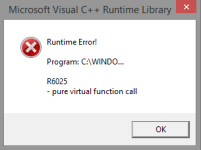
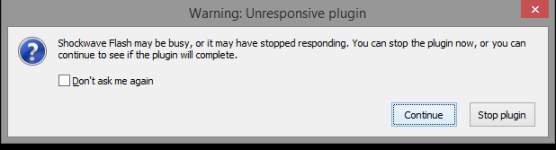
FYI, coincidental with poor performance I get these error messages--typically when a video has ended and I try to start another. Adobe Flash player is up to date. When I get these I choose "stop plugin" and then "OK" on the C++ error, and then wait a while and things will work again, until the next time.
Attachments
I frankly don't know what is going on and this if beyond my skills. I either suggest to reinstall your system or to contact Microsoft support. I primarily provide malware removal help here.
Too bad. Thanks for the cleanup you did do. At least it's better than it was.Done. Files attached.
FYI, coincidental with poor performance I get these error messages--typically when a video has ended and I try to start another. Adobe Flash player is up to date. When I get these I choose "stop plugin" and then "OK" on the C++ error, and then wait a while and things will work again, until the next time.
View attachment 74667 View attachment 74668
Recently browsing
Members who viewed this thread in the last 5 minutes


