NoVirusThanks OSArmor

No Windows Defender notification with version 42 here either. This version 42 cured the problem of the disabling of the NVTOSArmor service at startup--no issues over multiple startups and restarts. Perfect! :)(y)
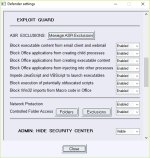
WD can recognize files as dangerous depending on Defender configuration. @Av Gurus has very aggressive Defender settings, so Defender AI is more sensitive to the potential threats.
 
OK, I see. What aggressive Windows Defender settings would provoke this detection? Here is W10 Home with Smart Screen all set to "block," Cloud Protection, PUA in registry and all default Exploit Guards enabled. Only Controlled Folder Access is "off" because it's a pain. Would additional, more aggressive settings only be attainable by using a third party configurator? Edit: I have NVTSysHardener, for example, with some extra settings enabled, but there is also your application Hard_Configurator, right?
 
Last edited by a moderator:
  • Like
Reactions: oldschool and AtlBo
OK, I see. What aggressive Windows Defender settings would provoke this detection? Here is W10 Home with Smart Screen all set to "block," Cloud Protection, PUA in registry and all default Exploit Guards enabled. Only Controlled Folder Access is "off" because it's a pain. Would additional, more aggressive settings only be attainable by using a third party configurator? Edit: I have NVTSysHardener, for example, with some extra settings enabled, but there is also your application Hard_Configurator, right?
You can try ConfigureDefender tool:
ConfigureDefender utility for Windows 10
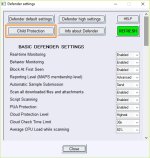
 
You can try ConfigureDefender tool:
ConfigureDefender utility for Windows 10
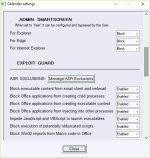
...with "Child Protection" :devil:

Clipboard01.jpg Clipboard02.jpg Clipboard03.jpg
 
Here is a new v1.4 (pre-release) test43:
http://downloads.novirusthanks.org/files/osarmor_setup_1.4_test43.exe

*** Please do not share the download link, we will delete it when we'll release the official v1.4 ***

So far this is what's new compared to the previous pre-release:

+ Improved detection of system processes
+ Improved detection of suspicious processes
+ Block known UAC-bypass attempts
+ Block new and unknown UAC-bypass attempts (experimental)
+ Block known system processes used for UAC-bypass
+ Block ALL "autoelevate" system processes
+ Merged "Block execution of sdctl.exe\sysprep.exe\etc" with "Block known system processes used for UAC-bypass"
+ Block execution of Logoff.exe
+ Block execution of Vssadmin.exe
+ Block execution of Makecab.exe
+ Block execution of LxRun.exe
+ Block execution of Bash.exe
+ Block execution of Sdbinst.exe
+ Minor fixes and optimizations
+ Fixed some false positives

To install it, first uninstall the previous build, then reboot (not really needed but may help), and install the new build.

Since the issue "protection disabled at startup" seems fixed, we may officially release OSA v1.4 with the next build.

With this build 43 there is a new section dedicated to UAC-bypass mitigations:

osa43.png


"Block known UAC-bypass attempts"

This option should not generate FPs (even if I added the orange icon).

It should block known (public) UAC-bypass attempts.

The other 3 options, may generate FPs:

"Block new and unknown UAC-bypass attempts (experimental)"

This experimental option should mitigate new and unknown UAC-bypass attempts that exploit system processes to elevate the malware payload. In my tests it performed well with very low FPs (on the work-PC, with just a few programs installed).

"Block known system processes used for UAC-bypass"

This option blocks the execution of known system processes used to bypass UAC, for example slui.exe, sdctl.exe, fodhelper.exe, wusa.exe, mmc.exe, dccw.exe, BitlockerWizardElev.exe, and some more. By preventing their execution we mitigate entirely the UAC bypass attempt, but in exchange we may get a few alerts (FPs) when they are legitimately executed by the OS.

"Block ALL "autoelevate" system processes"

This option blocks ALL autoelevate system processes and may be particularly useful for companies or officies to mitigate new and unknown UAC bypass attempts that exploit "autoelevate" system processes (generally used in targeted attacks against companies). This option may generate alerts (FPs) depending on the PC usage, i.e if the office PC is used to print\edit documents, read emails, open the web browser, open a few programs and such (doing the same routine all days), you may even get no alerts.

Would be nice if some of you could test these new options (mainly the first two) and share here if you get FPs.

Please include also the blocked event so I can fix it in case.

@shmu26

Will check it and will see.
 
Last edited:
A couple blocks (not connected to test 43)

Date/Time: 3/18/2018 7:11:11 PM
Process: [10880]C:\Windows\System32\sc.exe
Parent: [1484]C:\Windows\System32\svchost.exe
Rule: BlockScExecution
Rule Name: Block execution of sc.exe
Command Line: C:\WINDOWS\system32\sc.exe start wuauserv
Signer:
Parent Signer: Microsoft Windows Publisher

Date/Time: 3/18/2018 9:22:49 PM
Process: [2096]C:\Windows\System32\sc.exe
Parent: [1388]C:\Windows\System32\svchost.exe
Rule: BlockScExecution
Rule Name: Block execution of sc.exe
Command Line: C:\WINDOWS\system32\sc.exe start pushtoinstall registration
Signer:
Parent Signer: Microsoft Windows Publisher
 
"Block new and unknown UAC-bypass attempts (experimental)"
...
"Block known system processes used for UAC-bypass"
...
"Block ALL "autoelevate" system processes"
...
Those options would be welcome especially on the admin account.
But, it would be much better to block processes executed as standard user and do not block processes executed with higher rights. The malware trying to bypass UAC is executed as standard user. When it is executed with administrative rights the UAC has been already bypassed. Furthermore, blocking processes executed with administrative rights can break system tasks and give many false positives.
I block 57 system processes in this way using SRP (configured by Hard_Configurator) and hardly can see any alert even when making Windows updates and upgrades to the higher Windows version.
 
Last edited:
Last edited:
Here is a new v1.4 (pre-release) test44:
http://downloads.novirusthanks.org/files/osarmor_setup_1.4_test44.exe

*** Please do not share the download link, we will delete it when we'll release the official v1.4 ***

So far this is what's new compared to the previous pre-release:

+ Fixed blocking of .cpl applets
+ Block execution of wscript\cscript.exe
+ Improved blocking of vbs\js\vbe\etc scripts
+ Block execution of .cpl applets outside System folder
+ Fixed some false positives

To install it, first uninstall the previous build, then reboot (not really needed but may help), and install the new build.

@shmu26

FPs fixed, will think about the other suggestions.

@Andy Ful

Will run some tests on these days.
 
Those options would be welcome especially on the admin account.
But, it would be much better to block processes executed as standard user and do not block processes executed with higher rights. The malware trying to bypass UAC is executed as standard user. When it is executed
emdorse thatwith administrative rights the UAC has been already bypassed. Furthermore, blocking processes executed with administrative rights can break system tasks and give many false positives.
I block 57 system processes in this way using SRP (configured by Hard_Configurator) and hardly can see any alert even when making Windows updates and upgrades to the higher Windows version.
By experience can endorse that. Risky commands block for Basic User does not seem to cause Windows Update problems
 
exclusions are ignored when "Block execution of suspicious executables"
I have added blocked executable to exclusion list and it keeps being blocked.
 
  • Like
Reactions: AtlBo and shmu26
exclusions are ignored when "Block execution of suspicious executables"
I have added blocked executable to exclusion list and it keeps being blocked.
Sometimes the same command line will get blocked by several different rules, and will need to be whitelisted for each rule separately.
For instance, if cmd calls netsh, it will need an allow rule for cmd and another allow rule for netsh.
 
Sometimes the same command line will get blocked by several different rules, and will need to be whitelisted for each rule separately.
For instance, if cmd calls netsh, it will need an allow rule for cmd and another allow rule for netsh.
it's a simple exe execution from a usb drive, same block message.
 
  • Like
Reactions: AtlBo and shmu26