

The MalwareTips app
Your community, one tap away.
Open MalwareTips from your Home Screen or desktop. Follow discussions, find answers and pick up where you left off.
- Home Screen access
- Optional push alerts
- Your community
You're ready to explore.Explore what's new
Installation instructions
iPhone & iPad
- Open MalwareTips in Safari and tap Share. You may need to open the Page Menu first.
- Choose Add to Home Screen. If it is not listed, use Edit Actions to add it.
- Keep Open as Web App enabled if shown, then tap Add.
Android
- Open MalwareTips in Chrome or another browser that supports app installation.
- Open the browser menu and look for Install app, Install and create shortcut, or Add to Home screen.
- Choose Install and confirm. Wording varies by browser.
Desktop
- Chrome: use the install icon in the address bar, or the menu under Cast, save and share.
- Edge: open the menu, then More tools, Apps and Install this site as an app.
- Safari on Mac: choose Share or File, then Add to Dock. Firefox on Windows: look for the web apps button in the address bar.
If you cannot find an install option, update your browser or use its bookmark option to keep MalwareTips close.
Keep up with your conversations
After installation, open the app and sign in. Enable push notifications in Preferences if you want alerts. On iPhone and iPad, push requires a Home Screen web app and iOS or iPadOS 16.4 or later.
Sign in to manage notificationsInstallation is optional. Your notification settings stay under your control.
You are using an out of date browser. It may not display this or other websites correctly.
You should upgrade or use an alternative browser.
You should upgrade or use an alternative browser.
NoVirusThanks OSArmor
- E Thread starter Evjl's Rain
- Start date
- 1,785 Replies
- 549,053 Views

Why?? I do not agree, there are still companies that use Xp. and people who use Xp because they do not have anything else and do not know that Linux exists.& i must agree with the others, support for XP has to stop.
Well in my case I have broken two PCs do not know why, and now I'm using Xp and Xubuntu Because my machine does not go with W7 or W10.
I also respect Andreas if he does not want to continue giving support to Xp.


Not sure that is true.Why?? I do not agree, there are still companies that use Xp. and people who use Xp because they do not have anything else and do not know that Linux exists.
Well in my case I have broken two PCs do not know why, and now I'm using Xp and Xubuntu Because my machine does not go with W7 or W10.
I also respect Andreas if he does not want to continue giving support to Xp.
even my brothers laptop is win7 with a slow 720p screen, celeron & 3gb ram.
Businesses who use XP still are already not thinking about security, so a security application that supports XP or not, truly is not a thought of theirs.
Well, if it's true ... I've run out of two PCs overnight. and this one I'm using was given to me by my brother who forgot it in the back room ... with 1GB of ram. now I have increased it to 2 gb of ram. ddr 400 that are slower than the horse of the badNot sure that is true.

Here is a new v1.4 (pre-release) test64:
http://downloads.novirusthanks.org/files/osarmor_setup_1.4_test64.exe
*** Please do not share the download link, we will delete it when we'll release the official v1.4 ***
So far this is what's new compared to the previous pre-release:
+ Improved Block suspicious processes
+ Improved Block execution of PowerShell malformed commands
+ Disabled by default "Block reg.exe from hijacking Registry startup entries"
+ Minor fixes and optimizations
+ Fixed some false positives
To install it, first uninstall the previous build, then reboot (not really needed but may help), and install the new build.
If you find any false positive or issue please let me know.
@Carphedon
Should be fixed now.
Let me congratulate you, your'e a great programmer and you know how to fix bugs very quickly.
We are happy at using your beta programs, thank you for protect us.
F
ForgottenSeer 58943
Why?? I do not agree, there are still companies that use Xp. and people who use Xp because
These are the types of companies and people a security software shouldn't want themselves associated with. Not only does it show a lack of IT knowledge and proactive security measures, but it also probably indicates they don't even have enough money to buy your product.
Not a single second of development manpower and resources should be spent supporting legacy operating systems.
F
ForgottenSeer 58943
Not long ago I saw in a post office that they had Xp and a state employment office as well. Now I do not know if they had Internet access or not. In any case, Xp is not recommended, I agree with that.
Those tired old govt. offices really don't care about security so that's not surprising. The only proper way to secure an XP machine is to yank out the ethernet card to put hot glue in the ethernet port. I've dealt with some XP machines in recent months, and that's how we secure them in situations where firms simply can't afford replacement. Those machines will never talk out again, ever. The 'work around' is you setup bi-directional sync from the XP machine to a Win10 machine, then use the Win10 machine to talk out if it is required.
Here is a new v1.4 (pre-release) test64:
http://downloads.novirusthanks.org/files/osarmor_setup_1.4_test64.exe
*** Please do not share the download link, we will delete it when we'll release the official v1.4 ***
So far this is what's new compared to the previous pre-release:
+ Improved Block suspicious processes
+ Improved Block execution of PowerShell malformed commands
+ Disabled by default "Block reg.exe from hijacking Registry startup entries"
+ Minor fixes and optimizations
+ Fixed some false positives
To install it, first uninstall the previous build, then reboot (not really needed but may help), and install the new build.
If you find any false positive or issue please let me know.
@Carphedon
Should be fixed now.
Reported false positives are still there, i attached new logs, see previous post for context. Thank you for all your work!
Attachments

Got this two when updating IDM put to exclude for now.
Date/Time: 12/05/2018 12:41:01 PM
Process: [3876]C:\Windows\SysWOW64\net.exe
Process MD5 Hash: B9A4DAC2192FD78CDA097BFA79F6E7B2
Parent: [1728]C:\Users\xxx\AppData\Local\Temp\IDM_Setup_Temp\IDM1.tmp
Rule: BlockNetNet1Execution
Rule Name: Block execution of net\net1.exe
Command Line: "C:\Windows\System32\net.exe" start IDMWFP
Signer:
Parent Signer: Tonec Inc.
User/Domain: xxx/xxx
System File: True
Parent System File: False
Integrity Level: High
Parent Integrity Level: High
Date/Time: 12/05/2018 12:41:00 PM
Process: [3632]C:\Windows\SysWOW64\net1.exe
Process MD5 Hash: 2041012726EF7C95ED51C15C56545A7F
Parent: [1896]C:\Windows\SysWOW64\net.exe
Rule: BlockNetNet1Execution
Rule Name: Block execution of net\net1.exe
Command Line: C:\Windows\system32\net1 stop IDMWFP
Signer:
Parent Signer:
User/Domain: xxx/xxx
System File: True
Parent System File: True
Integrity Level: High
Parent Integrity Level: High
[%PROCESS%: C:\Windows\SysWOW64\net.exe] [%PROCESSCMDLINE%: "C:\Windows\System32\net.exe" stop IDMWFP] [%PARENTPROCESS%: C:\Users\xxx\AppData\Local\Temp\IDM_Setup_Temp\IDM1.tmp] [%PARENTSIGNER%: Tonec Inc.]
[%PROCESS%: C:\Windows\SysWOW64\net.exe] [%PROCESSCMDLINE%: "C:\Windows\System32\net.exe" start IDMWFP] [%PARENTPROCESS%: C:\Users\xxx\AppData\Local\Temp\IDM_Setup_Temp\IDM1.tmp] [%PARENTSIGNER%: Tonec Inc.]
[%PROCESS%: C:\Windows\SysWOW64\net1.exe] [%PROCESSCMDLINE%: C:\Windows\system32\net1 stop IDMWFP] [%PARENTPROCESS%: C:\Windows\SysWOW64\net.exe]
[%PROCESS%: C:\Windows\SysWOW64\net1.exe] [%PROCESSCMDLINE%: C:\Windows\system32\net1 start IDMWFP] [%PARENTPROCESS%: C:\Windows\SysWOW64\net.exe]
Date/Time: 12/05/2018 12:41:01 PM
Process: [3876]C:\Windows\SysWOW64\net.exe
Process MD5 Hash: B9A4DAC2192FD78CDA097BFA79F6E7B2
Parent: [1728]C:\Users\xxx\AppData\Local\Temp\IDM_Setup_Temp\IDM1.tmp
Rule: BlockNetNet1Execution
Rule Name: Block execution of net\net1.exe
Command Line: "C:\Windows\System32\net.exe" start IDMWFP
Signer:
Parent Signer: Tonec Inc.
User/Domain: xxx/xxx
System File: True
Parent System File: False
Integrity Level: High
Parent Integrity Level: High
Date/Time: 12/05/2018 12:41:00 PM
Process: [3632]C:\Windows\SysWOW64\net1.exe
Process MD5 Hash: 2041012726EF7C95ED51C15C56545A7F
Parent: [1896]C:\Windows\SysWOW64\net.exe
Rule: BlockNetNet1Execution
Rule Name: Block execution of net\net1.exe
Command Line: C:\Windows\system32\net1 stop IDMWFP
Signer:
Parent Signer:
User/Domain: xxx/xxx
System File: True
Parent System File: True
Integrity Level: High
Parent Integrity Level: High
Last edited:

Here is a new v1.4 (pre-release) test65:
http://downloads.novirusthanks.org/files/osarmor_setup_1.4_test65.exe
*** Please do not share the download link, we will delete it when we'll release the official v1.4 ***
So far this is what's new compared to the previous pre-release:
+ Block rundll32.exe from using RegisterOCX
+ Improved Block suspicious command-lines (50+ new internal rules)
+ Improved Block loading of .inf files via InstallHinfSection\LaunchINFSection\etc
+ Fixed "Restore to Default" and disabling of "Block reg.exe from hijacking Registry startup entries"
+ Fixed some false positives
To install it, first uninstall the previous build, then reboot (not really needed but may help), and install the new build.
If you find any false positive or issue please let me know.
@Stas
Thansk for sharing, it should be fixed now.
@Carphedon
Add these 3 rules in Exclusions.db:
I will discuss soon if we will include them internally.
http://downloads.novirusthanks.org/files/osarmor_setup_1.4_test65.exe
*** Please do not share the download link, we will delete it when we'll release the official v1.4 ***
So far this is what's new compared to the previous pre-release:
+ Block rundll32.exe from using RegisterOCX
+ Improved Block suspicious command-lines (50+ new internal rules)
+ Improved Block loading of .inf files via InstallHinfSection\LaunchINFSection\etc
+ Fixed "Restore to Default" and disabling of "Block reg.exe from hijacking Registry startup entries"
+ Fixed some false positives
To install it, first uninstall the previous build, then reboot (not really needed but may help), and install the new build.
If you find any false positive or issue please let me know.
@Stas
Thansk for sharing, it should be fixed now.
@Carphedon
Add these 3 rules in Exclusions.db:
Code:
[%PROCESS%: C:\Windows\System32\netsh.exe] [%PROCESSCMDLINE%: netsh.exe  interface ipv6 add route ????::/? "*" ????::?  store=active]
[%PROCESS%: C:\Windows\System32\cmd.exe] [%PROCESSCMDLINE%: C:\Windows\system32\cmd.exe /c echo 10.?.??.?? |findstr -r .*\..*\..*\..*]
[%PROCESS%: C:\Windows\System32\cmd.exe] [%PROCESSCMDLINE%: C:\Windows\system32\cmd.exe /c echo 192.168.1.??? |findstr -r .*\..*\..*\..*]
I will discuss soon if we will include them internally.
Here is a new v1.4 (pre-release) test66:
http://downloads.novirusthanks.org/files/osarmor_setup_1.4_test66.exe
*** Please do not share the download link, we will delete it when we'll release the official v1.4 ***
So far this is what's new compared to the previous pre-release:
+ Fixed some false positives
+ Improved Block processes located in suspicious folders
+ Improved Block execution of malformed PowerShell commands
+ Block execution of scp\ssh\sftp.exe (located on C:\WINDOWS\System32\OpenSSH\)
To install it, first uninstall the previous build, then reboot (not really needed but may help), and install the new build.
If you find any false positive or issue please let me know.
http://downloads.novirusthanks.org/files/osarmor_setup_1.4_test66.exe
*** Please do not share the download link, we will delete it when we'll release the official v1.4 ***
So far this is what's new compared to the previous pre-release:
+ Fixed some false positives
+ Improved Block processes located in suspicious folders
+ Improved Block execution of malformed PowerShell commands
+ Block execution of scp\ssh\sftp.exe (located on C:\WINDOWS\System32\OpenSSH\)
To install it, first uninstall the previous build, then reboot (not really needed but may help), and install the new build.
If you find any false positive or issue please let me know.
Here is a new v1.4 (pre-release) test67:
http://downloads.novirusthanks.org/files/osarmor_setup_1.4_test67.exe
*** Please do not share the download link, we will delete it when we'll release the official v1.4 ***
So far this is what's new compared to the previous pre-release:
+ Fixed some false positives
To install it, first uninstall the previous build, then reboot (not really needed but may help), and install the new build.
If you find any false positive or issue please let me know.
http://downloads.novirusthanks.org/files/osarmor_setup_1.4_test67.exe
*** Please do not share the download link, we will delete it when we'll release the official v1.4 ***
So far this is what's new compared to the previous pre-release:
+ Fixed some false positives
To install it, first uninstall the previous build, then reboot (not really needed but may help), and install the new build.
If you find any false positive or issue please let me know.
features that OsArmour need are; a personal password to acccess into main menu and rest of the options.
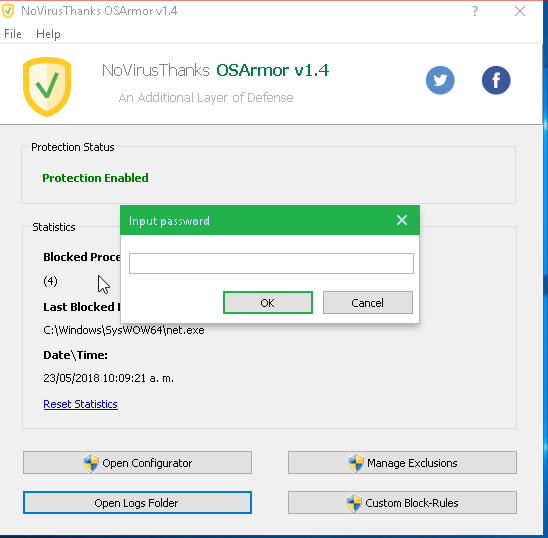
Another Nvtoa feature it need lock itself in the bacground to avoid the termination process into taskmgr.exe

And it need the searchbar with definitions to save time by configuring parameters.
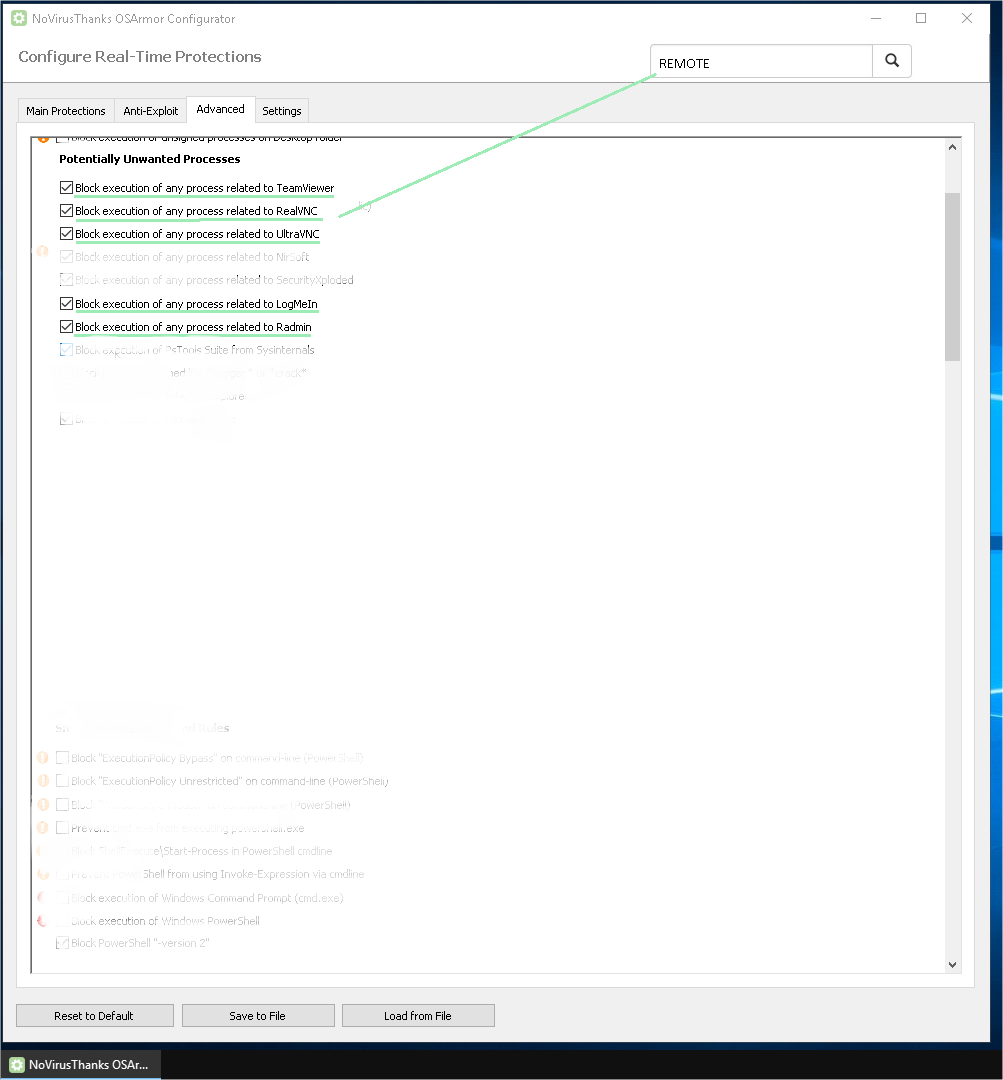
Thank you very much for giving us this great program, 2 months using it.
Another Nvtoa feature it need lock itself in the bacground to avoid the termination process into taskmgr.exe
And it need the searchbar with definitions to save time by configuring parameters.
Thank you very much for giving us this great program, 2 months using it.
Here is a new v1.4 (pre-release) test68:
http://downloads.novirusthanks.org/files/osarmor_setup_1.4_test68.exe
*** Please do not share the download link, we will delete it when we'll release the official v1.4 ***
So far this is what's new compared to the previous pre-release:
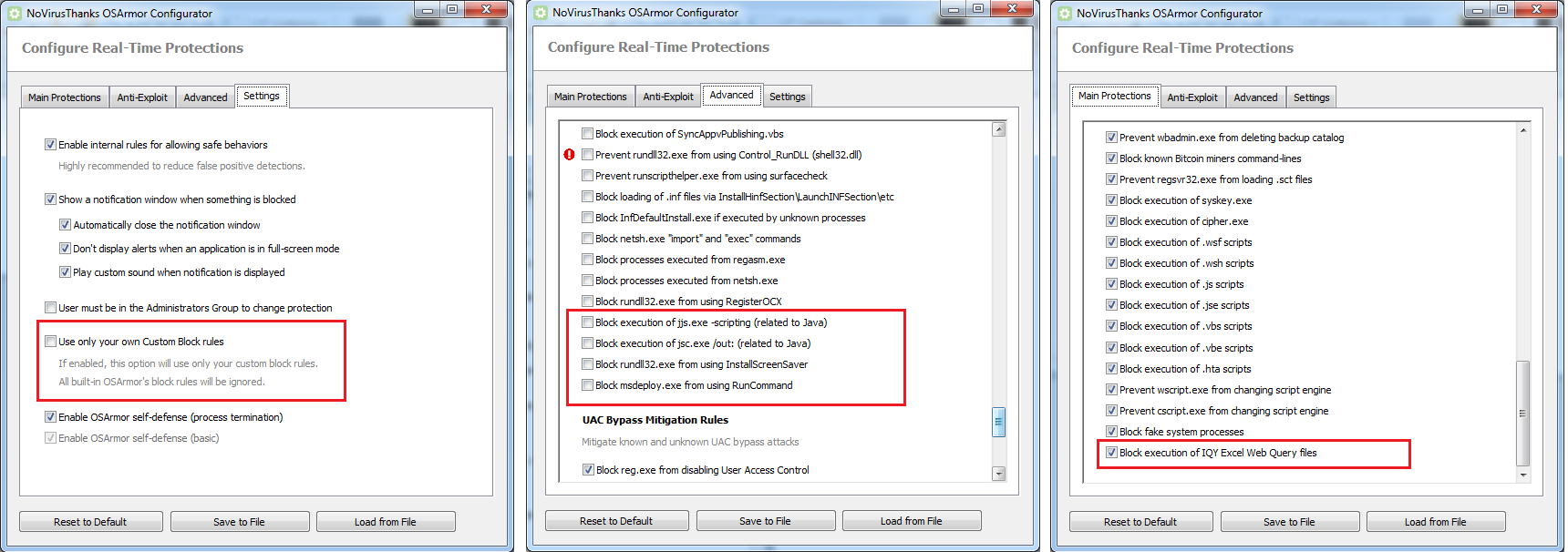
+ New option to "Use only your own Custom Block rules"
+ Extended process and parent process cmdline to 8192 chars (max for Windows)
+ Block execution of IQY Excel Web Query files (Main Protections, enabled)
+ Block rundll32.exe from using InstallScreenSaver
+ Block msdeploy.exe from using RunCommand
+ Block execution of jjs.exe -scripting (related to Java)
+ Block execution of jsc.exe /outrelated to Java)
+ Updated Help/FAQs file with two new Q&A
+ Fixed all reported false positives
To install it, first uninstall the previous build, then reboot (not really needed but may help), and install the new build.
If you find any false positive or issue please let me know.
Here is a screenshot:
//EDIT
* Will reply to posted questions tomorrow, just wanted to post this update *
http://downloads.novirusthanks.org/files/osarmor_setup_1.4_test68.exe
*** Please do not share the download link, we will delete it when we'll release the official v1.4 ***
So far this is what's new compared to the previous pre-release:
+ New option to "Use only your own Custom Block rules"
+ Extended process and parent process cmdline to 8192 chars (max for Windows)
+ Block execution of IQY Excel Web Query files (Main Protections, enabled)
+ Block rundll32.exe from using InstallScreenSaver
+ Block msdeploy.exe from using RunCommand
+ Block execution of jjs.exe -scripting (related to Java)
+ Block execution of jsc.exe /out
related to Java)+ Updated Help/FAQs file with two new Q&A
+ Fixed all reported false positives
To install it, first uninstall the previous build, then reboot (not really needed but may help), and install the new build.
If you find any false positive or issue please let me know.
Here is a screenshot:
//EDIT
* Will reply to posted questions tomorrow, just wanted to post this update *

@NoVirusThanks
I miss and auto-update feature in the final version (optional)
I miss as well the popup behaviour, to manually accept or block the detections of OsArmor (optional)
When the final version will be released?
I miss and auto-update feature in the final version (optional)
I miss as well the popup behaviour, to manually accept or block the detections of OsArmor (optional)
When the final version will be released?


Does it make sense to use both OSArmor and EXE Radar Pro?
D
Deleted member 178
Yes it does. I do it.Does it make sense to use both OSArmor and EXE Radar Pro?
Recently browsing
Members who viewed this thread in the last 5 minutes
You may also like...
-

-
 Advanced Plus Security enaph's PC Security Config
 -

-

-
