

Advice Request Odd symbols in Chrome search

Please provide comments and solutions that are helpful to the author of this topic.
Status
Not open for further replies.

Malakke

Level 5
Thread author
Verified
Well-known
Jan 29, 2013
214
575
368
Hello guys. I was testing the effectiveness of DNS servers (Opendns, Norton Connectsafe, etc...) against porn sites, and when i searched "xvideos" in Chrome browser....:
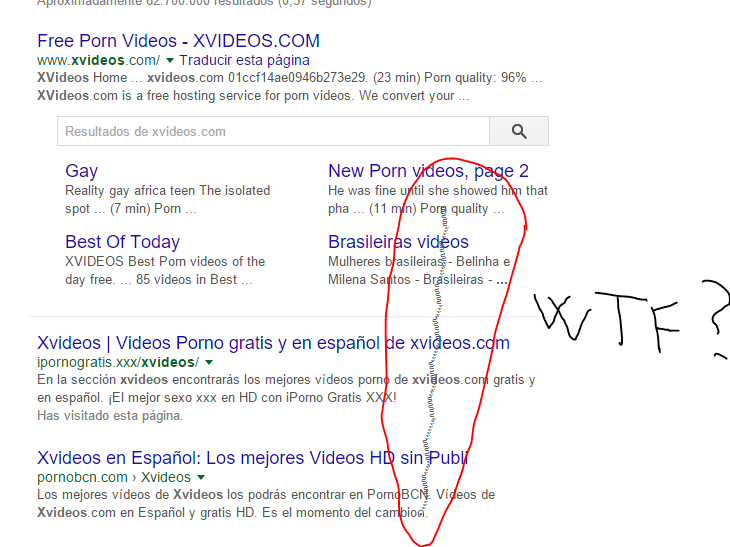
upload_2016-2-3_11-2-24.png


Whatever DNS server i use, it shows these odd symbols when I do a search for a term related to porn
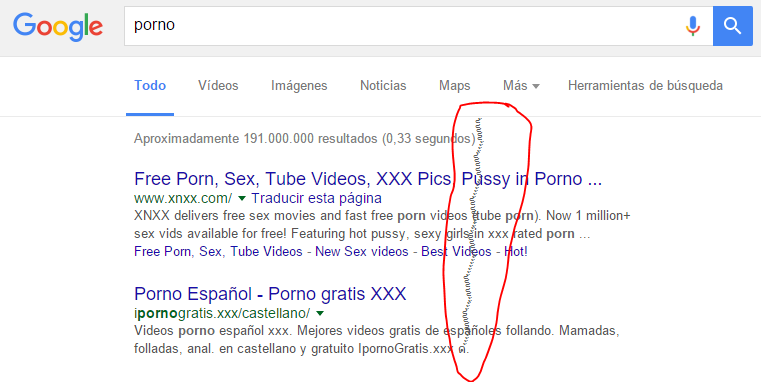
upload_2016-2-3_11-6-56.png


Internet Explorer or Edge not show this behaviour...
 
Try using different search engines and see if the issue persists, e.g. Bing, Yahoo, DuckDuckGo or Startpage. It's an accented or modifier unicode implemented several times above/below a normal character, you can find those in character map in Windows OS.
 
Try using different search engines and see if the issue persists, e.g. Bing, Yahoo, DuckDuckGo or Startpage. It's an accented or modifier unicode implemented several times above/below a normal character, you can find those in character map in Windows OS.

With other engines the issue is gone... Paranormal activity cleared ;)
 
Although it has been fixed, the first thing I would've recommended would be changing DNS it is very strange that it's happening never seen anything like it before in my life o_O
It's just a key character. Back in my trolling days, I used to use those characters to annoy random people off the internet (because that's the roll of a troll xD) If you want to create or use these keys, try googling "Zalgo Generator".
 
Its a key character, there are instances that some AV can detect malicious page if you search some keywords without visiting a site however low chance of rate to get infected.

So that likely a bug that contribute from your installed addons or DNS.
 
Status
Not open for further replies.