Solved onclickads redirection problem

FRST.gif
Scan with Farbar Recovery Scan Tool

Please re-run Farbar Recovery Scan Tool to give me a fresh look at your system.
  • Right-click on
    FRST.gif
    icon and select
    RunAsAdmin.jpg
    Run as Administrator to start the tool.
    (XP users click run after receipt of Windows Security Warning - Open File).
  • Make sure that Addition option is checked.
  • Press Scan button and wait.
  • The tool will produce two logfiles on your desktop: FRST.txt and Addition.txt.
Please include their content into your next reply.
 
Something new today!!!

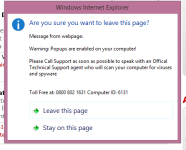
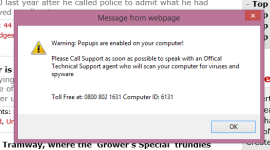
Today I got an unwanted pop-up (2.png) and when I clicked the top RH corner X to close it, it immediately came back.

When I clicked the X again a different pop-up immediately showed (3.png).

I've assumed that clicking either the "Stay" option and the "Leave" option would not have been a good move - so I rebooted straight away.

Any suggestions??
 
Warnings you get are usually related to compromised website and not to infected computer. I didn't find signs of malware in your latest reports.
 
Hi again - sorry about the delay in responding but I've been very busy and haven't had a chance to see how the browser is reacting.

I guess if you say there isn't any signs of malware then there won't be anything else that can be done. I thank you for your time and patience on this matter. I do believe though that something isn't right - maybe if I just switch browsers then at least I can ignore any problems that exist.
 
I believe so. I have Chrome installed as well as IE although I don't really use it. I haven't spotted the malware appearing on Chrome so I'll give that a try and hope for the best.