Advanced Security Overkill's Mobile Security Config

Archived configuration (not current) · expand details
Thread details
Last updated
Aug 29, 2023
Mobile brand
Samsung
Mobile model
Galaxy S20 FE 5G 128 GB + 64 GB SD Card
Mobile operating system
Android
Mobile OS version
13
Mobile system updates
Automatic updates
App store(s)
    • Google Play Store
    • Samsung Galaxy Store
App updates
Auto-update on any connection
Screen lock method
PIN
Biometric security
    • Fingerprint(s)
Stolen Device Protection
Security and privacy apps
Bitdefender Antivirus Free | Virus Total Mobile | NextDNS | Google Play Protect
Firewall and VPN apps
NextDNS | Proton VPN (Free version)
Mobile browsers
Google Chrome | Firefox | Firefox Focus | Brave | Vivaldi | Kiwi Browser | Opera Mini | Ghostery Private Browser | Tor Browser | Swisscows Search | Samsung Internet
Password and passkey manager
Keepass2Android | Proton Pass
Phone & Caller ID
Samsung Phone | T-Mobile Scam Block
Messaging
Default Text | Facebook Messenger | WhatsApp | Signal | Swisscows TeleGuard | Session Decentralized/Oxen Onion Routing Chat
Music & Podcasts
Samsung Music | Musicolet | Musixmatch | AIMP | Mp3 Player | Music Player | Vinylage | Casse-o-player | Spotify | YouTube Music | SoundHound
Photo & Video
Samsung Gallery | Google Photos | YouTube | NewPipe | VLC | MPV
Entertainment
Tubi | Netflix
Note-taking
Samsung Notes
Cloud storage
Google Photos | Google Drive | MEGA | Proton Drive
Games
None
Android launcher
One UI 5.1
Two-factor authentication
None
File and photo backups
SD Card | MEGA | Google Photos | Google Drive | Proton Drive
Subscriptions
    • None
Notable changes
SD Maid Pro/SE for uninstalling apps, and cleaning cache etc.

================================

Note: I've been tinkering around with different search engines like... Mojeek, Presearch, Ecosia, Swisscows, Startpage, PriEco, Metager and Quant.

I also like tinkering with different browsers.

================================

I'm also tinkering with Proton Mail and Tutanota.

================================

I am using Google Voice as my burner number for WhatsApp and Signal.

================================

WhatsApp (max file size = 2GB)

Swisscows TeleGuard (max file size = 2.5GB)
Feedback preference

Only essential issues, please

Overkill

Level 31
Verified
Honorary Member
Forum Veteran
Last edited:
I have a serious problem with music apps! 😀

I have a 64GB SD Card that is almost full with mostly Mp3's and some Audio files. Rather than constantly switching music artists/discographies, using only one music app, I use multiple music apps for different genres.
 
Last edited:
I think I've tried Kiwi before. How can you tell Frost has lots of trackers?

I wasn't sure where to add SD Maid because of no 'Cleaners' category.
 
Last edited:
You can use either Exodus, App Manager or ClassyShark3xodus from F-Droid to check for trackers in apps


Last edited:

Attachments

  • Screenshot_20230507_005318_Google Play Store.png
    Screenshot_20230507_005318_Google Play Store.png
    158.2 KB · Views: 368
I see your IP address is exposed since you are not using a VPN

All the apps on your phone when connecting out will have your IP exposed and unencrypted.

I would suggest you get Mullvad VPN and you can set NextDNS as your DNS server to encrypt and protect your DNS queries. With a VPN set to Always-On your IP address will always be encrypted.

However, Adguard Premium will NOT work with a VPN (any VPN for that matter) for Adguard will need to create a VPN itself. So, you either operate without a VPN which exposes your IP address or you work with a VPN and with no Adguard Premium but your IP address is encrypted and the DNS queries encrypted and protected by Mullvad default DNS.

Also, don't use YouTube, unless you are paying for it. Can use apps like LibreTube (if not using a VPN)


or NewPipe (if using a VPN)


These 2 do NOT have trackers

FYI, Sophos Intercept X's Web Filtering don't work with Kiwi Browser. It supports mainstream browsers like Chrome, FF etc. If you use Kiwi Browser then you need extensions to filter the web. Adguard Premium will likely filter Kiwi Browser (you need to confirm on this as it's a device-wide app) but you cannot use a dedicated VPN with it as mentioned above. Sophos Intercept X's Web Filtering also looks like NOT web filtering Samsung Internet Browser. You need to check to confirm.

You need to make decisions on what apps work best for your needs.
 
Last edited:
I'm honestly not worried about my IP showing. I'm not going to use a VPN either. I prefer AdGuard the way I have it configured along with NDNS. I could do a lot more configuring (paranoid mode) but I'm satisfied with my configuration for now. Sometimes less is more.

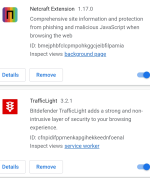
My extensions for Kiwi

Screenshot_20230507_022842_Kiwi Browser.png
 
Last edited:
I'm honestly not worried about my IP showing. I'm not going to use a VPN either. I prefer AdGuard the way I have it configured along with NDNS. I could do a lot more configuring (paranoid mode) but I'm satisfied with my configuration for now. Sometimes less is more.

My extensions for Kiwi

View attachment 275168

These 2 extensions collect user data.

Can use Emsisoft Browser Security and add phishing filters from filterlists.com to your Adguard Premium for better privacy
 
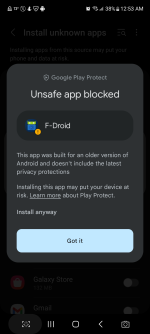
Same thing happens.
Instead of using the default F-Droid client, consider Droid-ify or Neo Store which are F-Droid client alternatives with wider repos, features and Material You design.


Temporary Allow your default browser to install Unknown apps.
 
I had Sophos Intercept X and AdGuard, but I wanted to use a VPN, so I had to uninstall AG since it creates a local VPN to be able to Intercept traffic. Sophos Intercept X was crashing a lot, so I went back to the only other free AV I know of. I added some browsers other than Chrome and FF. Those are the most significant changes. I like to try new apps, and tinker around to see if they are keepers.
 

Recently browsing

Members who viewed this thread in the last 5 minutes

Back
Top