

The MalwareTips app
Your community, one tap away.
Open MalwareTips from your Home Screen or desktop. Follow discussions, find answers and pick up where you left off.
- Home Screen access
- Optional push alerts
- Your community
You're ready to explore.Explore what's new
Installation instructions
iPhone & iPad
- Open MalwareTips in Safari and tap Share. You may need to open the Page Menu first.
- Choose Add to Home Screen. If it is not listed, use Edit Actions to add it.
- Keep Open as Web App enabled if shown, then tap Add.
Android
- Open MalwareTips in Chrome or another browser that supports app installation.
- Open the browser menu and look for Install app, Install and create shortcut, or Add to Home screen.
- Choose Install and confirm. Wording varies by browser.
Desktop
- Chrome: use the install icon in the address bar, or the menu under Cast, save and share.
- Edge: open the menu, then More tools, Apps and Install this site as an app.
- Safari on Mac: choose Share or File, then Add to Dock. Firefox on Windows: look for the web apps button in the address bar.
If you cannot find an install option, update your browser or use its bookmark option to keep MalwareTips close.
Keep up with your conversations
After installation, open the app and sign in. Enable push notifications in Preferences if you want alerts. On iPhone and iPad, push requires a Home Screen web app and iOS or iPadOS 16.4 or later.
Sign in to manage notificationsInstallation is optional. Your notification settings stay under your control.
You are using an out of date browser. It may not display this or other websites correctly.
You should upgrade or use an alternative browser.
You should upgrade or use an alternative browser.
New Update Patch My PC Home Updater
-
 Thread starter
silversurfer
Thread starter
silversurfer
- Start date
- 49 Replies
- 16,608 Views


What's new in 5.0.11.0 (13-Feb/2025)
Fixes and Improvements:
- Fixed an issue when application might stuck on “Updating” status, even after it had been successfully updated
- Fixed an issue with events logging during application update when it might fail with “Access Denied” error
- Support application installers compressed in TAR files
- Improvementes for scheduled tasks
- Minor improvements and fixes
Removed the following apps:
- AS SSD Benchmark
- Authy Desktop
- Backup and Sync from Google
- EagleGet
- ComboFix
Added the following apps:
- DeepCool
- HDCleaner
- Logi Options+
- LosslessCut (Portable)
- Nvidia App
- NVIDIA GeForce NOW
- RegCool
- WD Dashboard
- Wise ImageX
Home Updater Release Notes
5.4.5.0 (09-July-2026)Copy Link Home Updater 5.4.5.0 includes improvements to the Scheduler experience and enhanced registry matching logic for applications with multiple installed versions. This release is already self-updating for users on the beta channel and will be available for self-update...
 patchmypc.com
What's new in 5.1.0.0. (14-March/2025)
Fixes and Improvements:
- Fixed an issue where the PortableApps folder was created even when no app was downloaded.
- Fixed an issue where the app count in the “Apps” tab didn’t reflect the filter configuration.
- Fixed an issue where the UI could lock up when uninstalling apps.
- Fixed an issue where the UI may not be visible when switching from an external monitor to a laptop display.
- Improved overall accessibility for better user experience.
New Features:
- Added an option to prevent installer files from being deleted after installation.
- Added an option to prevent app shortcuts from being created after installation.
- Added a Light Mode
Home Updater Release Notes
5.4.5.0 (09-July-2026)Copy Link Home Updater 5.4.5.0 includes improvements to the Scheduler experience and enhanced registry matching logic for applications with multiple installed versions. This release is already self-updating for users on the beta channel and will be available for self-update...
patchmypc.com
What's new in 5.1.1.0 (25-March/2025)
Fixes:
- Fixes an issue where the Home Updater may show a 500 HTTP error code
Home Updater Release Notes
5.4.5.0 (09-July-2026)Copy Link Home Updater 5.4.5.0 includes improvements to the Scheduler experience and enhanced registry matching logic for applications with multiple installed versions. This release is already self-updating for users on the beta channel and will be available for self-update...
patchmypc.com
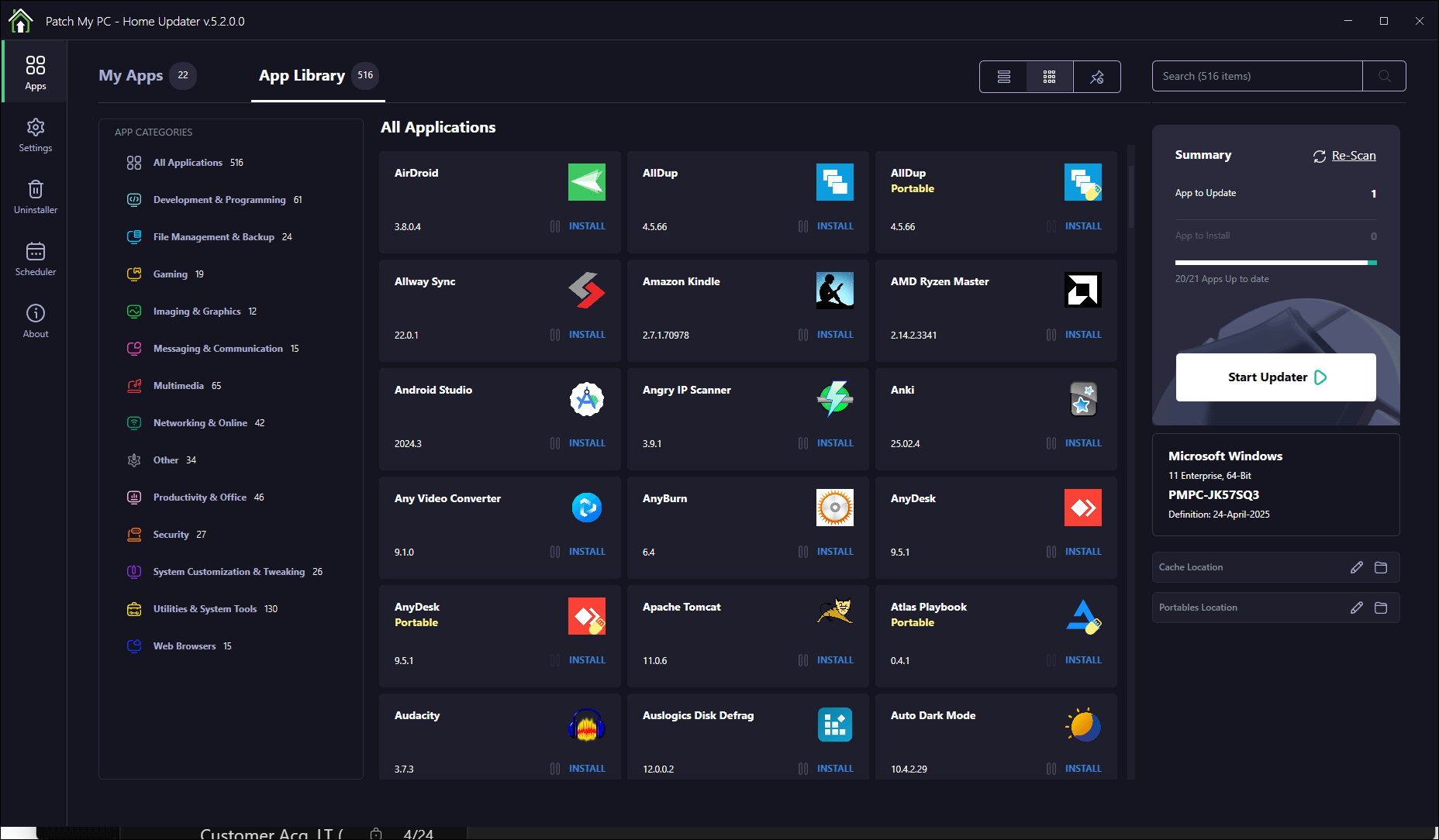
What’s new in 5.1.3.0 (10-April/2025):
- Added filtering by app categories in both the App Library and MyApps tabs.
- Added the ability to export and import settings as a JSON file.
- Added support for exporting a list of apps from one device and importing it on another for one-click installation.
- Improved app scan performance for faster detection.
Fixes and Improvements:
- Updated UI spacing and margins in the Settings panel.
- Made backend stability improvements and general performance tweaks.
Home Updater Release Notes
5.4.5.0 (09-July-2026)Copy Link Home Updater 5.4.5.0 includes improvements to the Scheduler experience and enhanced registry matching logic for applications with multiple installed versions. This release is already self-updating for users on the beta channel and will be available for self-update...
patchmypc.com
What’s new in 5.2.0.0 (25-April/2025):
- Added app categorization feature in the App Library for easier browsing and filtering.
Fixes and Improvements:
- Fixed an issue where the busy indicator could overlap a vertical taskbar.
- Fixed image loading failures related to color management profiles.
- Improved error handling for methods that access the Windows Registry.
Home Updater Release Notes
5.4.5.0 (09-July-2026)Copy Link Home Updater 5.4.5.0 includes improvements to the Scheduler experience and enhanced registry matching logic for applications with multiple installed versions. This release is already self-updating for users on the beta channel and will be available for self-update...
patchmypc.com
What’s new in 5.2.0.1 (04-May/2025):
Fixes and Improvements:
- Fixed an issue when being run from a scheduled task, where an error may happen: ERROR System.ArgumentException: The path is empty. (Parameter ‘path’)
Home Updater Release Notes
5.4.5.0 (09-July-2026)Copy Link Home Updater 5.4.5.0 includes improvements to the Scheduler experience and enhanced registry matching logic for applications with multiple installed versions. This release is already self-updating for users on the beta channel and will be available for self-update...
patchmypc.com
What's new in 5.2.1.0 (14-May/2025)
New Features & Improvements:
- Introduced a portable version of Home Updater for users who want to run it without installation. Great for techs on the go! Download the portable version here: https://homeupdater.patchmypc.com/public/PatchMyPC-HomeUpdater-Portable.exe
- We will update our download page in the coming days with an option for the portable download.
- Application icons now load faster thanks to new caching logic.
- Improved detection logic for installed applications to reduce mismatches and make scans more accurate.
- Now caches icon files locally to improve overall startup and scan times.
- Improvements in detection for portable applications
Fixes & UI Updates:
- Updated the “Need Help” section on the About page with cleaner links and better guidance.
- Other improvements to the About tab
- Updated the release notes URL to ensure it always points to the latest info.
- Fixed a bug where the log file was being written to the wrong folder.
- Minor UI fix: the Install button in the Import Template Wizard now behaves correctly.
- Updated how the app respects your system theme. If you’re using light or dark mode, the app will now follow suit more reliably.
Home Updater Release Notes
5.4.5.0 (09-July-2026)Copy Link Home Updater 5.4.5.0 includes improvements to the Scheduler experience and enhanced registry matching logic for applications with multiple installed versions. This release is already self-updating for users on the beta channel and will be available for self-update...
patchmypc.com
What's new in 5.2.1.3 (Preview Channel Only) - (23-May/2025)
Note: This is a preview release. To try it, enable preview updates in the Settings tab and click Check for Updates in the About tab.
Report bugs or feedback here: Home Updater: Report Bugs and Issues Not Related to Installing Apps
If you don’t see the update, try toggling “Use the beta channel for checking for Patch My PC updates” in Settings and check again. We had a bug where this setting might’ve been reset during to Product updates during self-update.
New Features:
- Added a new Startup tab for managing startup items
- View, disable, or delete startup applications and services
- Designed to make it easier to clean up what runs when Windows boots
Home Updater Release Notes
5.4.5.0 (09-July-2026)Copy Link Home Updater 5.4.5.0 includes improvements to the Scheduler experience and enhanced registry matching logic for applications with multiple installed versions. This release is already self-updating for users on the beta channel and will be available for self-update...
patchmypc.com
5.2.3.0 (06-June-2025)
Startup Manager
- New tab to manage which apps launch at startup. This helps speed up your boot time and gives you control over what runs in the background.
Generate Diagnostic ZIP
- You can now create a diagnostic ZIP file from the About page. This helps if you need to send logs on our support forum for Home Updater.
Remove Portable Apps
- Right-click any portable app in the App Catalog or Uninstaller page to remove it directly.
Applications Added:
- FFmpeg (Full Shared) – Portable
- Fing
- G-Helper – Portable
- IntelliJ IDEA Community Edition
- K-Lite Basic Codec Pack
- K-Lite Full Codec Pack
- K-Lite Standard Codec Pack
- KeePass Password Safe v1
- LibreOffice Help Pack
- MemTest86 – Portable
- Nexus Vortex
- Nvidia Profile Inspector – Portable
- Pale Moon – Portable
- ViVeTool – Portable
- WinCDEmu
- Windows PC Health Check
- Wise Video Converter
Applications Removed:
- Driver Easy
Home Updater Release Notes
5.4.5.0 (09-July-2026)Copy Link Home Updater 5.4.5.0 includes improvements to the Scheduler experience and enhanced registry matching logic for applications with multiple installed versions. This release is already self-updating for users on the beta channel and will be available for self-update...
patchmypc.com
5.2.3.1 (14-July-2025) (Preview Only)
This preview release of Patch My PC Home Updater introduces several UI enhancements, new features, performance improvements, and bug fixes. The release focuses on optimizing the startup manager, improving layout options, and enhancing user interaction through new context menu commands.
- New Features
- Added support to extract compressed portable apps after downloading.
- Implemented a compact UI layout mode for more streamlined use.
- Added ‘Open Web Page’ command to the context menu in the app catalog.
- Improvements
- Improved the Uninstaller view for better usability.
- Enhanced performance in the Startup Manager.
- General UI improvements throughout the application.
- Unified visual template for app display names across views.
- Updated color scheme for Light Mode for better visual consistency.
- Startup performance improvements.
- Fixes
- Resolved issue with removing items in the Startup view.
- Fixed issues with Dell Command and RustDesk applications.
Home Updater Release Notes
5.4.5.0 (09-July-2026)Copy Link Home Updater 5.4.5.0 includes improvements to the Scheduler experience and enhanced registry matching logic for applications with multiple installed versions. This release is already self-updating for users on the beta channel and will be available for self-update...
patchmypc.com
5.2.3.2 (23-July-2025) (Preview Only)
This preview release includes UI refinements, bug fixes, and improvements to app-specific processes.
Fixes
- Resolved a UI issue where the App Types dropdown overlapped the app catalog tabs when display scaling was set above 100%.
- Fixed an issue preventing deletion of import templates in Settings.
- Fixed downloading issue for the Display Driver Uninstaller app.
- Fixed extraction issue for the StaxRip app.
Home Updater Release Notes
5.2.3.2 (23-July-2025) (Preview Only) This preview release includes UI refinements, bug fixes, and improvements to app-specific processes. Fixes 5.2.3.1 (14-July-2025) (Preview Only) This preview release of Patch My PC Home Updater introduces several UI enhancements, new features, performance...
patchmypc.com
5.3.0.0 (01-August-2025) (Preview Only)
This preview release introduces support for multi-selection (checkboxes) in the List UI layout, several UI and behavior improvements, and important fixes related to the self-update scheduled task and app installations.
New Features
- Added multi-selection support in the List UI layout for the applications catalog.
Improvements
Fixes
- Updated headers on the startup view.
- Enhanced behavior for the self-update scheduled task:
- Ensures only one instance of the app runs when triggered via scheduled task.
- Automatically recreates the scheduled task if deleted.
- Re-enables the task during next startup if the user disabled it manually.
- Resolved an issue where the app could hang if launched via the self-update scheduled task when no update was available.
- Fixed an issue with installing Sumatra PDF in both UI and silent modes.
Home Updater Release Notes
5.4.5.0 (09-July-2026)Copy Link Home Updater 5.4.5.0 includes improvements to the Scheduler experience and enhanced registry matching logic for applications with multiple installed versions. This release is already self-updating for users on the beta channel and will be available for self-update...
patchmypc.com
5.3.0.0 (04-August-2025)
This release introduces multi-selection support in the List UI, significant UI and usability improvements, enhanced behavior for the self-update scheduled task, and a wide range of bug fixes.
New Features
- Added multi-selection support in the List UI layout for the applications catalog.
- Added support to extract compressed portable apps after downloading.
- Implemented a compact UI layout mode for more streamlined use.
- Added ‘Open Web Page’ command to the context menu in the app catalog.
Improvements
- Updated headers on the startup view.
- Enhanced behavior for the self-update scheduled task:
- Ensures only one instance of the app runs when triggered via scheduled task.
- Automatically recreates the scheduled task if deleted.
- Re-enables the task during next startup if the user disabled it manually.
- Improved the Uninstaller view for better usability.
- Enhanced performance in the Startup Manager.
- General UI improvements throughout the application.
- Unified visual template for app display names across views.
- Updated color scheme for Light Mode for better visual consistency.
- Startup performance improvements.
Fixes
- Resolved an issue where the app could hang if launched via the self-update scheduled task when no update was available.
- Fixed an issue with installing Sumatra PDF in both UI and silent modes.
- Resolved a UI issue where the App Types dropdown overlapped the app catalog tabs when display scaling was set above 100%.
- Fixed an issue preventing deletion of import templates in Settings.
- Fixed downloading issue for the Display Driver Uninstaller app.
- Fixed extraction issue for the StaxRip app.
- Resolved issue with removing items in the Startup view.
- Fixed issues with Dell Command and RustDesk applications.
Home Updater Release Notes
5.4.5.0 (09-July-2026)Copy Link Home Updater 5.4.5.0 includes improvements to the Scheduler experience and enhanced registry matching logic for applications with multiple installed versions. This release is already self-updating for users on the beta channel and will be available for self-update...
patchmypc.com
4.5.0.9 (19-August-2025)
We expect this to be the final release of the legacy (version 4) of Patch My PC Home Updater. This update will automatically migrate users to the new version 5 of Home Updater, ensuring a smoother and more future-ready experience.
Improvements
- Finalized support for migration to the new version 5 of Home Updater.
New Features
- Automatically installs .NET 8 if it is not already present on the system which is required for version 5.
Home Updater Release Notes
4.5.0.9 (19-August-2025) We expect this to be the final release of the legacy (version 4) of Patch My PC Home Updater. This update will automatically migrate users to the new version 5 of Home Updater, ensuring a smoother and more future-ready experience. Improvements New Features 5.3.0.0...
patchmypc.com
5.3.0.2 (04-September-2025) (Preview Only)
This preview release introduces expanded UI localization, improvements to diagnostics and telemetry, and several key bug fixes for a smoother update experience.
New Features
Improvements
- Added a new scheduled task that checks for updates and notifies the user via Windows toast notification if updates are available.
- Added UI Localization for the following languages:
- Spanish
- German
- French
- Dutch
- Portuguese
- Brazilian Portuguese
Fixes
- Updated portable apps extractor to support self-contained archives bundled within .exe files
- Updated diagnostic ZIP: now includes details for scheduled tasks
- Added ‘App Preferences’ telemetry event with ‘UI Language’ and ‘UI Theme’ reporting properties
- Fixed issue with creating restore point while running the apps updater
- Fixed a bug that prevented cancelling the updater when at least one portable app was in the update queue
- Minor fix: corrected incorrect label for versions while running the updater pipeline
Home Updater Release Notes
5.3.0.2 (04-September-2025) (Preview Only) This preview release introduces expanded UI localization, improvements to diagnostics and telemetry, and several key bug fixes for a smoother update experience. New Features Improvements Fixes 4.5.0.9 (19-August-2025) We expect this to be the final...
patchmypc.com
5.3.0.3 (05-September-2025) (Preview Only)
This preview update adds support for ARM-based versions of several popular applications, improving compatibility for devices running ARM processors.
New Features
- Added support for ARM-specific installers in the following applications:
- 7-Zip
- Brave
- Figma
- Google Chrome
- HandBrake
- Microsoft Visual C++ 2015-2022 Redistributable
- Microsoft Visual Studio Code
- Mozilla Firefox
- Mozilla Firefox ESR
- Notepad++
- Opera
- PowerShell
- PowerToys
- Vivaldi
- Zoom Workplace
Home Updater Release Notes
5.4.5.0 (09-July-2026)Copy Link Home Updater 5.4.5.0 includes improvements to the Scheduler experience and enhanced registry matching logic for applications with multiple installed versions. This release is already self-updating for users on the beta channel and will be available for self-update...
patchmypc.com

5.3.0.4 (16-September-2025) (Preview Only)
This preview release introduces a new language option and enhancements to update notifications and cancellation options for individual apps.
New Features
Improvements
- Added Italian localization for the UI (machine-translated).
- Support added for cancelling a single running update/install operation from the app catalog.
- “Check and Notify” scheduled task now excludes apps with auto-update or auto-scan disabled from notification counts.
Home Updater Release Notes
5.3.1.0 (02-October-2025) This release introduces several major enhancements including new language support, ARM architecture compatibility for applications, and improvements to scheduled tasks and diagnostics. New Features Improvements Fixes 5.3.0.4 (16-September-2025) (Preview Only) This...
patchmypc.com
5.3.1.0 (02-October-2025)
This release introduces several major enhancements including new language support, ARM architecture compatibility for applications, and improvements to scheduled tasks and diagnostics.
New Features
- Added UI localizations: Spanish, German, French, Dutch, Brazilian Portuguese, Portuguese, Italian (Machine-translated).
- Added support for ARM-based app versions.
- Added support for cancelling a single running update/install operation in the app catalog.
- Added ability to customize color for status labels.
- Added ‘Open install location’ context menu option in the My Apps tab.
Improvements
- Updated the setting Prefix the log file name with the hostname of this computer with an option to append the machine name at the start.
- Updated the Check and Notify scheduled task to exclude apps with auto-update or auto-scan disabled from notification count.
- Improved portable apps extractor to support self-contained archives bundled within .exe files.
- Updated recommended configuration for the Update Apps scheduled task.
- Enhanced diagnostic ZIP export to include scheduled task details.
Fixes
- Fixed an issue when creating a restore point during app updates.
- Fixed an issue when cancelling the updater with at least one portable app in the update queue.
Home Updater Release Notes
5.3.1.0 (02-October-2025) This release introduces several major enhancements including new language support, ARM architecture compatibility for applications, and improvements to scheduled tasks and diagnostics. New Features Improvements Fixes 5.3.0.4 (16-September-2025) (Preview Only) This...
patchmypc.com
5.3.1.1 (06-October-2025) (Preview Only)
This preview release introduces new ARM-based device support features and several UI and localization fixes to improve overall usability and clarity.
New Features
Fixes
- Added indication for ARM app versions (available only for ARM-based devices).
- Added “ARM-based Apps” filtering option in the apps catalog (available only for ARM-based devices).
- Fixed “Scheduler” translation for German UI localization.
- Fixed a UI issue where selected checkboxes appeared unselected when opening the filter dropdown in the app catalog.
Home Updater Release Notes
5.3.2.0 (17-October-2025) This release introduces ARM-specific enhancements, additional customization for notifications, and several key fixes improving UI and portability. New Features Fixes 5.3.1.1 (06-October-2025) (Preview Only) This preview release introduces new ARM-based device support...
patchmypc.com
Recently browsing
Members who viewed this thread in the last 5 minutes


