Troubleshoot Problem Created by Wise Cleaner for SFC /scannow

annaegorov

Level 7
Thread author
Well-known
Forum Veteran
Feb 6, 2018
343
948
566
USA
I did a new clean install this last week. Installed all my must have software, which included Wise Cleaner.

I Made a BU with Macrium.

Then I did cleanup, ran SFC /scannow, and it found corruption. It fixed it without any assistence from me.

I figured it was a cleaner. I had to find out which one. I use HDCleaner, and Wise cleaner.

I ran HDcleaner, ran SFC /scannow. No problems.

I ran Wise cleaner, then SFC /scannow the problem reappeared. I ran SFC /scannow it fixed it again.

I uninstalled Wise, rebooted, ran SFC /scannow, no problems. I ran HDcleaner again, ran SFC /scannow again, still no problems.

I have not contacted Wise. But this is a just heads up for you guys, here at MWT
 
Yea maybe there is a diff between 365 and the simple cleaner by Wise ?
There are probably different opinions on whether it is sensible to use cleaning programs, but I find that the computer works faster when many unwanted files are removed. I did another test to see if the AVG Ultimate cleaning program generates corrupt files, but no, everything was perfect:) I ran Hibit again, and corrupt files appeared:( Hibit has now been removed from here.
 
Upvote 0
Sometimes I use Privazer.
It's also unnecessary. All the things that clear temp files and cache from apps or defragment/optimize the drive are unnecessary because Windows does it on its own (if it's set up correctly; by default settings it is).

Prior to Windows 10 it was needed, since Windows 10 not anymore.
 
Upvote 0
HiBit also failed to uninstall big sized software and crashed. For example Quick Heal. I'm searching for alternative uninstaller. Revo is good but I wonder how effective it's free version.
There's probably not much difference between the two. I have had very rare cases when HiBit has major issues with false positives, where it thinks an incredibly large amount of valid registry keys need to be deleted and ends up crashing. But the developer has always been quick to fix issues when I've messaged him on his account here.
 
Upvote 0
It's also unnecessary. All the things that clear temp files and cache from apps or defragment/optimize the drive are unnecessary because Windows does it on its own (if it's set up correctly; by default settings it is).

Prior to Windows 10 it was needed, since Windows 10 not anymore.
Windows does a great of cleaning temporary files and its own junk, however some third party cleaning software can clan junk from a wide variety of third party software that Windows can't clean. In some cases, they can find a large amount of junk to clean, that Windows misses. As a result, sometimes it can be beneficial to use third party cleaning software. However, unless you're running low on disk space, there's often not much need to do so.
 
Upvote 0
Windows does a great of cleaning temporary files and its own junk, however some third party cleaning software can clan junk from a wide variety of third party software that Windows can't clean. In some cases, they can find a large amount of junk to clean, that Windows misses. As a result, sometimes it can be beneficial to use third party cleaning software. However, unless you're running low on disk space, there's often not much need to do so.
What do you mean by "junk from a wide variety of third party software"?
 
  • Like
Reactions: Sorrento
Upvote 0
What do you mean by "junk from a wide variety of third party software"?
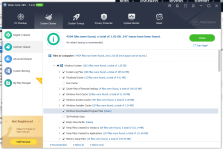
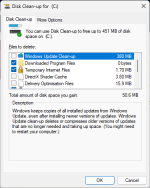
Some apps create cache files or other temporary files that don't get stored in the standard temp folder. As a result, this junk will not be cleaned by Microsoft's Disk Clean-up or Storage Sense. Even for cleaning Windows junk, some cleaners do better as well. For example, I just ran Disk Clean-up and it could free up 50.6MB of space (excluding the space that could be cleaned by deleting old Windows Update data). I then did a scan with WiseCare 365, which found 1.82GB of junk to clean. Of that 1.3GB was Windows junk, so it does a much better job of cleaning Windows junk than Windows itself does.

Clean.png Wise.png
 
Upvote 0
I run HD cleaner everyday, IMHO it does remove unneeded junk from my system often from 3rd party programs that Windows never touches - if I had any issues with HD Cleaner or Wise 365 I would cease & deist today - I don't use registry cleaners but this install was done a year ago & I never have issues & zero problems, I run HD Cleaner on my wife's Windows PC also (and others PC's I look after) without issue though not that often as she also uses a Mac air & her work lappy.. Just my 10 pence worth, however we all have different views
 
  • Like
Reactions: roger_m
Upvote 0
Some apps create cache files or other temporary files that don't get stored in the standard temp folder. As a result, this junk will not be cleaned by Microsoft's Disk Clean-up or Storage Sense. Even for cleaning Windows junk, some cleaners do better as well. For example, I just ran Disk Clean-up and it could free up 50.6MB of space (excluding the space that could be cleaned by deleting old Windows Update data). I then did a scan with WiseCare 365, which found 1.82GB of junk to clean. Of that 1.3GB was Windows junk, so it does a much better job of cleaning Windows junk than Windows itself does.

View attachment 289937 View attachment 289936
Disk Cleanup and Storage Sense clean data that's no longer needed and is safe to be deleted. Wise and other cleaners will go extra length and delete things Windows might still need or use. This is a reason why all 3rd party cleaners find way more to clean than built-in tools. Microsoft just plays safe, while other don't really care what happens (this is why they always advise you to create backup before cleaning). They don't want to be responsible for any errors might occur after cleaning and them warning you to create backup is just a protection so you can't start a lawsuit in case something undesired happens.

Yes, some programs store cache in their own folders. However, this cache is always updated and replaces the old cache; it's not just gradually increasing used storage. If a software does this, you should immediately replace it with alternative because it isn't coded well. And as I said, I had multiple issues with those cleaners cleaning the dirt of 3rd party software. I got profiles in my web browsers corrupt multiple times and is the reason why I eventually stopped using these cleaners. After that, I can't trust any 3rd party software to touch the files of other 3rd party software.

This could explain the fact that I pretty much never have issues with the operating system itself or the software installed. I just let Windows take care of it instead of letting other unknown software do something.
 
Upvote 0
@Marko :) I respect your views & do understand about Windows making temp files etc, & if you have had problems in the past with such programs you should follow your feeling & certainly not use them - But I for one have run such programs for years without issues, when I say I never have problems I mean it - Frankly I love Windows 11 but use almost none of the modules within it as, (also with 95 upwards) I feel there are almost always often free small programs that do the jobs faster smaller & more effective (Such as: search, media player, photo whatsits of many types, Edge, explorer, clean up, Office, AV, mail, sound player, imaging, storage sense, indexing & others)
 
Last edited:
  • Like
Reactions: Marko :)
Upvote 0
Wise and other cleaners will go extra length and delete things Windows might still need or use. This is a reason why all 3rd party cleaners find way more to clean than built-in tools
In my experience, Wise Care 365 and Wise Disk Cleaner are safe to use, as long as you don't use the registry cleaner in Wise Care 365, which has minor issues with false positives. Aside from cache files, some apps create temporary files that they don't delete and in some cases occupy a large amount of disk space.
 
Upvote 0
@Marko :) I respect your views & do understand about Windows making temp files etc, & if you have had problems in the past with such programs you should follow your feeling & certainly not use them - But I for one have run such programs for years without issues, when I say I never have problems I mean it - Frankly I love Windows 11 but use almost none of the modules within it as, (also with 95 upwards) I feel there are almost always often free small programs that do the jobs faster smaller & more effective (Such as: search, media player, photo whatsits of many types, Edge, explorer, clean up, Office, AV, mail, sound player, imaging & others)
That's great! I wish that you don't have same issues I had. The purpose of my posts are to warn everyone from using these (often presented as Microsoft recommended software—they aren't) optimizers/cleaners.

When discussing about this, we have to think that this forum isn't only read by advanced and expert users, but also inexperienced users who might not be aware of dangers using said programs. Let alone know how to create backup before cleaning. For an average user, it's just best to leave Windows take care of it as these programs can do more harm than good.
 
Upvote 0
That's great! I wish that you don't have same issues I had. The purpose of my posts are to warn everyone from using these (often presented as Microsoft recommended software—they aren't) optimizers/cleaners.

When discussing about this, we have to think that this forum isn't only read by advanced and expert users, but also inexperienced users who might not be aware of dangers using said programs. Let alone know how to create backup before cleaning. For an average user, it's just best to leave Windows take care of it as these programs can do more harm than good.
I agree totally, & I don't use some programs such as ant registry cleaners as in the past I've had issues that are not apparent until some times later & before imaging days so I avoid them, I suppose as a person who images often as many on here do we have freedom to faff around with experiments that normal users (whatever they are) don't have - In mitigation you have changed some of my views in the past & often you are right & obviously are very experienced user, so I'm certainly not taking issue with you, so I often as with many on here listen & add their experiences to my own.
 
Upvote 0
I ran Wise Care 365, and SFC /scannow. No problems everything was fine, but then I ran Hibit, and it found corruption.
I've never had Windows corruption issues with HiBit, but I'm careful to check the leftovers before removing them.

HiBit also failed to uninstall big sized software and crashed. For example Quick Heal. I'm searching for alternative uninstaller. Revo is good but I wonder how effective it's free version.
I use HiBit to uninstall, and it has never failed or crashed. All software can have issues; thus, no software will completely satisfy you.
 
Upvote 0
I've never had Windows corruption issues with HiBit, but I'm careful to check the leftovers before removing them.


I use HiBit to uninstall, and it has never failed or crashed. All software can have issues; thus, no software will completely satisfy you.
Have you tried to run SFC /scannow when you are finished?
 
Upvote 0
I believe the main problem with so-called computer cleaners these days is that they try to add more sections to clean (sometimes too much) just to compete with each other because end-users tend to think that the program that deletes more items is the best, even though most of the items deleted will be recreated as soon as the computer is restarted.

There are programs that only clean what needs to be cleaned and use Windows built-in tools to do the work, such as "Emjysoft Cleaner" However, don't expect constant updates for these types of programs.
 
Upvote 0

You may also like...