F
ForgottenSeer 94738
I have that version too.The servers lined me up to receive the latest update sooner than before. McAfee is still my ol' reliable.


Open MalwareTips from your Home Screen or desktop. Follow discussions, find answers and pick up where you left off.
If you cannot find an install option, update your browser or use its bookmark option to keep MalwareTips close.
After installation, open the app and sign in. Enable push notifications in Preferences if you want alerts. On iPhone and iPad, push requires a Home Screen web app and iOS or iPadOS 16.4 or later.
Sign in to manage notificationsInstallation is optional. Your notification settings stay under your control.
 Thread starter
Trident
Thread starter
Trident
I have that version too.The servers lined me up to receive the latest update sooner than before. McAfee is still my ol' reliable.

Just download the new installer through your McAfee Account, if you install this one, you have the newest version.I'm still on 1.33, I've obviously upset someone, (this happens often so used to it)
That doesn't work for me. I'm still on 1.33.Just download the new installer through your McAfee Account, if you install this one, you have the newest version.
Oh, haha thats the tip i heard from @TridentThat doesn't work for me. I'm still on 1.33.

It worked 3-4 times for me…Oh, haha thats the tip i heard from @Trident
Any update on this ?I am still working out the McAfee detections and logs, the log contains something like this (from another thread).
Detection Source File Reputation HTI Reputation hti 4 4 <- online reputation reports the file as malicious cache 0 0 <- nothing in cache, as detections are cached only once they occur, not before that uwp 0 0 <- not a UWP app signature 0 50 <- picked up by a Yara rule trust-dat 4 4 <- file is untrusted rp-s 4 4 <- minor tweaks to the final score. RealProtect static analysis deems the file suspicious av 0 1 <- these verdicts are minor tweaks to the final score neo 0 1 <- minor tweaks to the final score
The “Cache” appears to come into play when behavioural-based detections occur. McAfee likely refers to the behavioural blocking database (the one where actions are recorded) as “Cache”.
Detections from the “Cache” are named “Cache!<part of SHA256>
Oh yeah, I’ve long worked them out.Any update on this ?
Like a guide. For example, if a file has been detected and you open the log to check it, using the guide you can break down and see the overall picture of the detectionOh yeah, I’ve long worked them out.
Anything in particular that you are curious about?

There is no really guide that can be created, there are many engines and every engine has offline and online verdict. You will probably need to read this 3-4 times.Like a guide. For example, if a file has been detected and you open the log to check it, using the guide you can break down and see the overall picture of the detection
I have to admit I am not hating that, it is quite unique.I reinstalled McAfee on fresh Windows a few days ago. I think I just encountered the AI-generated threat description for the first time.
Yeah, but the description is not there yet... same for me. I've got this screen but no description generated as of yet.View attachment 292153
It came with an incremental update.

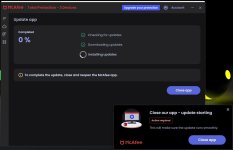
Both McAfee and I in my projects use Web View hahah@Sunqfu thanks for posting, I just did a manual update and now have dark mode. It adjusts to your Windows theme, as I didn't see an additional setting for it. And since McAfee has minimal settings, that falls in line with its "set it and forget it", approach.
The update needed the app restart, but didn't need a Windows restart.
View attachment 292731
View attachment 292732
Is the white line a reminder that it was once a white app@Sunqfu thanks for posting, I just did a manual update and now have dark mode. It adjusts to your Windows theme, as I didn't see an additional setting for it. And since McAfee has minimal settings, that falls in line with its "set it and forget it", approach.
The update needed the app restart, but didn't need a Windows restart.
View attachment 292731
View attachment 292732

LOL, it's baby steps my friend, baby steps, we're not talking about the depth and quality of the Eset or Kaspersky UIIs the white line a reminder that it was once a white app

Members who viewed this thread in the last 5 minutes

