
Question Random Account Connected to my Microsoft account! Is this normal?

Help answer the author's question with clear explanations and useful steps.

Xeno1234

Level 14
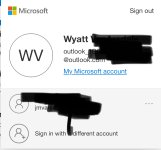
Within my Outlook account I see this:

I only have 1 Microsoft account and it appears there’s two entries here. One with my actual outlook email and one with a random one. If I click sign in on the other one nothing happens. Is this something to be concerned about? Could a hacker be manipulating my email accounts?
 

Attachments

  • IMG_1474.jpeg
    IMG_1474.jpeg
    100.4 KB · Views: 289
It could be a cause for concern as it might be a sign of a compromised account. It's recommended to change your password immediately and enable two-factor authentication for added security. Also, contact Microsoft support to report this issue.
 
Within my Outlook account I see this:

I only have 1 Microsoft account and it appears there’s two entries here. One with my actual outlook email and one with a random one. If I click sign in on the other one nothing happens. Is this something to be concerned about? Could a hacker be manipulating my email accounts?
There was an Australian that used to be around this forum many years ago, and he had a rather unique method for issues like this that involved making sure it was eradicated from the hard drive. He would need if I recall, a ax, shovel, can of gas and a lighter and what appeared to be a long stroll out into the desert in the outback.

All jokes aside, I would contact Microsoft as what you are seeing is server side on their end, get support to help you clear it up.
 
There was an Australian that used to be around this forum many years ago, and he had a rather unique method for issues like this that involved making sure it was eradicated from the hard drive. He would need if I recall, a ax, shovel, can of gas and a lighter and what appeared to be a long stroll out into the desert in the outback.

All jokes aside, I would contact Microsoft as what you are seeing is server side on their end, get support to help you clear it up.
So it’s all safe? No one spying on my email or anything?
 
So it’s all safe? No one spying on my email or anything?
You are taking it pretty calmly, I would have already changed my password, 2FA, backup code, log out of all devices.
Code:
https://account.live.com/proofs/manage/additional
Removed all 3rd party logins:
Code:
https://account.live.com/names/manage
Removed all apps, I do not recognize:
Code:
https://account.microsoft.com/privacy/app-access
 
You are taking it pretty calmly, I would have already changed my password, 2FA, backup code, log out of all devices.
Code:
https://account.live.com/proofs/manage/additional
Removed all 3rd party logins:
Code:
https://account.live.com/names/manage
Removed all apps, I do not recognize:
Code:
https://account.microsoft.com/privacy/app-access
I can’t tell if you are being sarcastic like someone earlier, or if this is geniuine advice.

I’ve already secured the account.
 
There was an Australian that used to be around this forum many years ago, and he had a rather unique method for issues like this that involved making sure it was eradicated from the hard drive. He would need if I recall, a ax, shovel, can of gas and a lighter and what appeared to be a long stroll out into the desert in the outback.
The venerable @frogboy. May he rest in peace!
 
I saw YouTube connected to my Microsoft account - is that even possible since you can’t sign in with it? I removed the connection but it said last used 3 years ago.
 

Recently browsing

Members who viewed this thread in the last 5 minutes

Back
Top