

Removing default Windows 10 apps

Status
Not open for further replies.

ParaXY

Level 6
Thread author
Verified
Mar 14, 2017
273
482
467
CI
I know this has been discussed on many websites and forums but I still have an issue removing the default built-in Windows 10 apps. I'm referring to the "modern apps" or "UWP apps".

This kind of annoys me because I don't use any of these apps and I am a minimalist so I like to keep things tidy and only keep installed what I use.

So to start I disabled Store and updating of apps in the registry as follows:

Code:
;Disable Store, auto updating of Store apps and disable all Store apps
[HKEY_LOCAL_MACHINE\SOFTWARE\Policies\Microsoft\WindowsStore]
"AutoDownload"=dword:00000002
"DisableStoreApps"=dword:00000001
"RemoveWindowsStore"=dword:00000001

If I run Get-AppXPackage I have many dozens of these apps installed. Before anyone asks, yes, I have tried running:

Get-AppxPackage | Remove-AppxPackage

On another website I follow one of the well known members posted a copy of the output of his machine and this is how it looked:
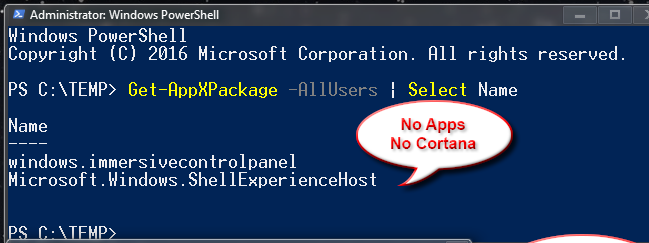
upload_2018-3-3_20-44-47.png


This is what I would like to aim for. How can I achieve this?

I'm running Windows 10 Enterprise 1709.
 
I just use Geek Uninstaller, install it run it, then select 'View' at the top to select Windows 10 Apps, right click to uninstall and remove traces. WPD can also do it.

WPD
 
I just use Geek Uninstaller, install it run it, then select 'View' at the top to select Windows 10 Apps, right click to uninstall and remove traces. WPD can also do it.

WPD

Thanks but when I run either of these it only shows that the Microsoft Store is installed:

upload_2018-3-3_21-7-33.png


upload_2018-3-3_21-7-41.png


And yet, if run Get-AppxPackage I see dozens of apps installed still...
 
Try this in BAT format if nothing else works.

cls
echo Deleting trash apps...
powershell -Command "& {Get-AppxPackage -AllUsers | Remove-AppxPackage; Get-AppxProvisionedPackage -Online | Remove-AppxProvisionedPackage -Online;}"
takeown /f "%ProgramFiles%\WindowsApps" /r
icacls "%ProgramFiles%\WindowsApps" /inheritance:e /grant "%UserName%:(OI)(CI)F" /T /C
for /d %%i in ("%ProgramFiles%\WindowsApps\*") do (
rd /s /q "%%i"
)
icacls "%ProgramFiles%\WindowsApps" /setowner "NT Service\TrustedInstaller"
icacls "%ProgramFiles%\WindowsApps" /inheritance:r /remove "%UserName%"
 
You can remove Windows Apps with IObit Uninstaller. You can select multiple apps and it will remove them all and afterwards will scan for leftovers.
 
  • Like
Reactions: CyberTech
You can remove Windows Apps with IObit Uninstaller. You can select multiple apps and it will remove them all and afterwards will scan for leftovers.

Iobit is excellent for this, I agree. Just remember to 'sc delete' the service it leaves behind after uninstall. Or use the portable one.
 
Iobit is excellent for this, I agree. Just remember to 'sc delete' the service it leaves behind after uninstall. Or use the portable one.
I just disabled the service. In the past I never did this, but in v7.x releases the background monitoring uses more CPU time, which lead me to disable it.
 
Try this in BAT format if nothing else works.

cls
echo Deleting trash apps...
powershell -Command "& {Get-AppxPackage -AllUsers | Remove-AppxPackage; Get-AppxProvisionedPackage -Online | Remove-AppxProvisionedPackage -Online;}"
takeown /f "%ProgramFiles%\WindowsApps" /r
icacls "%ProgramFiles%\WindowsApps" /inheritance:e /grant "%UserName%:(OI)(CI)F" /T /C
for /d %%i in ("%ProgramFiles%\WindowsApps\*") do (
rd /s /q "%%i"
)
icacls "%ProgramFiles%\WindowsApps" /setowner "NT Service\TrustedInstaller"
icacls "%ProgramFiles%\WindowsApps" /inheritance:r /remove "%UserName%"

This helped! I ran this in a test VM and it got rid of loads but I still have the following left:

Code:
PS C:\WINDOWS\system32> Get-AppxPackage | select name

Name
----
Windows.MiracastView
Microsoft.Windows.CloudExperienceHost
Microsoft.AAD.BrokerPlugin
Microsoft.Windows.ShellExperienceHost
windows.immersivecontrolpanel
Microsoft.Windows.ContentDeliveryManager
Microsoft.Windows.PeopleExperienceHost
1527c705-839a-4832-9118-54d4Bd6a0c89
c5e2524a-ea46-4f67-841f-6a9465d9d515
Microsoft.Windows.Apprep.ChxApp
E2A4F912-2574-4A75-9BB0-0D023378592B
Windows.PrintDialog
Microsoft.XboxGameCallableUI
Microsoft.Windows.SecureAssessmentBrowser
Microsoft.Windows.SecondaryTileExperience
Microsoft.Windows.PinningConfirmationDialog
Microsoft.Windows.ParentalControls
Microsoft.Windows.OOBENetworkConnectionFlow
Microsoft.Windows.OOBENetworkCaptivePortal
Microsoft.Windows.AssignedAccessLockApp
Microsoft.PPIProjection
Microsoft.LockApp
Microsoft.ECApp
Microsoft.CredDialogHost
Microsoft.BioEnrollment
Microsoft.AccountsControl
F46D4000-FD22-4DB4-AC8E-4E1DDDE828FE
Microsoft.Windows.HolographicFirstRun
Microsoft.MicrosoftEdge
Microsoft.Windows.Cortana
Microsoft.Windows.SecHealthUI
InputApp

How can i get rid of whats left?
(except for:
Microsoft.Windows.ShellExperienceHost
windows.immersivecontrolpanel)
 
Status
Not open for further replies.