Advanced Plus Security Sampei Nihira Security Config 2026

Last updated
Feb 19, 2026
How it's used?
For home and private use
Operating system
Windows 11
On-device encryption
BitLocker Device Encryption for Windows
Log-in security
    • Biometrics (Windows Hello PIN, TouchID, Face, Iris, Fingerprint)
Security updates
Allow security updates
Update channels
Allow stable updates only
User Access Control
Always notify
Smart App Control
On
Network firewall
Enabled
About WiFi router
TP-Link with IPv6 disabled and all security features enabled - Wi-Fi is disabled for security reasons.
Real-time security
Standard Microsoft Account
Secure Boot enabled
Disabled some services
Virtualization enabled
O&O ShutUp10
O&O AppBuster
Show hidden files enabled
Hide extensions for known file types disabled
SMB1 - off
Hard_Configurator - Recommedend Settings
Validate Admin Code Signatures registry key enabled set via H_C
Block Remote Access set via H_C
Windows Script Host - Added Trust Policy = 0x00000002
LockBatchFilesWhenInUse = 1 (Enhanced security and performance for batch files)
PowerShell 7 - Constrained Language Mode - RemoteSigned
Windows PowerShell - Constrained Language Mode - RemoteSigned

Microsoft Defender hardened with Configure Defender [Hard_Configurator] (Customized level) - Cloud Block Level
Core Isolation: Memory integrity - enabled
Local Security Authority Protection - enabled
Microsoft Vulnerable Driver Blocklist - enabled
Reputation Based Protections all modules - enabled
Ransomware protection - enabled
Exploit Protection - All System Override enabled + 13/14 Override applied to the most vulnerable softwares
Firewall security
Microsoft Defender Firewall with Advanced Security
About custom security
Firewall Hardening [Hard_Configurator] LOLBins + Recommended H_C + some custom blocking rules
Periodic malware scanners
  • MD
  • VT
  • PE
  • Sirius LLM
Malware sample testing
I do not participate in malware testing
Environment for malware testing
N/A
Browser(s) and extensions
(Main browser) Chrome --disable-webgl --no-pings --enable-features=NetworkServiceSandbox,EnableCsrssLockdown,WinSboxDisableExtensionPoint,RendererAppContainer --cipher-suite-blacklist=0x002F,0x009D,0x009C,0x0035,0xC013,0xC014 --disable-features=ExtensionManifestV2Unsupported,ExtensionManifestV2Disabled
  • Home page Start.DDG
  • Search engine = DDG
  • DNT disabled
  • HTTPS enabled
  • Delete data on exit
  • JavaScript block = http://*
  • Block third-party cookies
  • Safe browsing - Standard Protection
Policies:
  • ClearBrowsingDataOnExitList = [ "browsing_history", "download_history", "cookies_and_other_site_data", "cached_images_and_files", "autofill" ,"hosted_app_data" ]
  • DnsOverHttpsMode = secure
  • DnsOverHttpsTemplates = Private Next DNS
  • SavingBrowserHistoryDisabled = true
  • GenAILocalFoundationalModelSettings = 1
Flags:

  • Block scripts loaded via document.write
  • TLS 1.3 Early Data
  • Parallel downloading
  • Save PDF to Drive - disabled
  • Input protection
  • Strict-Origin-Isolation
  • Bind cookies to their setting origin's port
  • Bind cookies to their setting origin's scheme
  • Origin-keyed Processes by default
  • Safe Browsing Local Lists use v5 API
  • Enable RenderDocument - Enabled Swap RendererFrameHosts on same-site navigatios from any frame (experimental)
  • Device Bound Session Credentials (Standard)
  • Device Bound Session Credentials (Standard) - Federated Registrations
  • Device Bound Session Credentials (Standard) on Google
  • Local Network Access Checks - Enabled (Blocking)
  • Local Network Access Checks for WebRTC
  • Local Network Access Checks for WebSockets
  • Local Network Access Checks for WebTransport
  • Always show confirmation dialog for new search engine overrides
Extensions:
  • uBlock Origin - Super Hard Mode (1p scripts + 3p + 3p frames + 3p scripts) outside the 9 TLDs.
  • API Void Script Stop - Extended Medium Mode (1p-frame + 3p-script + 3p-frame) within the 9 TLDs.
  • Bonjourr
  • Search Engine Blocker - enabled only on certain websites
  • AG Browser Extension - Super Hard Mode - off by default
  • Video DownloadHelper - off by default
  • FetchV - off by default

(Secondary) Firefox:
  • Home page Start.DDG
  • Search engine = DDG
  • GPC enabled
  • Tracking protection: Custom Protection - All cross-site cookies
  • DNS over HTTPS : Max Protection
  • HTTPS-only-mode enabled
  • Pocket disabled
  • Clearing browsing data on exit
  • Firefox telemetry disabled
  • Protection against fraudulent content and dangerous software enabled - all enabled
  • Some FastFox.js settings
  • Some Arkenfox.js settings
Policies:
  • OverridePostUpdatePage set to ""
  • DontCheckDefaultBrowser = true
  • OverrideFirstRunPage set to ""
Extensions:
  • uBlock Origin - Super Hard Mode (1p scripts + 3p + 3p frames + 3p scripts) outside the 9 TLDs.
  • API Void Script Stop - Extended Medium Mode (1p-frame + 3p-script + 3p-frame) within the 9 TLDs.
  • Video DownloadHelper - (off by default)
  • HLS Downloader (off by default)
Secure DNS
System = Cloudflare DNS encrypted
Browsers = Next DNS DOH (Account) - All Security settings enabled - Blocking of all domains with non-European characters + dangerous TLDs - HaGeZi - Multi ULTIMATE
Desktop VPN
none
Password manager
built-in
Maintenance tools
Process Explorer
CCleaner - Block updates with firewall rule + some Hosts file rules
Thunderbird - hardened
Pop-Peeper Email Notifier
File and Photo backup
External SSD + Pen-drive USB
Subscriptions
    • None
System recovery
External SSD
Risk factors
    • Browsing to popular websites
    • Opening email attachments
    • Buying from online stores, entering banks card details
    • Logging into my bank account
    • Downloading software and files from reputable sites
    • Streaming audio/video content from trusted sites or paid subscriptions
Computer specs
Lenovo IdeaCentre AIO 3
AMD Athlon Silver
8 GB RAM
SSD 238 GB
Notable changes
  • Enabled RendererAppContainer (Chrome) via Chromium Command Line Switch
  • Added Sirius LLM as on-demand scan
  • Added these flags to Chrome - "Save PDF to Drive" -disabled + "Bind cookies to their setting origin's port" + "Bind cookies to their setting origin's scheme"
  • AMD Software Adrenalin Edition - AMD Crash Defender Service - (manual) + AMD External Events Utility Service (disabled)
  • Switched Microsoft Video to MPC BE, which was added to the WD Anti-Exploit list with 13 overrides
  • Switched Microsoft Photo to PhoXoSee which was added to the WD Anti-Exploit list with 13 overrides
  • Added "Safe Browsing Local Lists use v5 API" flag in Chrome
  • Added "Search Engine Blocker" extension on Chrome - enabled only on certain websites
  • Added "GenAILocalFoundationalModelSettings" policy on Chrome
  • Enabled LockBatchFilesWhenInUse = 1
  • Enabled "Input protection" flag on Chrome
  • Switched from uBoL in Firefox/Chrome to the API Void Script Stop (3p-script + 3p-frame)
  • Added to API Void Script Stop (1p-frame block)
What I'm looking for?

Looking for minimum feedback.

Sampei-San,

I question some f the points listed here in regard to AdGuard Mv3

1779455148348.png


uBo Mv2 versus AdGuard
uBo Mv2 has as extra dynamic filtering compared to AG Mv3, but I can´t see how that translates to

a) script injection hardening?
AG requires filters to be trusted AND you need to give the extension more rights for importing user scripts, how can that be stronger than uBo (digesting 3p-filters without any threshold)?

Anti-0 day adaptibility?
What is that? What feature are you talking about?

Behavioral exploit mitigation?
What is that? What feature are you talking about?

Devalrative Net Request
Adguard LimitedIt is Mv3 compatible

By the uBol is by far not DNR only, it also handles cosmetic rules, declarative and some javascriptlets
 
  • Like
Reactions: Zero Knowledge
Some of the AI's assessments are heavily focused on my personal security configuration.

uBo handles the injection of certain scripts that can be considered incremental security measures and are not available in AG.
For example, the `js nostif` rule.
The AI therefore assessed this omission as a potential reduction in security when using AG compared to uBo.
 
  • +Reputation
Reactions: simmerskool
Some of the AI's assessments are heavily focused on my personal security configuration.

uBo handles the injection of certain scripts that can be considered incremental security measures and are not available in AG.
For example, the `js nostif` rule.
The AI therefore assessed this omission as a potential reduction in security when using AG compared to uBo.
Yes but that was separately listed, so still does not explain the magical (antt-exploit and behavioral exploit mitigation). In regard to javascript injection I consider AG (and Mv3) much more robust than uBo and Mv2, so part of the listing looks like an AI-hallucination (uBo accepts 3p-filters without any question, so it i more vulnarable to script injection, not forgetting its own vulnabilities in regard to its WebRequest permissions). I would drop uBo in favor of uBol o_O

1779463348134.png
 
You're more likely to "AI-hallucination" if you're using the free version of ChatGPT.
I use the ChatGPT 5.5 account version, which has superior analytical capabilities.
It's hard for me to show you the analysis page in my language because it's too long.
And it’s been too long since I had my configuration analyzed by the AI.
So I’ll just list the two that I think might meet your needs; for the rest, you’ll have to take my word for it:

Code:
Anti-0day adaptability
What it means

How quickly the extension can mitigate new techniques.

uBO is very high because

The lists can:

distribute behavioral fixes
patch JS patterns
respond without a browser update

Example:

new tracker
new anti-adblock
new beacon technique

→ filter/scriptlet updated within a few hours.

MV3, on the other hand, is more rigid.

Code:
Behavioral exploit mitigation

This was the most important part of the table.

Actual meaning

It does not mean:

“blocks kernel exploits”

It means:

mitigation of exploits and attacks that depend on the page’s runtime behavior.

Therefore:

JS exploit kits
multi-stage loaders
anti-debug scripts
anti-user interaction
aggressive telemetry
exploits that use DOM/events/browser APIs
Concrete examples
A. Malvertising loaders

A script:

eval(atob(payload))

then:

fetch(remote_payload)

then:

document.createElement(“iframe”)

uBO can:

block the domain
abort inline scripts
neutralize fetch
prevent iframe injection

This is behavioral exploit mitigation.

B. Fake CAPTCHA malware

Many fake CAPTCHAs perform:

clipboard hijack
keyboard listener
PowerShell social engineering

uBO with updated filters:

blocks scripts
blocks domains
breaks the runtime chain
C. Anti-debug JS malware

Techniques:

setInterval(debugger)

or:

devtools detection

Scriptlets/filtering can neutralize part of the behavior.

Why uBO was “Yes”

Why:

it has an advanced scripting engine
it has runtime injection
it has dynamic filters
it has a rapid community response

and therefore:

it mitigates many modern browser-side techniques.
Why MV3 Lite was “No”

Manifest V3:

eliminates most of the runtime logic
no powerful scripting engine
no deep dynamic modification

Therefore:

blocks URLs
but does NOT mitigate advanced behavior.
 
Last edited:
  • +Reputation
Reactions: simmerskool
It is highly theoretical that a filter maintainer decides to block exploits. Malware filters often simply block the domain, so the explanation made of behavioral exploit mitigation makes me even more convinced AI made some strange assumptions. Same with the zeroday exploit adoption, that depends on filters to be adopted.
 
It is highly theoretical that a filter maintainer decides to block exploits. Malware filters often simply block the domain, so the explanation made of behavioral exploit mitigation makes me even more convinced AI made some strange assumptions. Same with the zeroday exploit adoption, that depends on filters to be adopted.

Maybe, but I don't really care that much.
I've already mentioned that the AI evaluated my personal security configuration, which includes blocking third-party scripts + third-party frames + first-party scripts + custom rules outside the 9 allowed TLDs + custom rules within the 9 allowed TLDs + filter lists + DNS filtering.
And within the 9 allowed TLDs, there are always filter lists + DNS filtering + third-party frame blocking + custom rules within the 9 TLDs.

If anyone is worried about me... relax... because I’m not the least bit worried.;)

Have a nice day.
 
Last edited:
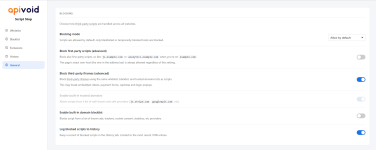
Switched from uBoL in Firefox/Chrome to the API Void Script Stop.
Allow by default
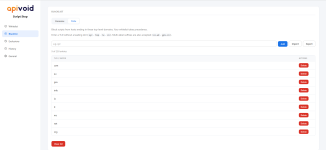
9 TLD in BlackList

1.png2.png

The purpose of the extension is to enable Dynamic Filtering (Medium Mode) in the 9 TLDs:

Blocking mode: medium mode

With SS, I can also handle Medium Mode.
With uBoL, it was a real challenge to handle “Enhanced Easy Mode” because the extension lacked a counter for blocked elements.

I tried comparing SS's performance in the Speedometer 3.1 test to that of uBoL.
It makes no difference.
 
Last edited:
Switched from uBoL in Firefox to the API Void Script Stop.
Allow by default
9 TLD in BlackList

View attachment 297851View attachment 297852

The purpose of the extension is to enable Dynamic Filtering (Medium Mode) in the 9 TLDs:

Blocking mode: medium mode

With SS, I can also handle Medium Mode.
With uBoL, it was a real challenge to handle “Enhanced Easy Mode” because the extension lacked a counter for blocked elements.

I tried comparing SS's performance in the Speedometer 3.1 test to that of uBoL.
It makes no difference.
But in the DNS your are blocking all TLD's except the ones blacklisted by Script Block, is that correct?
 
I've also enabled the 1p-frame block in the API Void Script Stop.
This configuration should be more challenging than Medium Mode but less so than Hard Mode.
I called it “Extended Medium Mode”
I haven't gone into this in depth -- I enabled iframe block in Script Stop and it seems less challenging than ubo medium mode (less site breakage) but I'm sure you tweak the settings more than I do...
 
  • Like
Reactions: Sampei.Nihira
I haven't gone into this in depth -- I enabled iframe block in Script Stop and it seems less challenging than ubo medium mode (less site breakage) but I'm sure you tweak the settings more than I do...

Yes, obviously less problematic because “Same Host” is always allowed + if you've also enabled “Enable built-in trusted domains.”
Always keep in mind that less problematic = less protective.
But there are always the filter lists in AdBlock + DNS + any protective rules in AdBlock......;)
 
  • +Reputation
Reactions: simmerskool