Serious Discussion Secure Boot certificate updates

Non so se è supportato dalla mia CPU o meno; è un vecchio Core i5 di terza generazione.
Inoltre, utilizzo la modalità legacy, non UEFI.
In precedenza ho provato a cambiare il BIOS in UEFI, ma l'installazione non ha funzionato.

Ho anche letto di alcuni gravi problemi se Secure Boot non fosse impostato correttamente


Do you use Windows 10?
 
Windows 11 IoT Ent LTSC

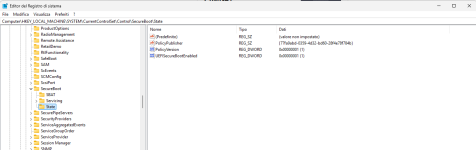
I assume you are unable to enter the BIOS if you say you have already tried and failed, so check this registry key:

1.png

Is it zero?
 
I do not know if it's supported by my cpu or not; it's an old 3rd gen core i5.
In addition, I use legacy mode, not UEFI.
Tried to change the BIOS to UEFI before but installation did not work.

Also I have read about some serious issues if Secure Boot was not properly set


If you haven't found the answers you need regarding secure boot and BIOS, you can check your device by looking for "BIOS Mode" and "Secure Boot State" values under "System Information."
Do we need to enter the BIOS, reset the secure boot keys, and then re-enter the keys?
No, you don't. All you have to do is:
  • Ensure Secure Boot is enabled in UEFI.
  • Install Windows Update or feature update—Microsoft’s signatures use the existing Microsoft-signed db/KEK/PK.
  • Reboot and let the update finish.
Secure boot is enabled and all necessary certificate updates have been applied. No further certificate changes are needed.
This indicates that everything has been successfully installed.