Poll Does your PC already have the new Secure Boot 2023 certificates, or do you still have the 2021 certificates?

Do you have 2023 Secure Boot certificates or 2021 Secure Boot certificates?

  • My PC already has the new 2023 Secure Boot certificates installed.

    Votes: 10 66.7%
  • My PC still has the 2021 Secure Boot certificates installed.

    Votes: 3 20.0%
  • My PC has Secure Boot disabled.

    Votes: 2 13.3%
  • I'm not interested in the poll.

    Votes: 0 0.0%

  • Total voters
    15

Sampei.Nihira

Level 20
Thread author
Oct 14, 2025
958
3,378
1,867
Italy
What you need to know about the Secure Boot certificate expiration in Windows - Chipp.in Tech News and Reviews

My six-year-old PC is probably not among those that are highly compatible.
So I still have the 2021 certified Secure Boot.
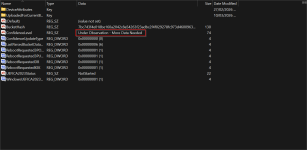
In this registry key, you can check whether more data needed before Windows Update proceeds with the update:

3.png
 
Last edited:
One of the many reasons I use a Chromebook as my personal device. Standard Secure Boot relies on a database of certificates (like those from Microsoft) that can sometimes expire or be revoked. Chromebooks use Hardware-Rooted Keys. The "root of trust" is baked into a read-only firmware chip, meaning the system doesn't need to check external certificate authorities to know if the software is safe.
 
For interested users to check via PowerShell:
Code:
[System.Text.Encoding]::ASCII. GetString((Get-SecureBootUEFI db).bytes) -match 'Windows UEFI CA 2023'


Edit: seems already installed automatically Secure Boot 2023 certificates...

Screenshot 2026-03-10 152936.png
 
Last edited:
My PC already has the new 2023 Secure Boot certificates installed.

Edit:

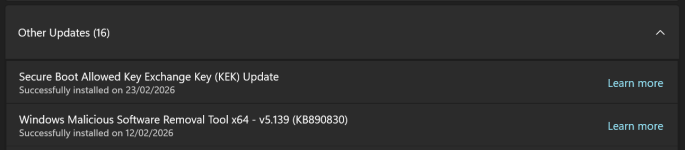
I have it installed according to the article.

View attachment 296278

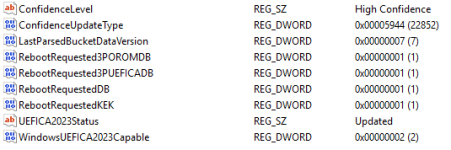
However, the registry also displays what is displayed in your registry screenshot.

View attachment 296277
Mine is similar. I have 2023. Though not exactly the same as yours, for example my "WindowsUEFICA2023Capable" value is 2.
1773150900548.png

I think I will not do anything else manually. I'm gonna let Windows decide if something else needs to be done.
 
I just manually updated this laptop.

View attachment 296279

Here is what the registry looks like.

View attachment 296280
Sorry, I can't remember the link, I had about 3 tabs open, but it was suggested to have Fast Startup disabled, Bitlocker off, and do a couple restarts in a row to set the update. I'm not sure if turning Bitlocker off did anything (it was enabled when I did the manual update), or another restart finished it, but it now says CA2023Status Updated, and WindowsUEFICA is now on (2).

Screenshot 2026-03-10 092312.png
 
Last edited: