Advanced Plus Security Shmu26 Config in 2018

Last updated
Dec 28, 2018
Windows Edition
Pro
Security updates
Allow security updates and latest features
User Access Control
Always notify
Real-time security
Windows Defender with ConfigureDefender
Software Restriction Policy with Hard_Configurator
Firewall security
Microsoft Defender Firewall
Periodic malware scanners
Macrium Reflect does the job just fine...
Malware sample testing
I do not participate in malware testing
Browser(s) and extensions
Chrome
Edge
Maintenance tools
Hard_Configurator, SysHardener, BandiZip, PatchCleaner, autoruns
File and Photo backup
Dropbox
OneDrive
GoogleDrive
System recovery
Macrium Reflect, Timeshift (Ubuntu)
Last edited by a moderator:
Safe Mode (Default): While monitoring critical system activity, Defense+ automatically learns the activity of executables and applications certified as 'Safe' by Comodo. It also automatically creates 'Allow' rules these activities, if the checkbox 'Create rules for safe applications' is selected. For non-certified, unknown, applications, you will receive an alert whenever that application attempts to run. Should you choose, you can add that new application to the safe list by choosing 'Treat this application as a Trusted Application' at the alert. This instructs the Defense+ not to generate an alert the next time it runs. If your machine is not new or known to be free of malware and other threats as in 'Clean PC Mode' then 'Safe Mode' is recommended setting for most users - combining the highest levels of security with an easy-to-manage number of Defense+ alerts.

One thing people shouldn't trust is Comodo's TVL; 1st thing i delete when installing CIS.
 
Was fun while it lasted, but Comodo inexplicably started crashing Chrome again.
Spent some time on the good old Comodo forum trying to troubleshoot it. Folks there do try to help, it's not their fault the software is buggy.
Back to NVT ERP. Hey, it works...
 
Was fun while it lasted, but Comodo inexplicably started crashing Chrome again.
I ran the official uninstaller/registry cleaner tool for a couple AVs I had used (Kaspersky and Avira), and I think that might have fixed it. So far, so good.
 
Was fun while it lasted, but Comodo inexplicably started crashing Chrome again.
Spent some time on the good old Comodo forum trying to troubleshoot it. Folks there do try to help, it's not their fault the software is buggy.
Back to NVT ERP. Hey, it works...
Same here, straight back to KIS and VS for me.
 
Same here, straight back to KIS and VS for me.
I'm afraid you're right.
Every time I think I have the kinks worked out of Comodo, I am in for another bad surprise. Remind me not to punish myself again. I should know by now which softs work right, and which don't.
 
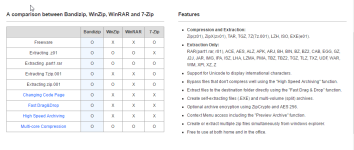
thank you, and please tell me something about bandizip
Maybe this is useful to you

chrome_2017-03-12_10-53-05.png
 
I ran the official uninstaller/registry cleaner tool for a couple AVs I had used (Kaspersky and Avira), and I think that might have fixed it. So far, so good.
Well, the pesky problem came back after a while, but I seem to have solved ALL my Comodo issues by replacing Norton Family with Safe Lagoon, which doesn't do this intrusive thing with Chrome that drives CFW crazy.
 
Uninstalled: NoVirusThanks EXE Radar Pro (degrades system performance on Windows 10)
Uninstalled: Comodo Firewall (embedded code protection conflicts with certain apps)
Uninstalled: F-Secure Search in Chrome (too slow)
Uninstalled: HitmanPro.Alert (drag on system)

Reinstalled: Kaspersky Internet Security 2017 (close to default settings)
Reinstalled: ReHIPS (mainly for the anti-exe. My productivity apps are not isolated)
Installed: AppCheck free

Only major tweak is that I put script interpreters, including cmd.exe, into High Restricted category of Kaspersky Application Control. All my apps still run.
 
hi could you please tell us what apps did CF conflict with and what were the signs of conflicts?
thank you
It's nothing I haven't kvetched about before: Norton Family (free standalone app) needs a Chrome extension in order to work properly, and that Chrome extension doesn't do its job when Comodo embedded code protection is enabled. In addition, it prevents Chrome from loading my user profile.
 
Reinstalled: Kaspersky Internet Security 2017 (close to default settings)

I would love to try it in place of Emsi IS. What do you say?
For the rest nothing to say. Every great software that you uninstall, you replace it with another excellent program!
 
I would love to try it in place of Emsi IS. What do you say?
For the rest nothing to say. Every great software that you uninstall, you replace it with another excellent program!
Kaspersky gives you a trial period, like most other software...
Try it out and see if you like it.
 
I would love to try it in place of Emsi IS. What do you say?
For the rest nothing to say. Every great software that you uninstall, you replace it with another excellent program!
Last time I tried EMSI (probably about a year ago), I got a lot of unnecessary prompts from the BB, and I also heard from people that you can't put Chrome in appcontainer lockdown.
Maybe those problems are gone now. There is no security soft that is only smiles and no frowns.
 
Last time I tried EMSI (probably about a year ago), I got a lot of unnecessary prompts from the BB, and I also heard from people that you can't put Chrome in appcontainer lockdown.
Maybe those problems are gone now. There is no security soft that is only smiles and no frowns.


Many thanks. I Emsi with Chrome and I've never had problems, but I will verify if Appcontainer is active. I do not remember.
 
Many thanks. I Emsi with Chrome and I've never had problems, but I will verify if Appcontainer is active. I do not remember.
Emsisoft having problems with Chrome (w/ AppContainer enabled) is a known issue. But as far as I know, the devs haven't fixed it yet, though they know about the problem. :)