Advice Request snipping & sketch not showing saved to clipboard

Share practical recommendations that address the author's needs.
When I click Windows + Shift + S to a screenshot and drag whatever part of the screenshot like normal, it doesn't say Copied to clipboard and show a picture of the screenshot in the bottom right corner so I can edit or even save the screenshot. Now I have to type Snip and sketch in my search bar. Is there any way to fix this?
 
So the question is you want to use Snip & Sketch without searching? I'm not sure I understood your question correctly.;)
Animation.gif

Double click.
 
Check the permissions in Snipping & Sketch Settings/Notifications and Actions.
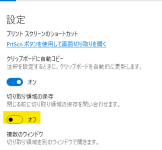
Please change the marked item from the current state, close the app once and restore the setting again.
スクリーンショット 2022-08-02 060122.png

Snipping & Sketch seems to have been fixed in the June update, and there seem to be many reports of small problems.
I want to fix it too!🔧:D
 
Check the permissions in Snipping & Sketch Settings/Notifications and Actions.
Please change the marked item from the current state, close the app once and restore the setting again.

Snipping & Sketch seems to have been fixed in the June update, and there seem to be many reports of small problems.
I want to fix it too!🔧:D
Oh, thank you it worked. I had all notifications turned off but Snip and sketch turned on
 

Attachments

  • notifcation settings.png
    notifcation settings.png
    5.2 KB · Views: 291

Recently browsing

Members who viewed this thread in the last 5 minutes

Back
Top