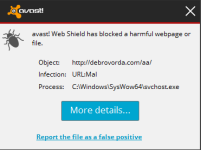
calmoran New Member Thread author Oct 3, 2014 13 0 5 32 Oct 5, 2014 #21 still getting this popup from avast.
TwinHeadedEagle Level 41 Verified Mar 8, 2013 22,627 2,906 3,979 Oct 5, 2014 #22 Scan with RogueKiller Please download RogueKiller and save the file to your desktop. Temporary disable your AntiVirus and AntiSpyware protection - instructions here. Right-click on icon and select Run as Administrator to start the tool. Wait patiently until the pre-scan will be done. It shouldn't take more than 2-3 minutes. Accept the Terms of use. When the Scan button becomes available, please click it. RogueKiller will start a full scan. Let this process run uninterrupted!. When finished, a Report button will become available. Click it. You will be presented with a logfile. Please include the content of this logfile in your next reply.
Scan with RogueKiller Please download RogueKiller and save the file to your desktop. Temporary disable your AntiVirus and AntiSpyware protection - instructions here. Right-click on icon and select Run as Administrator to start the tool. Wait patiently until the pre-scan will be done. It shouldn't take more than 2-3 minutes. Accept the Terms of use. When the Scan button becomes available, please click it. RogueKiller will start a full scan. Let this process run uninterrupted!. When finished, a Report button will become available. Click it. You will be presented with a logfile. Please include the content of this logfile in your next reply.
calmoran New Member Thread author Oct 3, 2014 13 0 5 32 Oct 5, 2014 #23 Done still getting reports from avast saying malware coming from svchost. Attachments RKreport_DEL_10052014_171138.log RKreport_DEL_10052014_171138.log 2.3 KB · Views: 34
TwinHeadedEagle Level 41 Verified Mar 8, 2013 22,627 2,906 3,979 Oct 6, 2014 #24 Scan with aswMBR Please download aswMBR by Avast! & Gmer and save it to your desktop. Temporary disable your AntiVirus and AntiSpyware protection - instructions here. Right-click on the icon and select Run as Administrator to start the tool. Allow virtualisation if offered. If you are prompted to download the latest anti-virus definitions from avast!, click Yes. Click the AV Scan: drop down box and select C:\. Select scan. Upon completion, you will see Scan finished successfully. Click Save log. Do NOT click Fix or FixMBR! A file (MBR.dat) will be created on your desktop. Do NOT click or delete it! Copy the contents of the logfile ans paste in into your next reply. Do not forget to re-enable your previously switched-off protection software!
Scan with aswMBR Please download aswMBR by Avast! & Gmer and save it to your desktop. Temporary disable your AntiVirus and AntiSpyware protection - instructions here. Right-click on the icon and select Run as Administrator to start the tool. Allow virtualisation if offered. If you are prompted to download the latest anti-virus definitions from avast!, click Yes. Click the AV Scan: drop down box and select C:\. Select scan. Upon completion, you will see Scan finished successfully. Click Save log. Do NOT click Fix or FixMBR! A file (MBR.dat) will be created on your desktop. Do NOT click or delete it! Copy the contents of the logfile ans paste in into your next reply. Do not forget to re-enable your previously switched-off protection software!