Purchased SEP just because of this review. Thanks Umbra. I hope I can set up everything just fine. I currently use Comodo Free Firewall.


The MalwareTips app
Your community, one tap away.
Open MalwareTips from your Home Screen or desktop. Follow discussions, find answers and pick up where you left off.
- Home Screen access
- Optional push alerts
- Your community
You're ready to explore.Explore what's new
Installation instructions
iPhone & iPad
- Open MalwareTips in Safari and tap Share. You may need to open the Page Menu first.
- Choose Add to Home Screen. If it is not listed, use Edit Actions to add it.
- Keep Open as Web App enabled if shown, then tap Add.
Android
- Open MalwareTips in Chrome or another browser that supports app installation.
- Open the browser menu and look for Install app, Install and create shortcut, or Add to Home screen.
- Choose Install and confirm. Wording varies by browser.
Desktop
- Chrome: use the install icon in the address bar, or the menu under Cast, save and share.
- Edge: open the menu, then More tools, Apps and Install this site as an app.
- Safari on Mac: choose Share or File, then Add to Dock. Firefox on Windows: look for the web apps button in the address bar.
If you cannot find an install option, update your browser or use its bookmark option to keep MalwareTips close.
Keep up with your conversations
After installation, open the app and sign in. Enable push notifications in Preferences if you want alerts. On iPhone and iPad, push requires a Home Screen web app and iOS or iPadOS 16.4 or later.
Sign in to manage notificationsInstallation is optional. Your notification settings stay under your control.
You are using an out of date browser. It may not display this or other websites correctly.
You should upgrade or use an alternative browser.
You should upgrade or use an alternative browser.
Symantec Endpoint Protection (review & explanation)
- Status
- Not open for further replies.

RamGuy
New Member
I've been using Symantec Endpoint Protection for some time. Both in unmanaged and managed by running Symantec Endpoint Manager on my Windows Server and I couldn't really see much of a difference other than the centralised management.
But there is one thing that is really nagging me with Symantec Endpoint Protection. Why is there no easy way to restore and exclude false positives? Every time Sonar or Download Insight is removing files there is no easy way for me to mark it as a false positive and get the file back..
A lot of times there might be a option to restore, but there is no easy way to exclude it so it will simply get grabbed again two seconds later... The only way is to go to the exclusion settings and add files manually which might be hard if the file has already been removed. Why is there no easy and logical way to do a simple restore and exclude within the sonar and download insight prompts themselves?
Running managed installations things get even worse where you have to login to the Management Server in order to exclude false positives. It's really annoying and unless you have Sonar and Download Insight on very low settings you will get quite a few false positives every now and then. And that's just fine, but it gets really annoying after a while when there is no easy way to restore and exclude in a efficient way.
But there is one thing that is really nagging me with Symantec Endpoint Protection. Why is there no easy way to restore and exclude false positives? Every time Sonar or Download Insight is removing files there is no easy way for me to mark it as a false positive and get the file back..
A lot of times there might be a option to restore, but there is no easy way to exclude it so it will simply get grabbed again two seconds later... The only way is to go to the exclusion settings and add files manually which might be hard if the file has already been removed. Why is there no easy and logical way to do a simple restore and exclude within the sonar and download insight prompts themselves?
Running managed installations things get even worse where you have to login to the Management Server in order to exclude false positives. It's really annoying and unless you have Sonar and Download Insight on very low settings you will get quite a few false positives every now and then. And that's just fine, but it gets really annoying after a while when there is no easy way to restore and exclude in a efficient way.
D
Deleted member 2913
Umbra,
Unmanaged Client - I see Low Risks under Sonar, Suspicious, etc... is log only, should I set it to block/prompt or FPs will increase?
Unmanaged Client - I see Low Risks under Sonar, Suspicious, etc... is log only, should I set it to block/prompt or FPs will increase?
D
Deleted member 178
I selected prompts
D
Deleted member 2913
Do you see FPs increase due to that?I selected prompts
D
Deleted member 178
noDo you see FPs increase due to that?
D
Deleted member 2913
Umbra,
64Bits installs in programfiles x86, right?
And if I have 12.1.3, can I download & upgrade with 12.1.6?
Or I have to install all i.e 12.1.4, 12.1.5 & then the latest 12.1.6?
And I have excluded AX64 from all the scans. Should I also exclude the backup folder in the other partition?
64Bits installs in programfiles x86, right?
And if I have 12.1.3, can I download & upgrade with 12.1.6?
Or I have to install all i.e 12.1.4, 12.1.5 & then the latest 12.1.6?
And I have excluded AX64 from all the scans. Should I also exclude the backup folder in the other partition?
Last edited by a moderator:
Setup PCPC setup
Excellent guide to SEP. It's really valuable, and when configured right can provide very good protection.SEP (managed), FireEye, an IDS and best practices should render you near bulletproof short of someone determined. Fair statement?
D
Deleted member 178
Excellent guide to SEP. It's really valuable, and when configured right can provide very good protection.SEP (managed), FireEye, an IDS and best practices should render you near bulletproof short of someone determined. Fair statement?
in theory


Rezart
Level 1
I have Symantec Endpoint Security 14 and Kaspersky Internet Security 2017 installed on my 2 Laptops x64.
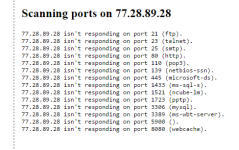
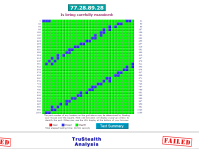
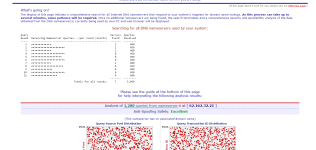
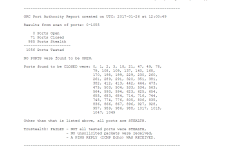
When I test online the Firewall security, the results are almost the same. I dont see any difference regarding firewall and web security.
I configured SEP Unmanaged as described by @Umbra in post 1 and twiked all the settings for maximum protection.
As described in this thread , if well configured, SEP should be better in tests than KIS.
Can anyone explain this situation ?
When I test online the Firewall security, the results are almost the same. I dont see any difference regarding firewall and web security.
I configured SEP Unmanaged as described by @Umbra in post 1 and twiked all the settings for maximum protection.
As described in this thread , if well configured, SEP should be better in tests than KIS.
Can anyone explain this situation ?
Attachments
D
Deleted member 178
because unmanaged has less security options than managed; after all SEP is supposed to be deployed for corporations workstations/laptops managed by a skilled Admin.
5
509322
I have Symantec Endpoint Security 14 and Kaspersky Internet Security 2017 installed on my 2 Laptops x64.
When I test online the Firewall security, the results are almost the same. I dont see any difference regarding firewall and web security.
I configured SEP Unmanaged as described by @Umbra in post 1 and twiked all the settings for maximum protection.
As described in this thread , if well configured, SEP should be better in tests than KIS.
Can anyone explain this situation ?
If your systems are behind a NAT router, then you have to set up port forwarding to accurately test the firewalls using those type tests.
Alternatively you can setup a LAN behind the NAT to test the firewalls.
Rezart
Level 1
because unmanaged has less security options than managed; after all SEP is supposed to be deployed for corporations workstations/laptops managed by a skilled Admin.
Thank you for the answer.
I understood many things about SEP and I needed exactly a professional opinion from someone who has entered deeply into SEP and know what is talking.
Finally after the help and opinions of the users in this wonderful forum, I have decided to go with Kaspersky Internet Security 2018 as my safe guard.
Thanks for everything
D
Deleted member 178
you are welcome
- Status
- Not open for further replies.
Recently browsing
Members and guests who viewed this thread in the last 5 minutes
You may also like...
-
 Software Review Symantec Endpoint Protection 2026
-
Software Review ZOHO Endpoint Managed Antivirus 2026
-

-
Software Review ESET HOME Security Premium 19
-
