Advanced Plus Security TairikuOkami's Mobile Security Config

Current configurationAndroid
Version 2Updated
4 replies

Edited by TairikuOkami after it was copied from the forum thread – not yet confirmed as current

Suggestions on the main improvementsWhat changed Answers for another system: 1
Staff assessment Advanced Plus Security

harlan4096 ·

LayoutBoth show the same answers.

Device & operating system

, 4 answers
Mobile operating system
Android
Mobile OS version
16
Mobile brand
Motorola
Mobile model
Moto G86 5G 8GB Pantone Spellbound 256GB

Protection & updates

, 12 answers
Security and privacy apps
Android Advanced Protection Mode
NextDNS Manager using PrivateDNS
Mobile security update support
Supported - still receiving security updates
Mobile system updates
Automatic updates
Google Play Protect settings
Scan apps with Play Protect, Improve harmful app detection, Permissions for unused apps to be removed
Android security patch date
2026-09-01
Google Play system update
2026-08-01
App store(s)
Google Play Store
App updates
Auto-update on Wi-Fi only
Screen lock method
PIN
Biometric security
Fingerprint(s), Face unlock (other than Apple Face ID)
SIM and mobile number protection
Lock SIM card with a PIN
Unknown tracker alerts
Unknown Tracker Alerts (Android)

Browsing, accounts & privacy

, 5 answers
Mobile browsers
Microsoft Edge for browsing Brave for Youtube/Google
Firewall and VPN apps
TOR
Password and passkey manager
Proton Pass
Phone & Caller ID
Google
Two-factor authentication
Microsoft Authenticator

Backup & recovery

, 3 answers
File and photo backups
Google
Find a lost device
Google Find Hub (formerly Find My Device)
Cloud storage
Google OneDrive

Apps, specs & notes

, 10 answers
Messaging
VK Google Telegram WhatsApp Messenger
Music & Podcasts
Audials Play
Photo & Video
Google
Entertainment
Netflix
Note-taking
Google
Games
None
Android launcher
Microsoft Launcher Microsoft SwiftKey
Subscriptions
Microsoft OneDrive 100GB
Notable changes
Xiaomi Smart Band 9 Notifications
Shokz OpenMove Bone Conduction
Night Light ON 24/7 to protect retina
Feedback preference
Suggestions on the main improvements

Answers for another system

, 1 answer

These answers were saved for questions that do not apply to the operating system chosen above. They are kept as entered, but they do not describe this device.

Stolen Device Protection iPhone only
On
Community rating

Community rating

How members rate the shared configuration. This is community feedback, not a security test.

Not rated yet
An open invitation for useful feedback.

Sign in to rate this setup

Go to discussion

Copied from the member's forum thread. This is a configuration record, not a device scan.

One of 211 member setups in the Security Setup Hub. Browse setupsGet yours checked

Original discussion fields (as posted in the thread)
Thread details
Last updated
Sep 26, 2026
Mobile brand
Motorola
Mobile model
Moto G86 5G 8GB Pantone Spellbound 256GB
Mobile operating system
Android
Mobile OS version
16
Mobile security update support
Supported - still receiving security updates
Mobile system updates
Automatic updates
Google Play Protect settings
    • Scan apps with Play Protect
    • Improve harmful app detection
    • Permissions for unused apps to be removed
Google Play system update
Aug 1, 2026
App store(s)
    • Google Play Store
App updates
Auto-update on Wi-Fi only
Screen lock method
PIN
Biometric security
    • Apple Face ID / Touch ID
    • Fingerprint(s)
SIM and mobile number protection
    • Lock SIM card with a PIN
Stolen Device Protection
On
Unknown tracker alerts
    • Unknown Tracker Alerts (Android)
Find a lost device
    • Google Find Hub (formerly Find My Device)
Security and privacy apps
Firewall and VPN apps
TOR
Mobile browsers
Microsoft Edge for browsing
Brave for Youtube/Google
Password and passkey manager
Proton Pass
Phone & Caller ID
Google
Messaging
VK
Google
Telegram
WhatsApp
Messenger
Music & Podcasts
Audial Radio
Photo & Video
Google
Entertainment
Netflix
Note-taking
Google
Cloud storage
Google
Android launcher
Microsoft Launcher
Microsoft SwiftKey
Two-factor authentication
Microsoft Authenticator
File and photo backups
Google 17GB
Subscriptions
    • Microsoft OneDrive 100GB
Notable changes
Security Update Sep 1, 2026
Xiaomi Smart Band 9 Milanese
Shokz OpenMove Bone Conduction
Night Light ON 24/7 to protect retina

Feedback preference

Suggestions on the main improvements

TairikuOkami

Level 42
Verified
Top Poster
Content Creator
Well-known
Forum Veteran
Published snapshot Version 1 View current setup This post records an earlier version. Open the current setup for the latest details.
My picks:
Android 16
eSIM (safer)
120Hz Display
Gorilla Glass 7i
5200 mAh Battery
30W charging (~30 mins)
MIL-STD-810H compliant
IP68/IP69 dust water resistant

It is faster than my old phone, yet security updates take 5 times longer to install. Upgrading from stock to Android 16 took several hours compared to half an hour on Samsung.
 
From the setup owner View current setup
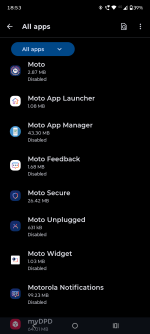
Are there many bundled apps?
It is like Windows Start. Tons of useless apps, games and Moto App Manager supposedly downloads them at random by itself, but it can be disabled.

Screenshot (Feb 25, 2026 18_53_52).png
 
Ive always been thinking motorola was one of the cleanest android, less bloated than others, but lately they have added stuff like you mentioned, sure its good that it can be disabled atleast.

Sure they have good specs, but i have never bought one as they live on the edge with updates, but the new motorola 'signature' promises even 7 years of security updates so , maybe theyre improving and one could use motorola for years instead of 2 years of updates
 

Join the discussion

Write your reply below. You'll create a free account or log in before it's posted.

Recently browsing

Members who viewed this thread in the last 5 minutes

Back
Top