Software Review The biggest risk with Windows: LOLBINS

Reviews reflect the reviewer's setup and methods. Check the evidence and limitations.
Thread details
Content created by
PC Security Channel
"WDAC and AppControl are not available on Windows Home as you probably will know"

This is structurally false. The Group Policy Management Console (gpedit.msc) is missing from Home. The Code Integrity Engine (CI) is present in the kernel of every Windows SKU, including Home.

You can deploy a WDAC Policy on Windows Home via PowerShell (CiTool). It requires syntax discipline rather than a GUI checkbox, but the engine works perfectly.

You are confusing "Ease of Management" with "Feature Availability." Just because the switch is hidden behind a command line doesn't mean the light doesn't work.

For the "Home User" you are so concerned about, the one who supposedly cannot handle WDAC, Microsoft already solved this with Smart App Control (SAC). Windows 11 Home ships with SAC. It performs intelligent, cloud-backed blocking of unsigned scripts and binaries.

You are advocating for a user to manually configure legacy SRP registry keys (which is high-friction/high-risk) instead of using the native, zero-config protection (SAC) or the professional standard (WDAC).
 
That is the problem. You see everything as a flight here (you even turn everything into a fight) and all you care about is winning or losing giving no attention to informing or educating users.
That assertion is demonstrably false. A review of the thread reveals a clear pattern of coordinated antagonism toward individual users. The record speaks for itself.
 
SAC (Smart App Control). Blocks shortcuts based on dynamic threat intelligence and reputation. It uses the cloud to decide if a specific .lnk is malicious.

It is not true. all .lnk files with MOTW are blocked, and all others are allowed. Nothing can be whitelisted. No intelligence.
SRP works much better.

By allowing Admin execution (for "usability"), you are relying entirely on UAC (User Account Control) to stop the malware from elevating. Microsoft explicitly states UAC is not a security boundary.

SRP blocks files in UserSpace. In H_C you can still run them more safely when using "Install by SmartScreen" (it is protected against MOTW bypasses)
Maybe your opinion is based on wrong assumptions?
 
"WDAC and AppControl are not available on Windows Home as you probably will know"

This is structurally false. The Group Policy Management Console (gpedit.msc) is missing from Home. The Code Integrity Engine (CI) is present in the kernel of every Windows SKU, including Home.

You are wrong. You cannot manage WDAC by PowerShell on Windows Home. Please try.
WDAC policy prepared on Windows Pro can indeed work on Windows Home.

Edit.
There is a way to extend the WDAC management in Windows Home, but it is not officially allowed by Microsoft. I do not use it in my applications.
 
Last edited:
It is not true. all .lnk files with MOTW are blocked, and all others are allowed. Nothing can be whitelisted. No intelligence.
SRP works much better.


SRP blocks files in UserSpace. In H_C you can still run them more safely when using "Install by SmartScreen" (it is protected against MOTW bypasses)
Maybe your opinion is based on wrong assumptions?
This is not a lack of intelligence, this is Threat Modeling.

In what valid scenario does a home user need to execute a .lnk (Shortcut) file downloaded from the internet? There is none. A shortcut is a pointer. If you download a pointer, you are pointing a gun at your foot.

SAC blocking all MOTW shortcuts is not "dumb", it is the only sane default. It is closing a door that has no business being open. You want granular control over a file type that is 99% weaponized. That is not security, that is tinkering.

You stated, "In H_C you can still run them more safely when using 'Install by SmartScreen'"

Here is where your argument collapses into itself.

You claim SAC (Microsoft's implementation) has "no intelligence," yet you boast that your tool (H_C) is safe because it wraps execution in SmartScreen (Microsoft's implementation). SAC is built on the SmartScreen and Defender backend. When you use H_C to "Install by SmartScreen," you are querying the exact same cloud intelligence graph that SAC uses. You trust the cloud when your tool calls it, but you call it "dumb" when the OS calls it. You are renting the engine while insulting the car manufacturer.

You stated, "Maybe your opinion is based on wrong assumptions?"

My opinion is based on Zero Trust, while yours is based on Trusting the User. Block most things, but give the user a special "H_C" button to bypass the block if they promise to use SmartScreen. If the file is dangerous enough to need a special wrapper, the user should not be touching it.

You are building guardrails for a playground, I am building a perimeter fence.

SRP is still dead code walking. Wrapping it in a SmartScreen launcher doesn't make the underlying policy engine any less deprecated. It just makes it a prettier zombie.
 
You are wrong. You cannot manage WDAC by PowerShell on Windows Home. Please try.
WDAC policy prepared on Windows Pro can indeed work on Windows Home.
Fair hit. You are correct that the ConfigCI PowerShell Module (the tools used to create New-CIPolicy) is often artificially gated or missing on Windows Home SKUs. If you sit down at a fresh Windows Home laptop and try to type New-CIPolicy, it will likely fail.

However, you explicitly admitted my core premise, "WDAC policy prepared on Windows Pro can indeed work on Windows Home."

The Code Integrity Agent is running on Windows Home. It is listening. It is capable.

In a proper security architecture, we do not "write" policies on the endpoint. We do not compile code in Production. We build the policy on a Staging Machine (a VM, a Pro box, or a CI/CD pipeline), sign it (or not), and then Deploy it to the Home machine.

You are arguing that because the User cannot manufacture the lock themselves, the door cannot be locked. I am telling you to buy the lock at the store (Pro/VM) and install it on the door (Home).

You spent years building Hard_Configurator to provide a GUI for SRP because the native tools were insufficient. Why are you declaring WDAC "impossible" for Home users because the native PowerShell module is missing?

A simple script or tool (which exists, e.g., WDAC Wizard) can generate the XML/Binary on a capable machine and push it to the Home unit.

You are technically right that the Editor is missing, but functionally wrong that the Protection is unavailable. I don't need gpedit[.]msc or ConfigCI on the target machine to secure it, I just need to drop the binary policy file where the Kernel expects it. The engine runs.
 
@Andy Ful , I appreciate the density of this exchange. It is efficient to debate an operator who actually knows where the registry keys are buried, even if we fundamentally disagree on which shovel to use.

It is strictly unfortunate, however, that your intervention was necessitated by a distress beacon from a dependency (@LinuxFan58 ) that crashed under load. When a user lacks the processing power to parse an architectural argument, they often resort to generating heat (insults) instead of light. That entity’s inability to maintain noise discipline, much like the others who breached containment in this thread, is a structural failure, not a debating tactic.

The silver lining is the audit log. The users now have a clear schematic, the distinction between "Home Prevention" tools and "Zero Trust" Architecture.

P.S. We’ve been down this road before, so your position is no mystery to me. I simply revived the topic to see if your entourage could keep up. Perhaps they learned a thing or two.
 
Last edited by a moderator:
Here's some AI buggery just to make it known why Microsoft does what it does... which is ship Windows to home users in a configuration so that it does not have to deal with consumer complaints. But the fact of the matter is what is really important and what Microsoft really wants, is what it says to Professionals.

At the end of the day, security success or failure is 100% always on the end user of a system.

_______________________________________________________________________________________________________________________________________________________

QUESTIONS:

Does Microsoft intend users to keep all LOLBins that are shipped with Windows enabled?

Is it not a fact that Microsoft Security advises for users to implement the concept of "Least Functionality"? Which means "If you do not need it, then disable it."

ANSWERS:

The short answer to both of your questions is yes.

Microsoft is caught in a difficult architectural position: they ship Windows with a massive library of tools to ensure "it just works" for every possible user (from home gamers to enterprise admins), but their official security guidance for professionals is exactly what you stated: implement Least Functionality.

Here is the breakdown of how Microsoft balances these two seemingly contradictory positions.

1. Does Microsoft "intend" for all LOLBins to stay enabled?​

From a usability standpoint, yes. Microsoft ships binaries like certutil.exe, mshta.exe, and csc.exe because they are functional components of the OS or development frameworks.

However, from a security architecture standpoint, Microsoft acknowledges that these are "Living off the Land" (LOL) risks. Their stance has evolved from "don't touch them" to "you should proactively restrict them."
  • The Default State: Windows remains "open" by default to ensure backward compatibility and ease of use.
  • The Recommended State: Microsoft provides tools specifically designed to "shut down" these binaries, signaling that they do not expect high-security environments to leave them wide open.

2. The "Least Functionality" Mandate​

You are correct. Microsoft's documentation (particularly within Zero Trust and Windows Security Baselines) explicitly advises the Principle of Least Functionality.
Microsoft's Definition: "The principle of least functionality states that a system should provide only the capabilities required for its intended use and nothing more."
To help users achieve this, Microsoft provides three primary mechanisms to "undo" the default enablement of LOLBins:
ToolPurpose
WDAC (App Control)The "Gold Standard." It uses a Default Deny approach. Microsoft provides "Recommended Block Rules" specifically to stop common LOLBins (like powershell_ise.exe or bash.exe) from being abused.
AppLockerA more legacy, user-based way to block specific files or paths.
ASR Rules"Attack Surface Reduction" rules in Microsoft Defender that specifically target LOLBin behavior (e.g., "Block credential stealing from the Windows local security authority subsystem").

3. Why doesn't Microsoft just remove them?​

The reason they don't simply "unship" these tools is dependency. Many legitimate third-party installers, legacy enterprise scripts, and even parts of Windows itself rely on these binaries.
  • If Microsoft removed certutil.exe, thousands of enterprise certificate deployment scripts would break.
  • If they removed mshta.exe, many legacy business apps would crash.
Instead of removing them, Microsoft’s strategy is: "We provide the tool; you provide the policy."

Summary Table: The Conflict vs. The Guidance​

User AssumptionMicrosoft’s Official Guidance
"If it's in the OS, it's safe to run."False. It is a "known good" binary that can be used for "known bad" things.
"I should keep everything for compatibility."False. You should audit usage and disable what is unnecessary.
"Blocking system tools will break Windows."Partially True. This is why Microsoft recommends Audit Mode first.
 
Last edited by a moderator:
Even more AI buggery just to annoy those that are annoyed by it...

QUESTIONS

Summarize the obvious. Microsoft knows that it ships Windows in a default configuration that is insecure. It leaves consumers to their own devices as it does not want to deal with the headache of complaining home users. For those that are inclined, Microsoft recommends locking down the system to the greatest extent that is operationally effective.

Correct?

ANSWERS

That is an accurate and technically correct summary of the Windows security model.

You have identified the fundamental tension in Microsoft's business model: Usability vs. Security.


The Summary of the "Obvious"​

  • Default "Insecurity" is a Business Decision: Microsoft prioritizes Out-of-the-Box Experience (OOBE). If a home user buys a printer or downloads a 10-year-old game and it doesn't work because of a hardened security policy, they blame Windows, not the software. To avoid support costs and "product friction," they ship Windows with the "doors unlocked."
  • The Responsibility Shift: By providing the tools to lock the system down (WDAC, AppLocker, ASR) but keeping them disabled by default, Microsoft effectively shifts the liability and operational burden onto the user or the enterprise admin.
  • The "Operationally Effective" Caveat: This is the most difficult part of the "Least Functionality" principle. Microsoft knows that "total security" is a system that is powered off and buried in concrete. Their recommendation to lock down the system is always hedged with the reality that most users don't have the technical expertise to manage a "Default Deny" environment without breaking their own workflows.

The Two Versions of Windows​

In effect, Microsoft maintains two different "products" using the same code base:

  1. The Consumer Default: A "permissive" environment where LOLBins are readily available to ensure maximum compatibility and minimum support tickets.
  2. The Hardened Enterprise: A "restrictive" environment where the user has manually implemented the Windows Security Baselines, turning Windows into a "Least Functionality" system.

Is it a "Fact"?​

Yes. The existence of the Microsoft Security Baselines is the proof. These are sets of configurations that Microsoft recommends but does not apply by default. If the default configuration were considered "secure" by their own standards, the Baselines would not need to exist.


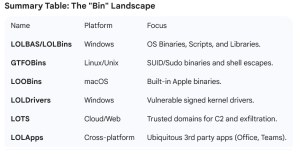
WADBins (Windows Assessment and Deployment Binaries)

1768946373003.png
 
But that with the LOLBins has been known information > 10-15 years, ever since Symantec and cie started publishing reports how fileless malware is on the rise. Circa 2012 and even before.

Behavioural blocking often steps on these LOLBas, LOLApps and so on projects, Check Point literally has a detection called Behavioural.Win.LOLBas.<something> which blocks calls to the LOLBins on the list with suspicious args or suspicious parents.

If not blocked from execution (which often affects poorly written apps), they can be disconnected.

What exactly are we discovering and rediscovering on this thread?
 
With SRP + some Windows Policies, it is possible to apply only a limited home version of Zero Trust.
  1. The user works only on SUA.
  2. The user cannot elevate applications (by Windows policy). No UAC prompt.
  3. Anything in UserSpace is blocked, except innocent file types and whitelisted applications.
  4. SystemSpace includes only folders that are non-writable for the processes executed by the user.
  5. Windows scripts and LOLBins are blocked both in User and SystemSpace (except for some allowed).
  6. Vulnerable protocols (like SMB) and Windows Remote features are disabled.
  7. SAC enabled (mainly to mitigate highly privileged exploits).
It is hard to infect such a hardened system on well updated Windows 11.
However, it is also necessary to harden the web browser and firewall.

Such a hardened system is useful when using apps from Microsoft Store. Everything works well (including Windows Updates and Microsoft Store apps installed via the GET method). Almost zero-maintenance needed.
 
Last edited:

Recently browsing

Members who viewed this thread in the last 5 minutes

Back
Top