Software Review The biggest risk with Windows: LOLBINS

Reviews reflect the reviewer's setup and methods. Check the evidence and limitations.
Thread details
Content created by
PC Security Channel
How is it possible that all your software broke?

Every major software vendor (Microsoft, Google, Adobe, Mozilla, Valve, Spotify) has designed their applications to run seamlessly under Standard User accounts for over 15 years.

If everything failed, you are either, exclusively using abandoned shareware from the Windows XP era that ignores all modern file hierarchy rules, lying about the scope of the failure, or you completely botched the migration.

My bet is on the latter. You likely didn't just "demote" the account, you probably created a new account or messed up the ownership of your user profile folder (C:\Users\<Name>).

If shortcuts disappeared and settings vanished, that isn't the software "breaking." That is you trying to access the private data of Admin_User from the profile of Standard_User.

I don't think I said all. Did you read where I stated all, as in every piece of software failed to function? I don't think I said that, but if I did say that, or if I implied that, my apologies, that would be incorrect. Lastly many software's don't give the option "install for all users".

Thanks for your attention to this matter, you seem very bright. I do agree with all your points, just not sure, even though I tried, that I can fully implement a user account with any success.
 
@bazang I like that as well. Also, in a post not to long ago, you mentioned if you were to install F-Secure on a family (friends) PC, would would make a couple of Windows security changes, to help harden the system. What changes would those be as well, if not the same as to mitigate LOLBin abuse?
Use Hard_Configurator and set everything to maximum protection. Read the Manual. Study it. Learn it.

And don't listen to Andy Ful's propaganda that "Users cannot handle it."

Microsoft's Terms of Service are that 100% of everything is on the user. Period. Full stop.
 
How is it different from Linux? For example on Ubuntu id you open anything that requires admin privileges, you get a prompt requiring you to enter your admin password.
When UAC was first introduced with Vista it asked for nearly everything an UAC confirmation. So while the mechanism is the same, the many times it triggered a prompt (at that time) made it a useless warning which people started (learned) to ignore. It would be interesting to see how for instance average users of 35+ react to UAC prompts and home users which learned to use their PC when UAC got an internal whitelist (reducing the number of UAC prompts).

In theory people below 35 might take the UAC prompt more serious than people over 35. But that is all speculation from my side.
 
If an application that Microsoft did not code, and it fails to work properly in a SUA, then how is that Microsoft's fault?

How is it Microsoft's fault for the software publisher's failure to properly test its own software in a SUA?

How is it Microsoft's fault for the software publisher who coded the application to be run only in a privileged account - thereby compromising the user's security?

It is not Microsoft's responsibility to change its OS for the thousands and thousands of software publishers. It is the responsibility of the thousands and thousands of software publishers to code their products to work properly on Microsoft's OS.
 
Help them out a bit. Point out those options. I haven't touched Windows Home for many many years so I can't do it.
That topic has been beaten to death here at MT. People need to spend the time and effort and search MT, and then read as much as possible.

If someone wants me to do the work for them, then it is 375 Euros per hour. That is what I charge and that is a cheap hourly rate.
 
Use Hard_Configurator and set everything to maximum protection. Read the Manual. Study it. Learn it.

And don't listen to Andy Ful's propaganda that "Users cannot handle it."

Microsoft's Terms of Service are that 100% of everything is on the user. Period. Full stop.
Then it's MS fault.

Apple did a better job locking its system down and it provides better overall security out of the box.

MS created a vulnerable OS and users are blamed for it.

Not everyone has the time or the knowledge to study OS architecture to harden it. Most people buy a PC to use.

No one in their right mind would expect a teacher, a linguist or a graphic designer to spend days studying the OS architecture because MS failed to create a secure system out of the box. And here I am not talking about corporate and business users (which btw they hire people to secure their systems)
 
Then it's MS fault.

Apple did a better job locking its system down and it provides better overall security out of the box.

MS created a vulnerable OS and users are blamed for it.

Not everyone has the time or the knowledge to study OS architecture to harden it. Most people buy a PC to use.

No one in their right mind would expect a teacher, a linguist or a graphic designer to spend days studying the OS architecture because MS failed to create a secure system out of the box. And here I am not talking about corporate and business users (which btw they hire people to secure their systems)
You praise Apple for "locking its system down" better. Do you understand how they do it?

MacOS is safer "out of the box" because it aggressively blocks you from running software that Apple hasn't personally blessed (Gatekeeper). On iOS, you literally cannot install software outside their store without jailbreaking.

Microsoft allows you to run code from 1995, code written by a teenager in a basement, and code that modifies the kernel. This backward compatibility and openness is the entire reason Windows owns the market.

You want the freedom of Windows (install anything) with the safety of Apple (install only approved things). You cannot have both. If Microsoft locked down Windows like Apple does, you would be the first to scream about "Monopoly" and "Freedom."

You argue that teachers and graphic designers shouldn't have to study architecture. They don't.

Microsoft gave you the solution. It is called the Standard User Account.

It takes exactly 30 seconds to set up. You create the account once. That is not "days of study." That is basic appliance maintenance, like cleaning the lint trap in your dryer.

Refusing to spend 30 seconds to click "Create Account" because "Microsoft should have done it" is not a valid defense. It is laziness masquerading as victimhood.
 
It is devs turn now. MS created store and webapps to run with minimal rights. Apps, just like games, should not need admin rights to run, ideally not even for install.

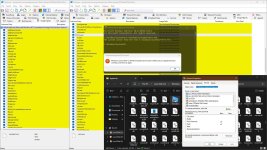
P.S. I was just coached by an user on github not to use DisallowRun, because it only blocks exe run via explorer, IFEO works better, it can block lolbins executed via CMD.
 

Attachments

  • capture_01182026_132657.jpg
    capture_01182026_132657.jpg
    334.4 KB · Views: 98
how do you use Image File Execution Options to block LoLbins?
Code:
reg add "HKLM\Software\Microsoft\Windows NT\CurrentVersion\Image File Execution Options\mshta.exe" /v "Debugger" /t REG_SZ /d "Blocked" /f
Remove execution rights for a specific user manually of for a group of users (eg. Standard users) or ........ ?
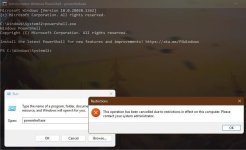
IIEFO blocks it system wide, for all users. I still use DisallowRun for those, that can not be blocked globally or it would break functionality, like PS.
Code:
reg add "HKCU\Software\Microsoft\Windows\CurrentVersion\Policies\Explorer\DisallowRun" /v "5" /t REG_SZ /d "powershell.exe" /f
 

Attachments

  • capture_01182026_135530.jpg
    capture_01182026_135530.jpg
    57.1 KB · Views: 95
It is devs turn now. MS created store and webapps to run with minimal rights. Apps, just like games, should not need admin rights to run, ideally not even for install.

P.S. I was just coached by an user on github not to use DisallowRun, because it only blocks exe run via explorer, IFEO works better, it can block lolbins executed via CMD.
The reliance on Image File Execution Options (IFEO) as a security mechanism represents a significant architectural misalignment, as this feature is designed for debugging rather than access control. When a "Debugger" value is attached to a binary like `powershell.exe`, the kernel intercepts the call and redirects execution, a behavior that historically functions less as a shield and more as a Persistence Vector utilized by attackers to hijack legitimate processes. Consequently, employing an exploitation pathway as a defensive layer is structurally unsound, furthermore, using IFEO to neutralize "LOLBins" (Living Off The Land Binaries) creates immediate technical debt by breaking dependencies for Windows Updates and maintenance tasks, effectively dismantling the operating system’s self-healing capabilities.

While your skepticism regarding the `DisallowRun` policy is well-founded, the reasoning requires precision, `DisallowRun` is merely a user-mode policy enforced by `explorer.exe` that is easily bypassed by invoking binaries through Task Manager or Command Prompt. True execution control requires kernel-level enforcement via Windows Defender Application Control (WDAC) or AppLocker. Unlike fragile registry modifications, these tools validate the cryptographic signature and hash of a binary before memory allocation, ensuring that protection relies on verifiable identity rather than easily manipulated filenames.
 
Use Hard_Configurator and set everything to maximum protection. Read the Manual. Study it. Learn it.

And don't listen to Andy Ful's propaganda that "Users cannot handle it."

Microsoft's Terms of Service are that 100% of everything is on the user. Period. Full stop.
Thanks for the reply. In my case, I'd tend towards DefenderUI. I'm familiar with its, IMO, more user friendly, informative layout, and would do a little more research of selective options to enable, other than maximum setting across the board. (to possibly not conflict or hinder F-Secure's protection or cause possible pop-ups etc. out of nowhere)
 
@TairikuOkami (y)

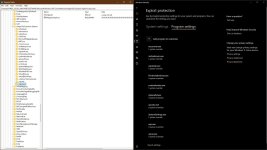
Thanks for the info. I disabled the EXE files on the "Microsoft's recommended WDAC block rules" by enabling all exploit protections in Micrososft (Defender) security center. I searched for a reliable way to block the DLL system wide, but your post on IEFO gave me the answer. For blocking the remaining LoLBins for standard user only I prefer to use ConfigureDefender of Andy Ful

Thanks, learned something today :)
 
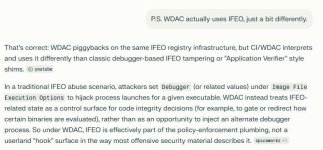
WDAC controls what can run. IFEO modifies how it runs. They are not the same tool, they do not live in the same neighborhood, and they certainly don't share a plumbing schematic.
You can literally add WDAC exceptions via ImageFileExecutionOptions.

capture_01182026_185117.jpg
However, testing and reverse engineering revealed that PAC is unconditionally enabled on user-mode processes (as shown above) with no way to disable the mitigation either at process creation (e.g., creating a child process with extended parameters) or by calling SetProcessMitigationPolicy at runtime. The only other supported way to enable a process mitigation at process creation is to use the ImageFileExecutionOptions (IFEO) registry key. This functionality is wrapped by the "Exploit Protection" UI on Windows systems, but the registry value can be set manually. Unfortunately, there is no PAC Exploit Protection setting in the UI.
 
Last edited:

Recently browsing

Members who viewed this thread in the last 5 minutes

Back
Top