Open MalwareTips in Safari and tap Share. You may need to open the Page Menu first.
Choose Add to Home Screen. If it is not listed, use Edit Actions to add it.
Keep Open as Web App enabled if shown, then tap Add.
Android
Open MalwareTips in Chrome or another browser that supports app installation.
Open the browser menu and look for Install app, Install and create shortcut, or Add to Home screen.
Choose Install and confirm. Wording varies by browser.
Desktop
Chrome: use the install icon in the address bar, or the menu under Cast, save and share.
Edge: open the menu, then More tools, Apps and Install this site as an app.
Safari on Mac: choose Share or File, then Add to Dock. Firefox on Windows: look for the web apps button in the address bar.
If you cannot find an install option, update your browser or use its bookmark option to keep MalwareTips close.
Keep up with your conversations
After installation, open the app and sign in. Enable push notifications in Preferences if you want alerts. On iPhone and iPad, push requires a Home Screen web app and iOS or iPadOS 16.4 or later.
I bought Kaspersky to try their banking mode, but I got the same problem as some other users, Kaspersky froze when I used banking mode. If someone buys Kaspersky for banking protection, buy another program.
That's a very general affirmation, maybe it froze for some reason in Your system, I don't think this is the behavior in the rest or the most of K. the users
Norton stands out as the premium brand without a free version—they have good reason to maximize revenue per user. Avast/AVG make their numbers through sheer volume. The new Norton interface was clearly designed to market extra features more.
Norton was also well-known for upselling and pop-ups before the Gen merger. They must be well aware that their userbase is comparatively skewed towards older and less tech-savvy people, whereas Avast and AVG lean towards a more budget-conscious audience.
Avast and AVG still appear to be on par with each other for upselling according to talk around the web.
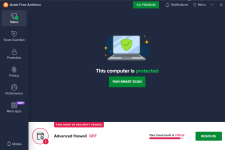
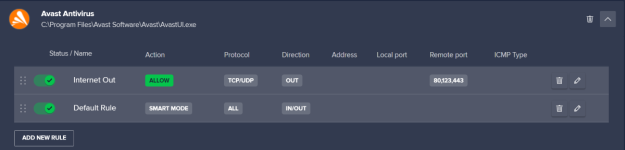
What used to work for me in blocking the UI ads in the firewall, is no longer being honored. Avast keeps turning it back on to enable ads on the main UI (installed on 2-4-26)
I wonder if it would be different in using NextDNS, which used to block UI.exe ads when I was using AVG?
What used to work for me in blocking the UI ads in the firewall, is no longer being honored. Avast keeps turning it back on to enable ads on the main UI (installed on 2-4-26)
I wonder if it would be different in using NextDNS, which used to block UI.exe ads when I was using AVG?
That's a very general affirmation, maybe it froze for some reason in Your system, I don't think this is the behavior in the rest or the most of K. the users
It only freeze when i do banking. I'm not the only one with this problem.
Kaspersky antivirus (likely Kaspersky Internet Security, Total Security, Premium, or similar) has a feature called Safe Money (or Protected Browser) designed specifically for secure online banking and shopping. It opens banking sites in a hardened, isolated browser environment to prevent keyloggers, screen capture, or other threats.
However, users have reported issues where this feature causes freezes, lags, slowness, or even full system hangs when accessing banking sites. This isn't uncommon and appears in Kaspersky's own forums and knowledge base over the years, including more recent reports.