Troubleshoot There Was A Problem Refreshing Your PC. No Changes Were Made error

OEM laptop/desktops usually have the license key built into the motherboard itself. Having worked previously for a major Geek Squad competitor, it was common practice for us to use the slimmed down OS without the manufacturer bloatware from the Microsoft website ISO. You're safe installing that ISO over your current HDD as long as you know how to format it properly during the install.
 
Upvote 0
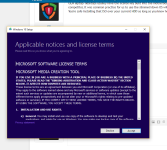
Ok im gunna download the ISO,ill let you know how it works

Its starting
 

Attachments

  • 10.PNG
    10.PNG
    61.9 KB · Views: 784
Last edited by a moderator:
Upvote 0
Good, just choose your method (DVD or USB, either works fine). When you get to the actual Windows installer, you should see multiple partitions of your HDD (recovery, etc.), make sure you select each individual drive, delete, and once they're all merged into 1 unpartitioned drive, you can click New, and then install over the new partition structure that the ISO makes for you.
 
Upvote 0