"this setting is enforced by your administrator"

mbbalentine

New Member
Thread author
Jul 12, 2015
9
0
3
49
my problem seems to mirror many other similar hijackings of Chrome, including

unfortunately all attempts to fix things have failed. Google omnibox is redirecting to a fake google "custom search." any attempt to change my search provider prompts the same notice, "this setting is enforced by your administrator."
Based on my FRST scans, what is the best thing to do next? i've already downloaded ADW.
 

Attachments

Hello,


They call me TwinHeadedEagle around here, and I'll be working with you.


Before we start please read and note the following:
  • At the top of your post, please click on the "Watch thread" button and make sure to check Watch this thread...and receive email notifications. This will send an email to you as soon as I reply to your topic, allowing me to solve your problem faster.
  • Please do not install any new software during the cleaning process other than the tools I provide for you. This can hinder the cleaning process. Please do not perform System Restore or any other restore.
  • Instructions I give to you are very simple and made for complete beginner to follow. That's why you need to read through my instructions carefully and completely before executing them.
  • Please do not run any tools other than the ones I ask you to, when I ask you to. Some of these tools can be very dangerous if used improperly. Also, if you use a tool that I have not requested you use, it can cause false positives, thereby delaying the complete cleaning of your machine.
  • All tools we use here are completely clean and do not contain any malware. If your antivirus detects them as malicious, please disable your antivirus and then continue.
  • If during the process you run across anything that is not in my instructions, please stop and ask. If any tool is running too much time (few hours), please stop and inform me.
  • I visit forum several times at day, making sure to respond to everyone's topic as fast as possible. But bear in mind that I have private life like everyone and I cannot be here 24/7. So please be patient with me. Also, some infections require less, and some more time to be removed completely, so bear this in mind and be patient.
  • Please stay with me until the end of all steps and procedures and I declare your system clean. Just because there is a lack of symptoms does not indicate a clean machine. If you solved your problem yourself, set aside two minutes to let me know.
  • Please attach all report using
    fjqb1h.png
    button below. Doing this, you make it easier for me to analyze and fix your problem.

  • Do not ask for help for your business PC. Companies are making revenue via computers, so it is good thing to pay for the repair.
  • If I don't hear from you within 3 days from this initial or any subsequent post, then this thread will be closed.


warning.gif
Rules and policies

We won't support any piracy.
That being told, if any evidence of illegal OS, software, cracks/keygens or any other will be revealed, any further assistance will be suspended. If you are aware that there is this kind of stuff on your machine, remove it before proceeding!
The same applies to any use of P2P software: uTorrent, BitTorrent, Vuze, Kazaa, Ares... We don't provide any help for P2P, except for their removal. All P2P software has to be uninstalled or at least fully disabled before proceeding!

Failure to follow these guidelines will result with closing your topic and withdrawning any assistance.


FRST.gif
Fix with Farbar Recovery Scan Tool

icon_exclaim.gif
This fix was created for this user for use on that particular machine.
icon_exclaim.gif

icon_exclaim.gif
Running it on another one may cause damage and render the system unstable.
icon_exclaim.gif

Download attached fixlist.txt file and save it to the Desktop:

Both files, FRST and fixlist.txt have to be in the same location or the fix will not work!

  • Right-click on
    FRST.gif
    icon and select
    RunAsAdmin.jpg
    Run as Administrator to start the tool.
    (XP users click run after receipt of Windows Security Warning - Open File).
  • Press the Fix button just once and wait.
  • If for some reason the tool needs a restart, please make sure you let the system restart normally. After that let the tool complete its run.
  • When finished FRST will generate a log on the Desktop, called Fixlog.txt.

Please attach it to your reply.
 

Attachments

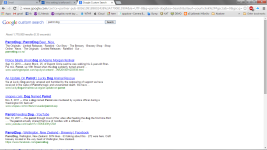
well, about all that changed was being required to resign into my google account upon reloading chrome. as soon as i used the omibox, the problem seems to still be there; what seems a screwy version of google.com without any tabs or search tool banners available on the page:
 

Attachments

well, about all that changed was being required to resign into my google account upon reloading chrome. as soon as i used the omibox, the problem seems to still be there; what seems a screwy version of google.com without any tabs or search tool banners available on the page:

additionally, i still get the error, "this setting is enforced..."
 
FRST.gif
Fix with Farbar Recovery Scan Tool

icon_exclaim.gif
This fix was created for this user for use on that particular machine.
icon_exclaim.gif

icon_exclaim.gif
Running it on another one may cause damage and render the system unstable.
icon_exclaim.gif

Download attached fixlist.txt file and save it to the Desktop:

Both files, FRST and fixlist.txt have to be in the same location or the fix will not work!

  • Right-click on
    FRST.gif
    icon and select
    RunAsAdmin.jpg
    Run as Administrator to start the tool.
    (XP users click run after receipt of Windows Security Warning - Open File).
  • Press the Fix button just once and wait.
  • If for some reason the tool needs a restart, please make sure you let the system restart normally. After that let the tool complete its run.
  • When finished FRST will generate a log on the Desktop, called Fixlog.txt.

Please attach it to your reply.


JRTbythisisu.png
Fix with Junkware Removal Tool

Please download JRT by Thisisu and save the file to your desktop.
Temporary disable your AntiVirus and AntiSpyware protection - instructions here.

  • Right-click on
    JRTbythisisu.png
    icon and select
    RunAsAdmin.jpg
    Run as Administrator to start the tool.
  • Follow the prompts and let this process run uninterrupted.
  • This scan can take a while, depending on your System specs.
  • Upon completion, a log (JRT.txt) will open on your desktop.

Please include the contents of that file in your reply.

Do not forget to re-enable your previously switched off protection software!
Please also manually reboot your machine after this procedure.
 

Attachments

FRST.gif
Fix with Farbar Recovery Scan Tool

icon_exclaim.gif
This fix was created for this user for use on that particular machine.
icon_exclaim.gif

icon_exclaim.gif
Running it on another one may cause damage and render the system unstable.
icon_exclaim.gif

Download attached fixlist.txt file and save it to the Desktop:

Both files, FRST and fixlist.txt have to be in the same location or the fix will not work!

  • Right-click on
    FRST.gif
    icon and select
    RunAsAdmin.jpg
    Run as Administrator to start the tool.
    (XP users click run after receipt of Windows Security Warning - Open File).
  • Press the Fix button just once and wait.
  • If for some reason the tool needs a restart, please make sure you let the system restart normally. After that let the tool complete its run.
  • When finished FRST will generate a log on the Desktop, called Fixlog.txt.

Please attach it to your reply.


JRTbythisisu.png
Fix with Junkware Removal Tool

Please download JRT by Thisisu and save the file to your desktop.
Temporary disable your AntiVirus and AntiSpyware protection - instructions here.

  • Right-click on
    JRTbythisisu.png
    icon and select
    RunAsAdmin.jpg
    Run as Administrator to start the tool.
  • Follow the prompts and let this process run uninterrupted.
  • This scan can take a while, depending on your System specs.
  • Upon completion, a log (JRT.txt) will open on your desktop.

Please include the contents of that file in your reply.

Do not forget to re-enable your previously switched off protection software!
Please also manually reboot your machine after this procedure.
 
it appears to have worked; both new tab searches and search settings appear to behave normally. i'm curious to know what in the reports clarifies the cause of the problem.

nevertheless, THANK YOU.
 

Attachments

Wait a minute...now unable to connect to wireless; troubleshooting problem reads "your machine administrator has disabled Teredo locally."
 
FRST.gif
Scan with Farbar Recovery Scan Tool

Please re-run Farbar Recovery Scan Tool to give me a fresh look at your system.
  • Right-click on
    FRST.gif
    icon and select
    RunAsAdmin.jpg
    Run as Administrator to start the tool.
    (XP users click run after receipt of Windows Security Warning - Open File).
  • Make sure that Addition option is checked.
  • Press Scan button and wait.
  • The tool will produce two logfiles on your desktop: FRST.txt and Addition.txt.
Please include their content into your next reply.
 
hello! it appears that whatever problem existed last night with the Teredo joint has resolved itself. here are the new reports just in case:
 

Attachments

my folder options are their own control panel item. i can also access the same 3 tab folder options dialogue by selecting the "View" drop down menu in any explorer window and selecting "Folder options." I've had this applied to all folders for years now, but I made sure to re-apply. Unfortunately C:\ProgramData just brings up a list of folders and when searched for ntuser or ntuser.pol, I find nothing.
 
yes, i did; still no results for ntuser.pol. i also notice that i'm getting more frequent 'kill page' dialogues in Chrome, and i have to choose my primary Gmail account (secondary is listed) and login every time i open Chrome unlike before.
 
JRTbythisisu.png
Fix with Junkware Removal Tool

Please download JRT by Thisisu and save the file to your desktop.
Temporary disable your AntiVirus and AntiSpyware protection - instructions here.

  • Right-click on
    JRTbythisisu.png
    icon and select
    RunAsAdmin.jpg
    Run as Administrator to start the tool.
  • Follow the prompts and let this process run uninterrupted.
  • This scan can take a while, depending on your System specs.
  • Upon completion, a log (JRT.txt) will open on your desktop.

Please include the contents of that file in your reply.

Do not forget to re-enable your previously switched off protection software!
Please also manually reboot your machine after this procedure.