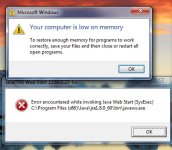
Solved thousands instances of javaws.exe in processes

Rozesky2

Level 3
Verified
I am a retired teacher and I volunteer to work on seniors computer who dont have
money or know how to fix their computers. Usually I can do it myself but this
computer is causing me trouble here is an upload of a frst scan.

Thank you for your help
 

Attachments

Boot to Safe Mode and go to this folder:

C:\Program Files\Java

And then into any/all JRExxxxx\bin folders ( example: C:\Program Files\Java\jre1.8.0_60\bin )

Rename; javaws.exe to; javaws.exe.BAK

Reboot into Normal Mode.

Then go to; Control Panel --> "Programs and Features"

Remove all versions of Oracle Java.
 
well this senior is 78 and she likes to play bridge on pogo.com which uses java. But
even firefox and Chrome don't support the site now because of java. But IE 11 will.
I think I will try to find her someplace else to play bridge online

The computer runs better but still opens things slowly especially if I use internet explorer
 
FRST.gif
Scan with Farbar Recovery Scan Tool

Please re-run Farbar Recovery Scan Tool to give me a fresh look at your system.
  • Right-click on
    FRST.gif
    icon and select
    RunAsAdmin.jpg
    Run as Administrator to start the tool.
    (XP users click run after receipt of Windows Security Warning - Open File).
  • Make sure that Addition option is checked.
  • Press Scan button and wait.
  • The tool will produce two logfiles on your desktop: FRST.txt and Addition.txt.
Please include their content into your next reply.
 
PC seems clean, but it seems that hard drive is dying:

Code:
Error: (12/13/2015 02:48:47 PM) (Source: Disk) (EventID: 7) (User: )
Description: The device, \Device\Harddisk0\DR0, has a bad block.

Error: (12/13/2015 02:48:47 PM) (Source: nvstor64) (EventID: 3) (User: )
Description: Data error on device.


Device: \Device\RaidPort0

Model: WDC WD5000AAKS-60Z1A0

Firmware Version: 06.0

Serial Number:      WD-WCAWF8819209

Port: 0

Error: (12/13/2015 02:48:45 PM) (Source: Disk) (EventID: 7) (User: )
Description: The device, \Device\Harddisk0\DR0, has a bad block.
 
Thanks you are great. I will see if she wants a new hard drive.
I does seem to be running alot fast.
Thank you for all you help
 

Recently browsing

Members who viewed this thread in the last 5 minutes

Back
Top